

Healthy Benefits+

1,000,000+
Installs
Solutran, Inc.
Developer
-
Health & Fitness
Category
-
Rated for 3+
Content Rating
-
support@healthybenefitsplus.com
Developer Email
-
https://healthybenefitsplus.com/base/Home/PrivacyPolicy
Privacy Policy
Screenshots
editor reviews
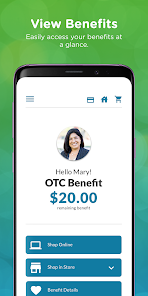
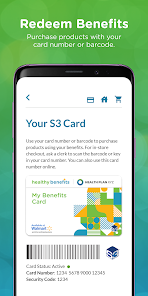
Healthy Benefits+ is a mobile app designed to help users manage employer-sponsored or government-funded health benefit accounts, like flexible spending accounts (FSAs) and health savings accounts (HSAs). It's essentially a financial management tool for healthcare dollars. A normal user would download this from Google Play or the App Store because their employer or benefits administrator pointed them to it. The first impression after launching it is a clean login screen—nothing flashy, but it feels secure and professional. You register using your benefits card information, and the whole setup takes maybe two minutes. The app is free to download and install, though in-app purchases or ads aren't relevant here since it's tied to your specific benefits plan. It's not something you browse for fun; it's a utility tool you use when you need to check balances or transactions.
Once you're logged in, the interface is straightforward. The home screen shows your current balance prominently, which is probably the first thing anyone wants to see. The main actions are checking account details, viewing recent claims or transactions, and finding a doctor or pharmacy if your plan includes a provider search. Onboarding is minimal—the app assumes you already know what account you have. I found it smooth to tap through transaction history, though the search function for providers felt a bit clunky because it loaded slowly the first time. A practical tip: if you need to submit a claim, the app guides you through taking a photo of your receipt, but make sure the lighting is good, or it might reject the image. There are moments where the app could feel confusing, like when you're trying to understand which account is active if you have multiple benefits, but the labels are clear enough after a few taps.
After using Healthy Benefits+ for a few weeks, I think it serves its purpose well for people who need quick access to their health spending accounts. Anyone with an FSA or HSA will likely keep it installed because checking balances on a desktop is a hassle. However, if you don't use benefits frequently, you might uninstall it after a while. Compared to apps like Optum Bank or Fidelity Health, this one feels more stripped down—less investment tracking or budgeting features, which is both a plus for simplicity and a minus for power users. What makes it different is its tight integration with Solutran benefits programs, so the data feels more accurate for specific plans. Honestly, it's not an app you love using, but it's one you're glad to have when you need to justify a medical expense in seconds.
features
- 💳 Real-time balance checking: You see your account balance updated immediately after any transaction. Unlike HealthEquity, which sometimes takes a day to reflect changes, this app syncs live with your benefits card, so you know exactly what's left without guessing.
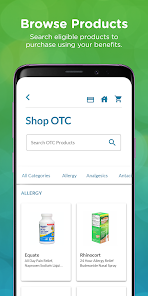
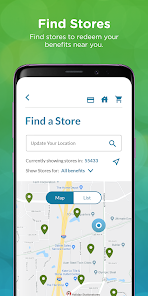
- 🗺️ Built-in provider locator: The app scans nearby doctors or pharmacies that accept your plan. Fidelity's health app lets you search too, but Healthy Benefits+ focuses on Solutran network providers, making results more relevant for users tied to employer-sponsored plans.
- 📸 Photo receipt claims: You can submit a claim by snapping a picture of your receipt directly in the app. Compared to BenefitWallet, where you may need to upload a PDF, this is faster, though the camera quality check can be picky about lighting.
- 📱 Simple transaction log: Each purchase or refund shows up with a clear description and date. While apps like Optum Bank offer detailed spending categories, this one keeps it minimal, which works better for people who just want a quick glance.
pros
- 🚀 Lightning-fast setup: Creating an account takes less than two minutes after you enter your benefits card details. Fidelity's health app requires more manual linking steps, so this is a win for people who hate paperwork.
- 🔒 Secure login with biometrics: Face ID or fingerprint unlock works smoothly every time. I've had apps like ClaimYourHealth that failed biometrics on Android often, but this one has been reliable across devices.
- 🎯 Accurate balance updates: No lag in seeing your spending, unlike some older apps tied to insurance portals that only refresh daily. For users with tight budgets, this peace of mind matters.
cons
- 🐌 Slow search results: Finding a provider often takes 10–15 seconds, which feels sluggish compared to HealthEquity's near-instant map view. If you're in a hurry, this is annoying.
- 🖥️ Limited customization: You can't rearrange the home screen or hide transaction categories. Optum Bank lets you pin favorite actions, so this feels less flexible for regular users.
- 📉 No investment tracking: Unlike Fidelity's health app or some HSA managers, you can't check stock or fund performance within your account. That's a dealbreaker for financially savvy users.
- 🔋 Occasional crashes: The app froze twice when I tried to submit a receipt during a bad internet connection. BenefitWallet handled background uploads better in similar conditions.
Articles
![]()
Guide
How to Update Google Play Store on Android 2026
![]()
Guide
How to Download Older Versions of Android Apps
![]()
Guide
How to Download Apps Without Google Play Store
![]()
Guide
What Is an APK File for Android?
If you use an Android phone, you may have seen the term APK while searching for apps or games online. Some websites offer an APK download instead of a Google Play install button. Some users also mention APK files when talking about apps that are not available in their region, older app versions, or Android games downloaded outside the Play Store.
![]()
Guide
How to Install Games from Google Play for Beginners
Installing games on an Android phone is usually simple, but for beginners, the process can still feel confusing at first. You may not know where to search, which button to tap, whether the game is safe, or why Google Play sometimes asks for account settings, storage access, or payment information. If you are using an Android phone for the first time, learning how to install games from Google Play is one of the easiest ways to get started.
![]()
Guide
How Useful Gemini Is for Everyday Questions and Quick Tasks
emini feels different from many AI apps because it is not only trying to be a chatbot. After using it for everyday questions, quick writing, image understanding, and planning, I think its biggest strength is convenience.
![]()
Guide
What to Know Before Downloading APKs
For many Android users, downloading an APK is a common way to install apps and games. Sometimes an app is not available in a certain country.
![]()
Guide
ChatGPT Review: Is It Still the Best AI App in 2026?
![]()
Guide
Seedance 2.0 vs Sora: The Future of AI Video Generation
The AI video race has intensified dramatically over the past two years. Platforms like Sora from OpenAI and Luma Dream Machine pushed the boundaries of text-to-video realism. Yet, despite their impressive outputs, most tools still operate as probabilistic generators—you describe a scene, and the model interprets it. Control remains limited. With the February 2026 release of Seedance 2.0, developed by ByteDance, the paradigm shifted. Internally known as Jimeng 2.0, Seedance does not position itself as just another video model. It positions itself as an AI Director. Rather than guessing what you want, Seedance 2.0 allows you to direct what happens. This distinction defines everything that follows.









Recommended Apps
![]()
Home Design 3D
Anuman4.2
![]()
Truth or Dare Game - Party App
Chouic4.8
![]()
Photo Collage Maker
Scoompa4.7![]()
Learn to Draw Flower
Creative APPS4.2![]()
FIFA World Cup 2026™
FIFA2.8![]()
Mirror Plus: Mirror with Light
Digitalchemy, LLC4.4![]()
Meitu- Photo Editor & AI Art
Meitu (China) Limited4.5![]()
Perplexity - Ask Anything
PerplexityAI4.7![]()
GhostTube SLS Camera Alternate
GhostTube4![]()
Boom Chip Blast: 2-Player
Black Pyramid 3D Games Studio0![]()
Healthy Benefits+
Solutran, Inc.4.5![]()
Deepcheck AI Search Assistant
rohe.ai4![]()
Idol Prank Video Call & Chat
LightCode Solutions4![]()
Face Shape - Pretty Scale
GlintTec Apps3.9![]()
Plant App - Plant Identifier
ScaleUp4.6











































