

Dandy's Rooms

100K+
Installs
Maxim Ten
Developer
-
Adventure
Category
-
Everyone 10+
Content Rating
-
maximtengames@gmail.com
Developer Email
-
https://sites.google.com/view/dandysrooms/main
Privacy Policy
Screenshots
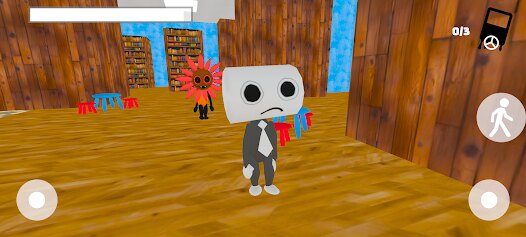
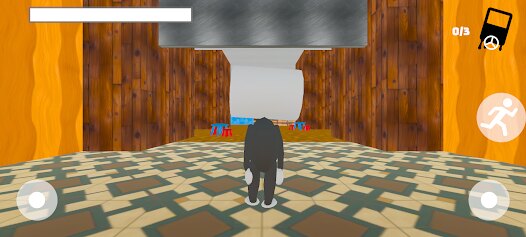
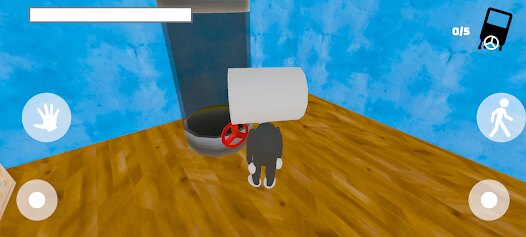
editor reviews
So, I've been sinking a decent amount of time into Dandy's Rooms lately, and honestly, it's a refreshing little puzzle game that's been scratching an itch I didn't know I had. For those who haven't checked it out yet, it's a pure mobile game first and foremost, designed specifically for your Android phone. You can grab it directly from the Google Play Store, and as far as I know, it's not available on Steam, Xbox, or the Switch—it's strictly a tap-and-swipe affair for your phone or tablet. The game launched relatively recently, and while I can't give you the exact date off the top of my head, it's already racked up a decent number of installs, sitting around the 100k mark from what I saw. The best part? It's completely free to download and play. There are no forced in-app purchases to progress, but there are optional ones if you want to skip a particularly tricky room or buy some cosmetic skins. In-app ads exist, but they're the typical "watch this for a hint" kind, not those obnoxious pop-ups that interrupt your flow. If you do decide to spend, most items are in the $1 to $3 range, which is pretty standard for this genre on Google Play.
When you first install the app, you're thrown into a series of increasingly clever escape rooms. The core gameplay is all about observation and logic. You tap on objects, rotate your view around the room, find hidden keys, solve riddles, and chain together a series of actions to unlock the door. The best part for me is that it doesn't hold your hand too much. There's no glowing "tap here" indicator; you actually have to experiment. My favorite aspect is the sense of discovery when you figure out a puzzle that felt impossible for ten minutes. For example, I spent ages trying to figure out a sequence for a safe, only to realize I had to combine a color pattern from a painting with a number from a clock. That "aha!" moment is what keeps me coming back. The rooms are also varied enough that it doesn't feel repetitive, which is a common issue with other puzzle games I've played on Google Play.
Compared to other games in this genre, like "Escape Room: Mystery Words" or even the more polished "The Room" series, Dandy's Rooms holds its own surprisingly well. It's not as graphically intense as "The Room: Old Sins" on a PC or console, but for a free Android game, the 3D environments are crisp and the lighting effects are great. What sets it apart for me is the pacing. A lot of similar apps either make the puzzles too simple or artificially inflate the difficulty with cryptic solutions. Dandy's Rooms strikes that sweet spot where you feel challenged but never outright cheated. I'd recommend it if you've ever enjoyed point-and-click adventures on your laptop or even older games like "Myst." It's a perfect time-killer for your commute, and since it's a free download on Google Play, you have nothing to lose. Just give it a try and see if you can escape the first room without using a hint.
features
- 🧠 Smart Hint System Unlike a lot of other puzzle games on the Google Play Store, Dandy's Rooms doesn't just give you the answer when you're stuck. The hint system here nudges you in the right direction without spoiling the entire solution. You watch a short ad, and it highlights a specific object you might have missed, letting you still feel like you solved it yourself.
- 🕹️ Clean, Touch-Optimized Controls The interface is clearly made for mobile. Swiping to rotate the room is smooth, and tapping on items feels responsive. Other games in this genre sometimes have wonky hitboxes where you tap exactly on a key but it doesn't register. Not here. The touch feedback is excellent.
- 🎨 Art Style with Character While it's not as hyper-realistic as "The Room" on PC or Switch, Dandy's Rooms has its own charming, slightly cartoonish vibe. The textures are clean, and each room has a distinct theme—like a dusty library or a steampunk workshop—which keeps the gameplay from feeling stale after a few levels.
pros
- 🏆 Perfect Difficulty Curve A big strength is that the difficulty ramps up naturally. The first few rooms teach you the basics without feeling like a tutorial, and by room ten, you're actually solving multi-step puzzles that require real logic. This beats games like "100 Doors" where the difficulty spikes randomly and feels unfair.
- 💰 True Free-to-Play Experience It's rare to find a free Android game that doesn't pressure you into spending money. Dandy's Rooms keeps the in-app purchases optional and non-intrusive. You never hit a wall where you need to pay to progress, which is a huge plus compared to some other time-waster apps that lock content behind a paywall.
- 🎯 No Internet Required After you download and install it from Google Play, the game runs fully offline. This is a lifesaver for me when I'm on the subway or in areas with spotty reception. You don't need a constant connection to play, unlike some newer puzzle games that try to farm your data with online requirements.
cons
- 📺 Repetitive Ad Structure My biggest gripe is that while the ads are optional for hints, the frequency of the "rewarded" video offers feels a bit monotonous. After a few rooms, you start to see the same 30-second ad loops. Games like "Antarctica 88" handle this better by mixing up their ad partners more frequently, so it doesn't feel like a chore to watch one.
- 🔁 Limited Replayability Once you solve a room, that's it. There's no random generator or new game plus mode. Unlike "The Room" series on PC, which sometimes has alternative solutions or hidden easter eggs to find on a second playthrough, Dandy's Rooms is very linear. After you escape a room, you move on, and you probably won't revisit it.
- 📉 Occasional Polish Issues The game is great for a free title, but it has some rough edges. The text in the menus is sometimes a bit small on larger Android screens, and there's a rare bug where an object won't highlight even when you're tapping the right spot. This just didn't happen in more polished games like "Dungeon Escape," which feels a bit more refined in its last update.
Articles
![]()
Guide
How to Update Google Play Store on Android 2026
![]()
Guide
How to Download Older Versions of Android Apps
![]()
Guide
How to Download Apps Without Google Play Store
![]()
Guide
What Is an APK File for Android?
If you use an Android phone, you may have seen the term APK while searching for apps or games online. Some websites offer an APK download instead of a Google Play install button. Some users also mention APK files when talking about apps that are not available in their region, older app versions, or Android games downloaded outside the Play Store.
![]()
Guide
How to Install Games from Google Play for Beginners
Installing games on an Android phone is usually simple, but for beginners, the process can still feel confusing at first. You may not know where to search, which button to tap, whether the game is safe, or why Google Play sometimes asks for account settings, storage access, or payment information. If you are using an Android phone for the first time, learning how to install games from Google Play is one of the easiest ways to get started.
![]()
Guide
How Useful Gemini Is for Everyday Questions and Quick Tasks
emini feels different from many AI apps because it is not only trying to be a chatbot. After using it for everyday questions, quick writing, image understanding, and planning, I think its biggest strength is convenience.
![]()
Guide
What to Know Before Downloading APKs
For many Android users, downloading an APK is a common way to install apps and games. Sometimes an app is not available in a certain country.
![]()
Guide
ChatGPT Review: Is It Still the Best AI App in 2026?
![]()
Guide
Seedance 2.0 vs Sora: The Future of AI Video Generation
The AI video race has intensified dramatically over the past two years. Platforms like Sora from OpenAI and Luma Dream Machine pushed the boundaries of text-to-video realism. Yet, despite their impressive outputs, most tools still operate as probabilistic generators—you describe a scene, and the model interprets it. Control remains limited. With the February 2026 release of Seedance 2.0, developed by ByteDance, the paradigm shifted. Internally known as Jimeng 2.0, Seedance does not position itself as just another video model. It positions itself as an AI Director. Rather than guessing what you want, Seedance 2.0 allows you to direct what happens. This distinction defines everything that follows.









Recommended Apps
![]()
My Supermarket Simulator 3D®
Game District LLC3.9

![]()
Fortnite
Epic Games, Inc4![]()
Poppy Playtime Chapter 3
Mob Entertainment4.2![]()
Diamond Painting ASMR Coloring
CrazyLabs LTD4.5![]()
Real Bus Simulator : Bus Games
Solo Studio Inc3.2![]()
Sprunki All Phases Beat Maker
Gotstar Studio0![]()
Looper!
Kwalee (Ltd)4.2![]()
Gugu Gaga Penguin: Mini Games
Kids Games LLC3![]()
KPop Demon Hunter Wallpaper
Highlights Devloper0![]()
Count Masters: Stickman Games
Freeplay Inc4.6![]()
Scary Teacher 3D
Z & K Games4.3![]()
Papa's Wingeria HD
Flipline Studios4.6![]()
Who's Your Daddy?!
Evil Tortilla Games Incorporated2.7![]()
AFK Arena
LilithGames4.6![]()
Hungry Balls
HYPERCELL4.6












































