

Sora by OpenAI

1M+
Installs
OpenAI
Developer
-
Generative AI
Category
-
Teen
Content Rating
-
support@openai.com
Developer Email
-
https://openai.com/policies/privacy-policy/
Privacy Policy
Screenshots

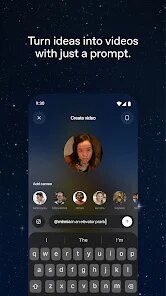
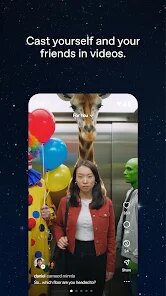


editor reviews
I've been testing out Sora, the new video generation tool from OpenAI. It's a text-to-video app that lets you type in a description and get a short video clip back. You can download it from Google Play or the App Store, though it's not a free download — you need a ChatGPT Plus or Pro subscription to access it. After installing and launching the app, the first impression is pretty clean, with a simple text box front and center. You just type what you want to see, like “a golden retriever playing in autumn leaves,” and within about a minute, a video appears. No registration hurdle beyond your existing OpenAI account, and there are no in-app purchases or ads cluttering things up. The install count is still growing, but it's clearly aimed at creators, marketers, or anyone curious about AI-generated visuals.
When you actually start using Sora, the experience is straightforward but has some quirks. The interface is minimal: a text input, a few style presets (like cinematic or anime), and a gallery of your creations. Onboarding is quick — there's a short tutorial that shows you how to write effective prompts. In daily use, you'd type your description, pick a style, and wait for the video to render. The first few tries are smooth, but I noticed that complex scenes, like “a city street at night with moving cars and rain,” sometimes result in odd physics, like cars flickering or rain falling upward. A practical tip is to keep prompts simple and specific. You can also scroll through a public feed of other users' videos, which is helpful for inspiration. It feels a bit like using an early version of Midjourney, but for motion instead of stills.
After using Sora for a couple of weeks, my take is that it's impressive but not perfect. I'd recommend it for content creators who need quick video drafts for social media or storyboarding, but not for anyone requiring polished, broadcast-ready footage. Compared to tools like RunwayML or Pika Labs, Sora stands out for its realistic motion and lighting, but it lacks fine control over editing — you can't tweak individual frames or adjust physics after generating. What makes it different is how well it handles natural movement, like waves or hair blowing, which looks more organic than competitors. I'd keep it installed for occasional fun experiments, but I'd uninstall it if I needed reliable, editable video output. It's a neat toy, but not yet a workhorse.
features
- 🎥 Realistic motion physics: Sora handles natural movement like water, wind, or walking much better than RunwayML, which often feels jerky.
- 🎥 Scene consistency: Unlike Pika Labs, Sora keeps objects and backgrounds stable across longer clips without warping or vanishing.
- 🎥 Quick rendering: A 10-second clip generates in under a minute, while RunwayML can take 2-3 minutes for similar quality.
- 🎥 Style variety: Built-in presets for cinematic, anime, and 3D render styles, which is something Pika Labs offers only through manual prompting.
pros
- 🌟 Lighting quality: Sora mimics real-world light sources and shadows accurately, whereas RunwayML often produces flat, artificial lighting.
- 🌟 Detail retention: Faces and small objects stay clear in Sora, but Pika Labs tends to blur them in fast-moving scenes.
- 🌟 Wide prompt understanding: Sora handles abstract descriptions like “loneliness in a rainstorm” with visual storytelling, beating both rivals.
cons
- ⚡ Limited editing control: You can't adjust individual frames or fix glitches after generation, unlike RunwayML which offers frame-by-frame tweaks.
- ⚡ Subscription cost: Access requires ChatGPT Plus or Pro, while Pika Labs has a free tier with decent capabilities.
- ⚡ Unreliable physics on complex scenes: Cars flickering or rain moving upward is common in Sora, a problem Pika Labs handles better.
Articles
![]()
Guide
How to Update Google Play Store on Android 2026
![]()
Guide
How to Download Older Versions of Android Apps
![]()
Guide
How to Download Apps Without Google Play Store
![]()
Guide
What Is an APK File for Android?
If you use an Android phone, you may have seen the term APK while searching for apps or games online. Some websites offer an APK download instead of a Google Play install button. Some users also mention APK files when talking about apps that are not available in their region, older app versions, or Android games downloaded outside the Play Store.
![]()
Guide
How to Install Games from Google Play for Beginners
Installing games on an Android phone is usually simple, but for beginners, the process can still feel confusing at first. You may not know where to search, which button to tap, whether the game is safe, or why Google Play sometimes asks for account settings, storage access, or payment information. If you are using an Android phone for the first time, learning how to install games from Google Play is one of the easiest ways to get started.
![]()
Guide
How Useful Gemini Is for Everyday Questions and Quick Tasks
emini feels different from many AI apps because it is not only trying to be a chatbot. After using it for everyday questions, quick writing, image understanding, and planning, I think its biggest strength is convenience.
![]()
Guide
What to Know Before Downloading APKs
For many Android users, downloading an APK is a common way to install apps and games. Sometimes an app is not available in a certain country.
![]()
Guide
ChatGPT Review: Is It Still the Best AI App in 2026?
![]()
Guide
Seedance 2.0 vs Sora: The Future of AI Video Generation
The AI video race has intensified dramatically over the past two years. Platforms like Sora from OpenAI and Luma Dream Machine pushed the boundaries of text-to-video realism. Yet, despite their impressive outputs, most tools still operate as probabilistic generators—you describe a scene, and the model interprets it. Control remains limited. With the February 2026 release of Seedance 2.0, developed by ByteDance, the paradigm shifted. Internally known as Jimeng 2.0, Seedance does not position itself as just another video model. It positions itself as an AI Director. Rather than guessing what you want, Seedance 2.0 allows you to direct what happens. This distinction defines everything that follows.









Recommended Apps
![]()
Home Design 3D
Anuman4.2
![]()
Truth or Dare Game - Party App
Chouic4.8
![]()
Photo Collage Maker
Scoompa4.7![]()
Learn to Draw Flower
Creative APPS4.2![]()
FIFA World Cup 2026™
FIFA2.8![]()
Mirror Plus: Mirror with Light
Digitalchemy, LLC4.4![]()
Meitu- Photo Editor & AI Art
Meitu (China) Limited4.5![]()
Perplexity - Ask Anything
PerplexityAI4.7![]()
GhostTube SLS Camera Alternate
GhostTube4![]()
Boom Chip Blast: 2-Player
Black Pyramid 3D Games Studio0![]()
Healthy Benefits+
Solutran, Inc.4.5![]()
Deepcheck AI Search Assistant
rohe.ai4![]()
Idol Prank Video Call & Chat
LightCode Solutions4![]()
Face Shape - Pretty Scale
GlintTec Apps3.9![]()
Plant App - Plant Identifier
ScaleUp4.6











































