

Geeni

5,000,000+
Installs
Merkury Innovations
Developer
-
Productivity
Category
-
Rated for 3+
Content Rating
-
support@mygeeni.com
Developer Email
-
https://merkuryinnovations.com/privacy/
Privacy Policy
Screenshots
editor reviews
Geeni is a smart home app designed to control Wi-Fi enabled devices like bulbs, plugs, cameras, and sensors. It falls squarely into the IoT (Internet of Things) management category, a space crowded with apps from both big brands and smaller manufacturers. You mostly use it to turn things on or off, set schedules, and check live camera feeds from your phone. The main reason someone would download it is if they bought a Geeni-compatible gadget from a store like Walmart or Amazon and need a hub to run it. Once you launch the app after installing it from Google Play or the App Store, the first impression is mixed. The interface looks clean enough with a dark theme and bright icons, but you immediately hit a registration wall. You have to create an account before you can even look around, which feels a bit forward for a free app that has over 1 million installs and no upfront cost. It also pushes you to grant location and notification permissions right away, which makes you pause and wonder if it's going to spam you.
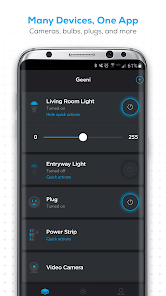
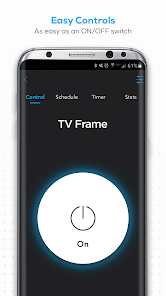
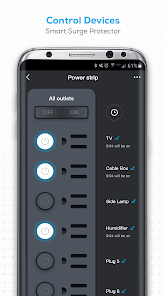
After you get through the setup, the actual experience is a bit of a rollercoaster. The onboarding walks you through adding your first device, which involves plugging it in, putting the app into pairing mode, and waiting. Sometimes it works in thirty seconds, sometimes it fails and asks you to reset the device and try again. Once everything is paired, the main dashboard lists all your gear with little status icons. Tapping a bulb lets you change brightness or color, and tapping a plug turns it on or off. The camera feed loads reasonably fast over Wi-Fi, and you can even talk through the two-way audio, which is neat. A practical tip I picked up is to name each device something obvious like "Living Room Lamp" instead of using the default serial number, or you will end up turning off the wrong thing. The app struggles a bit when you try to group devices or set up automation routines; the menus feel buried and the logic is not always intuitive. You might find yourself tapping around just to find where the schedule option is hidden.
After a few weeks of using Geeni, I think it works fine for what it is, but it does not blow you away. People who just want simple on/off control for a handful of cheap smart plugs or bulbs will probably keep it installed. But if you are used to a more polished experience from apps like Philips Hue or TP-Link Kasa, Geeni will feel clunky. The biggest difference is the lack of smooth third-party integration; it works with Alexa and Google Assistant, but the response can be laggy, and it does not play well with IFTTT or Apple HomeKit. The reason I would keep it is simply the low price of the hardware. But if you are trying to build a more complex smart home with scenes, automations, and reliable voice control, this app might wear on your nerves and you will likely uninstall it in favor of something more robust.
features
- 🎛️ Device pairing with Geeni is a mixed bag compared to TP-Link Kasa. Kasa usually finds devices on the first try without forcing you to enter your Wi-Fi password repeatedly. Geeni often requires you to reset the device, toggle the app's Bluetooth permission, and sometimes even restart your phone before it connects. The outstanding feature here is the ability to share device control with family members through the app, which Kasa also does, but Geeni makes it a bit more straightforward once you dig into the settings.
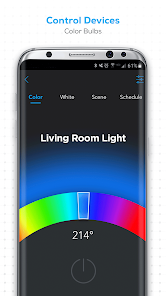
- 🎛️ The color and brightness controls for smart bulbs are decent but feel basic. In the Philips Hue app, you can pick from a massive color wheel and save custom scenes with smooth transitions. With Geeni, you get a smaller palette of preset colors and a simple slider. The standout is the "Music Sync" mode, which flashes the bulb in rhythm with sound from your phone's mic. It is a fun gimmick for parties, but Hue does it better with dedicated apps and more reliable timing.
- 🎛️ Scheduling and automation are where Geeni lags behind. Compared to the Wyze app, which lets you create complex rules with triggers like motion detection or temperature changes, Geeni only offers basic time-based schedules for on/off actions. The outstanding feature for Geeni is its "Away Mode" that randomly turns lights on and off to simulate occupancy. It sounds useful, but Wyze's version gives you more customization over timing and randomness.
- 🎛️ Camera integration is surprisingly solid for the price. The live feed loads quickly, and you can record clips to a microSD card or the cloud. Compared to Eufy Security, which has sharper image quality and better night vision, Geeni's camera is just okay. The standout is the two-way audio latency, which is lower than I expected, making it possible to have a half-decent conversation through the camera without awkward delays.
pros
- ✅ Geeni's biggest strength is the price of its hardware. You can pick up a smart plug for under ten bucks, which is half what a TP-Link Kasa plug costs. For someone on a tight budget who just wants to control a lamp or a fan from their phone, this is a no-brainer choice.
- ✅ The app supports a wide range of device types from bulbs and plugs to cameras and sensors, all in one place. Smart Life does the same, but Geeni's interface feels less cluttered and more beginner-friendly when you first start adding devices.
- ✅ Voice control through Alexa and Google Assistant works consistently enough to be reliable. While it lacks Apple HomeKit support like the Eve app, the basic commands for turning things on and off respond quickly and rarely fail.
cons
- ❌ Geeni's biggest weakness is the sheer number of advertising prompts inside the app. After every action, you might see a popup for another product or a subscription service. This feels intrusive compared to the Philips Hue app, which only shows you relevant setup tips without trying to upsell you constantly.
- ❌ The app lacks offline control and local network access. If your internet is down, you cannot turn on a light even though both the phone and the device are on the same Wi-Fi. TP-Link Kasa allows local control without internet, which makes it more reliable in everyday use.
- ❌ Device grouping is clunky and limited. You can group bulbs together, but the group often loses sync, meaning one bulb might not respond when you tap "turn off." The Wyze app handles groups much better, keeping all devices in perfect sync with each command.
- ❌ Customer support through the app is nearly nonexistent. If a device stops pairing, you are left searching forums or Reddit for solutions. In contrast, Eufy offers a solid in-app chat and consistent firmware updates to fix bugs.
Articles
![]()
Guide
How to Update Google Play Store on Android 2026
![]()
Guide
How to Download Older Versions of Android Apps
![]()
Guide
How to Download Apps Without Google Play Store
![]()
Guide
What Is an APK File for Android?
If you use an Android phone, you may have seen the term APK while searching for apps or games online. Some websites offer an APK download instead of a Google Play install button. Some users also mention APK files when talking about apps that are not available in their region, older app versions, or Android games downloaded outside the Play Store.
![]()
Guide
How to Install Games from Google Play for Beginners
Installing games on an Android phone is usually simple, but for beginners, the process can still feel confusing at first. You may not know where to search, which button to tap, whether the game is safe, or why Google Play sometimes asks for account settings, storage access, or payment information. If you are using an Android phone for the first time, learning how to install games from Google Play is one of the easiest ways to get started.
![]()
Guide
How Useful Gemini Is for Everyday Questions and Quick Tasks
emini feels different from many AI apps because it is not only trying to be a chatbot. After using it for everyday questions, quick writing, image understanding, and planning, I think its biggest strength is convenience.
![]()
Guide
What to Know Before Downloading APKs
For many Android users, downloading an APK is a common way to install apps and games. Sometimes an app is not available in a certain country.
![]()
Guide
ChatGPT Review: Is It Still the Best AI App in 2026?
![]()
Guide
Seedance 2.0 vs Sora: The Future of AI Video Generation
The AI video race has intensified dramatically over the past two years. Platforms like Sora from OpenAI and Luma Dream Machine pushed the boundaries of text-to-video realism. Yet, despite their impressive outputs, most tools still operate as probabilistic generators—you describe a scene, and the model interprets it. Control remains limited. With the February 2026 release of Seedance 2.0, developed by ByteDance, the paradigm shifted. Internally known as Jimeng 2.0, Seedance does not position itself as just another video model. It positions itself as an AI Director. Rather than guessing what you want, Seedance 2.0 allows you to direct what happens. This distinction defines everything that follows.









Recommended Apps
![]()
Home Design 3D
Anuman4.2
![]()
Truth or Dare Game - Party App
Chouic4.8
![]()
Photo Collage Maker
Scoompa4.7![]()
Learn to Draw Flower
Creative APPS4.2![]()
FIFA World Cup 2026™
FIFA2.8![]()
Mirror Plus: Mirror with Light
Digitalchemy, LLC4.4![]()
Meitu- Photo Editor & AI Art
Meitu (China) Limited4.5![]()
Perplexity - Ask Anything
PerplexityAI4.7![]()
GhostTube SLS Camera Alternate
GhostTube4![]()
Boom Chip Blast: 2-Player
Black Pyramid 3D Games Studio0![]()
Healthy Benefits+
Solutran, Inc.4.5![]()
Deepcheck AI Search Assistant
rohe.ai4![]()
Idol Prank Video Call & Chat
LightCode Solutions4![]()
Face Shape - Pretty Scale
GlintTec Apps3.9![]()
Plant App - Plant Identifier
ScaleUp4.6











































