

Amazing Circus Pixel Coloring

10K+
Installs
ValentinaDev
Developer
-
Puzzle
Category
-
Everyone
Content Rating
-
valentina432630@gmail.com
Developer Email
-
https://sites.google.com/view/marbleprivacypolicy/home
Privacy Policy
Screenshots
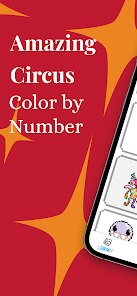
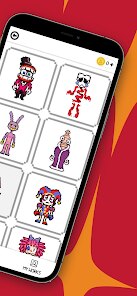


editor reviews
If you're looking for a chill, no-pressure mobile game to kill time, Amazing Circus Pixel Coloring from ValentinaDev is exactly what it sounds like—a pixel art coloring book wrapped in a circus theme. This is a pure mobile game, available on android via Google Play, and it's designed specifically for touchscreens. You won't find it on steam, xbox, or switch, so it's strictly a phone app for casual play. The game first launched a while back and has quietly amassed over 100,000 installs on Google Play, which shows it's found a steady audience. The best part? It's totally free to download and play. There are in app purchases, but they're super optional—things like unlocking extra palettes or removing the occasional ad. Most purchases range from $0.99 to $4.99, so it's not a cash grab. You can just install it, start coloring, and never spend a dime if you don't want to.
Playing Amazing Circus Pixel Coloring is as straightforward as it gets. You pick a pixel art image—everything from a sad clown to a circus tent or a lion—and tap the numbered cells to fill them with the corresponding colors. The numbers are small, but you can zoom in easily, which is perfect for those tiny 1x1 pixels. The best part of this game is how relaxing it is. There's no timer, no scoring, no pressure to finish. You just color at your own pace, and the pixel art gradually comes to life. My favorite part? The variety. The circus theme gives it a distinct vibe, but within that, you get animals, performers, props, and even some abstract patterns. It's not deep or complex, but that's the point. It's a stress reliever I pull out when I'm waiting in line or winding down before bed. The controls are smooth, and I've never had the app crash on me, which matters more than you'd think on android.
Compared to other pixel coloring apps like Pixel Art or Happy Color, this one has a more focused theme. Happy Color throws everything at you—landscapes, animals, food—and it can feel overwhelming. Amazing Circus Pixel Coloring keeps it tight with the circus motif, which makes it feel more like a curated collection than a random dump of images. I also appreciate that the ads aren't as aggressive as some other free coloring apps. You'll see one after finishing a picture, but it's not interrupting your flow mid-coloring. The color palettes are bright and well-chosen for the theme, so even a simple clown face looks vibrant. If you've played Color by Number games before, you know the drill, but this one has a charm that stands out. It's not trying to be deep or competitive—it's just a cozy, colorful escape. I'd recommend it if you want something low-commitment that doesn't require a tutorial or a manual. It's a perfect download for when you've got five minutes or an hour to spare.
features
- Curated Circus Theme 🎪 Unlike generic coloring apps that mix random subjects, this game dedicates all its content to a circus world. You get consistent vibes—clowns, elephants, tents, and fire breathers—which makes the collection feel cohesive and intentional.
- Zoom and Precision Controls 🔍 The app lets you zoom in smoothly to tap individual pixels without accidental taps. It's way better than some competitors where you struggle with tiny cells, especially on smaller phone screens.
- Minimal In App Pressure 💰 There are in app purchases, but they're avoidable. You can unlock extra color sets or remove ads for a buck or two, but the free content is already substantial. No paywalls hiding basic features, unlike some other free apps.
- Offline Play Support 📡 You don't need a constant internet connection. Once you download the app and its images, you can color anytime, anywhere—on a plane, in a subway, or during a road trip without data.
pros
- Relaxing, Timer-Free Gameplay 🧘 No countdown clocks, no points, no leaderboards. You can drop in and out without guilt. This makes it ideal for decompressing after a long day, unlike competitive games that demand constant attention.
- Clean and Simple User Interface 📱 The layout is straightforward—pick an image, zoom, tap, color. No cluttered menus or confusing options. It's a simple game that respects your time, which is rare for free android apps these days.
- Vibrant and Consistent Art Style 🎨 The pixel art is well-crafted within the circus theme. Colors pop, and the designs are cute without being childish. It's satisfying to watch a black-and-white grid turn into a colorful cartoon character.
- Good Value for Free Play 🆓 You can enjoy dozens of images without spending anything. The free content is genuine, not just a demo. This makes it a solid alternative to paid apps or subscription-based coloring tools.
cons
- Limited Content Variety 🎪 The circus theme is charming, but after a while, it can feel repetitive. You'll see similar clowns, tents, and animals. If you prefer variety like in Happy Color, this might feel narrow after a few sessions.
- Occasional Ad Frequency 📺 While ads are handled decently, they still pop up after completing an image. Some players might find them slightly intrusive compared to ad-free paid alternatives. There's no skip button sometimes, which can be annoying.
- No Advanced Features 🛠️ The app is simple to a fault. There's no undo button for mistakes, no sharing options to show off your work easily, and no social features. Pixel Art games on Google Play sometimes offer more tools like color palettes or saving progress mid-image.
- No Online Backup or Sync ☁️ Your progress is saved locally. If you switch phones or reinstall the app, you lose your unfinished images. This is a downside compared to apps with cloud saves, especially if you invest time in a complex piece.
Articles
![]()
Guide
How to Update Google Play Store on Android 2026
![]()
Guide
How to Download Older Versions of Android Apps
![]()
Guide
How to Download Apps Without Google Play Store
![]()
Guide
What Is an APK File for Android?
If you use an Android phone, you may have seen the term APK while searching for apps or games online. Some websites offer an APK download instead of a Google Play install button. Some users also mention APK files when talking about apps that are not available in their region, older app versions, or Android games downloaded outside the Play Store.
![]()
Guide
How to Install Games from Google Play for Beginners
Installing games on an Android phone is usually simple, but for beginners, the process can still feel confusing at first. You may not know where to search, which button to tap, whether the game is safe, or why Google Play sometimes asks for account settings, storage access, or payment information. If you are using an Android phone for the first time, learning how to install games from Google Play is one of the easiest ways to get started.
![]()
Guide
How Useful Gemini Is for Everyday Questions and Quick Tasks
emini feels different from many AI apps because it is not only trying to be a chatbot. After using it for everyday questions, quick writing, image understanding, and planning, I think its biggest strength is convenience.
![]()
Guide
What to Know Before Downloading APKs
For many Android users, downloading an APK is a common way to install apps and games. Sometimes an app is not available in a certain country.
![]()
Guide
ChatGPT Review: Is It Still the Best AI App in 2026?
![]()
Guide
Seedance 2.0 vs Sora: The Future of AI Video Generation
The AI video race has intensified dramatically over the past two years. Platforms like Sora from OpenAI and Luma Dream Machine pushed the boundaries of text-to-video realism. Yet, despite their impressive outputs, most tools still operate as probabilistic generators—you describe a scene, and the model interprets it. Control remains limited. With the February 2026 release of Seedance 2.0, developed by ByteDance, the paradigm shifted. Internally known as Jimeng 2.0, Seedance does not position itself as just another video model. It positions itself as an AI Director. Rather than guessing what you want, Seedance 2.0 allows you to direct what happens. This distinction defines everything that follows.









Recommended Apps
![]()
My Supermarket Simulator 3D®
Game District LLC3.9

![]()
Fortnite
Epic Games, Inc4![]()
Poppy Playtime Chapter 3
Mob Entertainment4.2![]()
Diamond Painting ASMR Coloring
CrazyLabs LTD4.5![]()
Real Bus Simulator : Bus Games
Solo Studio Inc3.2![]()
Sprunki All Phases Beat Maker
Gotstar Studio0![]()
Looper!
Kwalee (Ltd)4.2![]()
Gugu Gaga Penguin: Mini Games
Kids Games LLC3![]()
KPop Demon Hunter Wallpaper
Highlights Devloper0![]()
Count Masters: Stickman Games
Freeplay Inc4.6![]()
Scary Teacher 3D
Z & K Games4.3![]()
Papa's Wingeria HD
Flipline Studios4.6![]()
Who's Your Daddy?!
Evil Tortilla Games Incorporated2.7![]()
AFK Arena
LilithGames4.6![]()
Hungry Balls
HYPERCELL4.6












































