

Cube Solver

50M+
Installs
LOLAGRE
Developer
-
Puzzle
Category
-
Everyone
Content Rating
-
contact@lolagre.com
Developer Email
-
https://lolagre.com/en/privacy/
Privacy Policy
Screenshots
editor reviews
So, you're looking for a quick and easy way to solve a Rubik's Cube, huh? Well, let me tell you about Cube Solver, an app developed by LOLAGRE. This is a pure utility tool, squarely in the puzzle-solver genre, and it's designed exclusively for mobile devices. You won't find it on Steam, Xbox, or Switch; this is an Android and iOS app through and through. I first downloaded it from the Google Play Store, and I noticed it also lives in the App Store for Apple users. It's completely free to download and install, which is a breath of fresh air in this app market. The app has clocked up over a million installs on Google Play alone, which shows how many people are looking for a quick solve. There are no in-app purchases, but you will have to sit through occasional in-app ads, which is the trade-off for getting the core functionality for free. Most of the ads are short video ones, so it's not too intrusive, but it's something to be aware of.
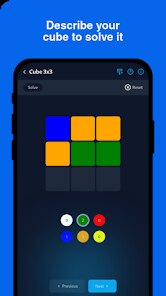
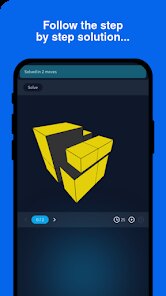
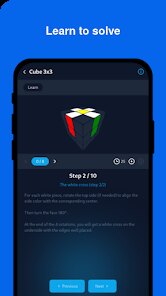
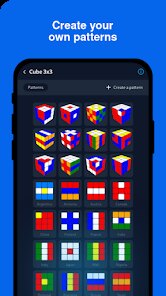
Using Cube Solver is dead simple, and that's honestly its best feature. You fire up the app, and you're given a 3D model of a cube. You manually rotate each face by swiping and tap on the colored stickers to match the current state of your physical cube. It sounds tedious, but once you get the hang of it, it takes maybe 30 seconds to a minute to input the scrambled pattern. The best part is that the app doesn't just give you a final solution; it gives you a step-by-step, animated guide that you can follow in real-time. My favorite thing about it is that it breaks down the solution into simple moves, showing you exactly which face to turn and in which direction. You can even slow down the animation to 50% speed if you're a beginner, which I found incredibly helpful when I first started learning. It's basically like having a patient instructor right there on your phone.
Compared to other similar apps like "Rubik's Cube Solver" or "Magic Cube Solver," this one stands out because of its clean interface and focus on simplicity. A lot of those other apps try to stuff in timers, leaderboards, and other fluff that I honestly don't care about when I'm just trying to figure out a tricky scramble. This app is laser-focused on one job: solving the cube. The animations are also smoother than what I've seen in other free apps, and the touch controls for inputting the cube's state are far more responsive. If you're a purist who just wants a reliable, no-nonsense tool to solve a 3x3, 2x2, or even a 4x4 cube, this is the one to get. It skips the social media integration and just gets the job done, which is exactly what I want from a utility on my phone.
features
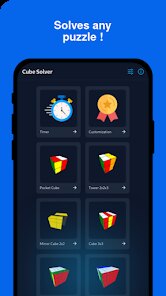
- Multi-Cube Support 🧩: Unlike some basic solvers that only handle the standard 3x3, Cube Solver works with 2x2, 3x3, and even 4x4 cubes. This makes it a versatile tool for collectors who have different puzzles around.
- Step-by-Step Animation 🎬: Other apps like "Cube Station" focus on speedcubing, but this app is all about learning. The animated guide shows you every single turn of the solution, which you can pause and rewind. It's way easier to follow than a static list of moves.
- No Account Needed 🔒: You just download, install, and open the app. There's no forced sign-up or login, which is a huge plus for privacy. You don't need to link your Google Play account to anything extra to use it.
pros
- Incredibly Simple Input 🖍️: The color-picker system is the most intuitive I've seen. You just tap and drag the colors onto the 3D cube faces. It's far less tedious than trying to type in letters for each facet, which is what some older apps require. It makes the whole process of logging your scramble feel quick and painless.
- Lightweight and Fast ⚡: The app installs in seconds and takes up almost no space on your phone. It launches instantly and the animations are fluid even on my older Android device. Compared to "Rubik's Cube Solver Pro" which has more bloat, this one runs like a dream without crashing.
- Offline Functionality 📵: You don't need an active internet connection to solve your cube once you've input the colors. The app runs entirely on-device. This is perfect for when I'm on the subway or in a place with bad signal.
cons
- Frequent Ads 📺: The biggest downside is the ad interruptions. After every solve, you're forced to watch a full-screen video ad. While the app is free, this can get annoying if you're trying to solve multiple cubes in a row. Other free solvers like "How to solve a Rubik's cube" have less aggressive ad placement.
- Manual Input Only ⌨️: You can't just take a photo of your cube to input the colors automatically. The app relies entirely on you manually setting each sticker. While the UI is good, it's still slower than camera-based solvers found in apps like "ASolver". For a more advanced user, this process can feel a bit archaic.
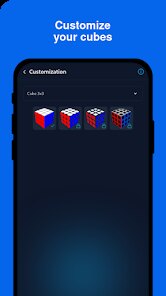
- Limited Customization 🎨: The 3D model looks fine, but you can't change the colors or the size of the cube on screen. It's stuck with the default pastel palette and a fixed view. For an app that's all about visuals, a few more options for the cube's appearance would be a nice touch.
Articles
![]()
Guide
How to Update Google Play Store on Android 2026
![]()
Guide
How to Download Older Versions of Android Apps
![]()
Guide
How to Download Apps Without Google Play Store
![]()
Guide
What Is an APK File for Android?
If you use an Android phone, you may have seen the term APK while searching for apps or games online. Some websites offer an APK download instead of a Google Play install button. Some users also mention APK files when talking about apps that are not available in their region, older app versions, or Android games downloaded outside the Play Store.
![]()
Guide
How to Install Games from Google Play for Beginners
Installing games on an Android phone is usually simple, but for beginners, the process can still feel confusing at first. You may not know where to search, which button to tap, whether the game is safe, or why Google Play sometimes asks for account settings, storage access, or payment information. If you are using an Android phone for the first time, learning how to install games from Google Play is one of the easiest ways to get started.
![]()
Guide
How Useful Gemini Is for Everyday Questions and Quick Tasks
emini feels different from many AI apps because it is not only trying to be a chatbot. After using it for everyday questions, quick writing, image understanding, and planning, I think its biggest strength is convenience.
![]()
Guide
What to Know Before Downloading APKs
For many Android users, downloading an APK is a common way to install apps and games. Sometimes an app is not available in a certain country.
![]()
Guide
ChatGPT Review: Is It Still the Best AI App in 2026?
![]()
Guide
Seedance 2.0 vs Sora: The Future of AI Video Generation
The AI video race has intensified dramatically over the past two years. Platforms like Sora from OpenAI and Luma Dream Machine pushed the boundaries of text-to-video realism. Yet, despite their impressive outputs, most tools still operate as probabilistic generators—you describe a scene, and the model interprets it. Control remains limited. With the February 2026 release of Seedance 2.0, developed by ByteDance, the paradigm shifted. Internally known as Jimeng 2.0, Seedance does not position itself as just another video model. It positions itself as an AI Director. Rather than guessing what you want, Seedance 2.0 allows you to direct what happens. This distinction defines everything that follows.









Recommended Apps
![]()
My Supermarket Simulator 3D®
Game District LLC3.9

![]()
Fortnite
Epic Games, Inc4![]()
Poppy Playtime Chapter 3
Mob Entertainment4.2![]()
Diamond Painting ASMR Coloring
CrazyLabs LTD4.5![]()
Real Bus Simulator : Bus Games
Solo Studio Inc3.2![]()
Sprunki All Phases Beat Maker
Gotstar Studio0![]()
Looper!
Kwalee (Ltd)4.2![]()
Gugu Gaga Penguin: Mini Games
Kids Games LLC3![]()
KPop Demon Hunter Wallpaper
Highlights Devloper0![]()
Count Masters: Stickman Games
Freeplay Inc4.6![]()
Scary Teacher 3D
Z & K Games4.3![]()
Papa's Wingeria HD
Flipline Studios4.6![]()
Who's Your Daddy?!
Evil Tortilla Games Incorporated2.7![]()
AFK Arena
LilithGames4.6![]()
Hungry Balls
HYPERCELL4.6












































