

Microsoft Teams

100,000,000+
Installs
Microsoft Corporation
Developer
-
Business
Category
-
Rated for 3+
Content Rating
-
mstandstore@microsoft.com
Developer Email
-
https://aka.ms/privacy
Privacy Policy
Screenshots

editor reviews
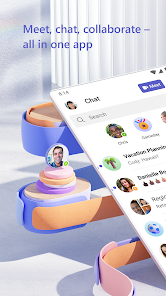
Microsoft Teams is a business communication and collaboration platform, a major player in the crowded workplace app space that combines chat, video conferencing, file storage, and application integration. People typically get it because their company or school forces them to use it for meetings and teamwork, but individuals can also download and install it for free from Google Play and the App Store to chat with friends or join public groups. The first impression after launching it is pretty overwhelming. You're greeted with a dense sidebar filled with icons for Activity, Chat, Teams, Calendar, and Files, plus a ton of notifications from every single channel you've been added to. It feels like walking into a busy office where everyone is shouting at once. The setup process requires you to sign in with a work, school, or Microsoft personal account, and while registration is straightforward, the initial sync of your contacts and chats can take a moment. There are in-app purchases for premium features like advanced meeting scheduling and extra storage, but the base experience is free with occasional ads promoting Microsoft 365 upgrades.
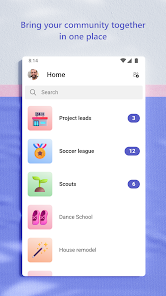
Once you start using it daily, the hands-on experience is a mixed bag of powerful tools and confusing navigation. The main interface is split into chat threads at the left and a main content area showing your conversation or meeting. The onboarding process doesn't hold your hand much, so you learn by clicking around. Common steps include sending a quick chat to a colleague, then suddenly being pulled into a video call that you can't easily decline without looking rude. Scheduling a meeting requires jumping into the Calendar tab, which feels clunky compared to standalone calendar apps. A small tip: you can use keyboard shortcuts like Ctrl+E to jump to the search bar for finding messages or people fast. The mobile app syncs notifications well, but switching between the desktop and phone versions sometimes causes double messages or missed alerts. The integration with Microsoft Office tools like Word and Excel is smooth, allowing you to edit documents directly within a chat. However, the app can be slow to load when you have many teams and channels, and finding a specific file buried in a long thread feels like digital archaeology.
After using it for a while, my personal judgment is that it works great for structured corporate environments but feels clunky for smaller teams or casual use. People who love having everything in one ecosystem, like Microsoft 365 subscribers or heavy Outlook users, will appreciate how deeply Teams integrates with their existing accounts. It's not for anyone seeking a clean, simple chat app like Slack or WhatsApp, since its complexity can feel like overkill for basic messaging. What sets Teams apart from similar apps like Slack is its tight integration with the Microsoft suite, allowing you to co-author documents in real time without leaving the chat. That said, Slack has a more intuitive search and smoother notification management, while Teams can feel bloated and prone to notification fatigue. You might keep it installed if your workplace mandates it, but if given a choice, many people uninstall it for lighter options, especially on mobile where it drains battery quickly. It's a love-it-or-hate-it tool that excels at bringing all work functions into one place but fails at keeping the experience simple and fast.
features
- 🤝 Microsoft Teams integrates seamlessly with the entire Microsoft 365 ecosystem, letting you edit Word docs, Excel spreadsheets, and PowerPoint presentations directly within chat threads. Slack, in comparison, requires third-party integrations or separate app launches to achieve the same level of document collaboration, making Teams much more convenient for organizations already using Microsoft tools. This single sign-on approach reduces time wasted switching between platforms.
- 📅 The built-in calendar and meeting scheduler in Teams is robust, allowing you to book video calls, set recurring meetings, and integrate with Outlook automatically. Slack lacks a native calendar feature, relying on integrations with Google Calendar or Outlook, which can break or require extra setup. Teams' scheduling is more tightly woven into the chat interface, so you can start a meeting from any conversation without leaving the window.
- 🗂️ Teams offers robust channel organization with tabs for files, notes, and apps within each team, creating a persistent workspace that Slack achieves with channels but without the same depth of file management. In Teams, you can pin frequently used documents or web pages to channel tabs, something Slack does not support natively, making Teams better for ongoing projects that need quick access to shared resources.
pros
- ✅ The biggest strength of Teams is its integration with Microsoft 365. If your company uses Outlook, SharePoint, or OneDrive, Teams ties them all together, making file sharing and meeting scheduling effortless. Slack requires extra plugins for such deep connections, which can be expensive and complex to manage.
- ✅ Teams supports huge group video calls with up to 300 participants in the free tier, and its background blur and custom backgrounds work reliably. Slack video calls are limited to small groups and lack the same polished experience for large meetings.
- ✅ The notification system is surprisingly customizable, allowing you to mute specific channels or threads while staying alert for urgent messages from managers. This provides more fine-grained control than Slack's broader muted channel options.
cons
- ❌ The main weakness is that Teams is slow and resource-heavy, often freezing on older devices or consuming large amounts of RAM. Slack runs lighter and loads faster on low-end hardware, especially on mobile where Teams drains battery quickly.
- ❌ Navigation is messy and unintuitive. Finding old messages or searching for files can be a chore because the search algorithm returns irrelevant results. Slack's search is far superior, allowing you to filter by date, person, or channel precisely.
- ❌ The free tier has annoying limitations, like a 2GB file storage cap and a 60-minute time limit on group calls. Slack's free plan offers unlimited search history and file storage up to 5GB per team, plus no call duration limit for smaller groups, making it better for small teams on a budget.
Articles
![]()
Guide
How to Update Google Play Store on Android 2026
![]()
Guide
How to Download Older Versions of Android Apps
![]()
Guide
How to Download Apps Without Google Play Store
![]()
Guide
What Is an APK File for Android?
If you use an Android phone, you may have seen the term APK while searching for apps or games online. Some websites offer an APK download instead of a Google Play install button. Some users also mention APK files when talking about apps that are not available in their region, older app versions, or Android games downloaded outside the Play Store.
![]()
Guide
How to Install Games from Google Play for Beginners
Installing games on an Android phone is usually simple, but for beginners, the process can still feel confusing at first. You may not know where to search, which button to tap, whether the game is safe, or why Google Play sometimes asks for account settings, storage access, or payment information. If you are using an Android phone for the first time, learning how to install games from Google Play is one of the easiest ways to get started.
![]()
Guide
How Useful Gemini Is for Everyday Questions and Quick Tasks
emini feels different from many AI apps because it is not only trying to be a chatbot. After using it for everyday questions, quick writing, image understanding, and planning, I think its biggest strength is convenience.
![]()
Guide
What to Know Before Downloading APKs
For many Android users, downloading an APK is a common way to install apps and games. Sometimes an app is not available in a certain country.
![]()
Guide
ChatGPT Review: Is It Still the Best AI App in 2026?
![]()
Guide
Seedance 2.0 vs Sora: The Future of AI Video Generation
The AI video race has intensified dramatically over the past two years. Platforms like Sora from OpenAI and Luma Dream Machine pushed the boundaries of text-to-video realism. Yet, despite their impressive outputs, most tools still operate as probabilistic generators—you describe a scene, and the model interprets it. Control remains limited. With the February 2026 release of Seedance 2.0, developed by ByteDance, the paradigm shifted. Internally known as Jimeng 2.0, Seedance does not position itself as just another video model. It positions itself as an AI Director. Rather than guessing what you want, Seedance 2.0 allows you to direct what happens. This distinction defines everything that follows.









Recommended Apps
![]()
Home Design 3D
Anuman4.2
![]()
Truth or Dare Game - Party App
Chouic4.8
![]()
Photo Collage Maker
Scoompa4.7![]()
Learn to Draw Flower
Creative APPS4.2![]()
FIFA World Cup 2026™
FIFA2.8![]()
Mirror Plus: Mirror with Light
Digitalchemy, LLC4.4![]()
Meitu- Photo Editor & AI Art
Meitu (China) Limited4.5![]()
Perplexity - Ask Anything
PerplexityAI4.7![]()
GhostTube SLS Camera Alternate
GhostTube4![]()
Boom Chip Blast: 2-Player
Black Pyramid 3D Games Studio0![]()
Healthy Benefits+
Solutran, Inc.4.5![]()
Deepcheck AI Search Assistant
rohe.ai4![]()
Idol Prank Video Call & Chat
LightCode Solutions4![]()
Face Shape - Pretty Scale
GlintTec Apps3.9![]()
Plant App - Plant Identifier
ScaleUp4.6












































