

LinkedIn: Jobs & Business News

1,000,000,000+
Installs
LinkedIn
Developer
-
Business
Category
-
Rated for 12+
Content Rating
-
team-mobile@linkedin.com
Developer Email
-
https://www.linkedin.com/legal/privacy-policy
Privacy Policy
Screenshots

editor reviews
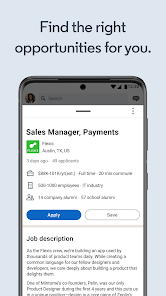
If you've ever looked for a job, kept an eye on industry trends, or tried to grow your professional network, you've probably come across LinkedIn. It's not exactly a social media app in the way Instagram or TikTok are, but more of a career-focused platform where your profile works like a living resume. People use it to apply for jobs, share updates about their work, read business news, and connect with colleagues or recruiters. For anyone actively looking for a new role or just wanting to stay visible in their field, it's pretty much the default starting point. The first time you open the app after downloading it from Google Play or the App Store, you're asked to either log in with an existing account or create a new one. The setup process asks for your name, current position, and industry, and it encourages you to add a photo and a summary if you want. For a first impression, the app feels clean but dense, there's a lot going on in the feed right away, and it can feel a bit overwhelming if you're not used to it.
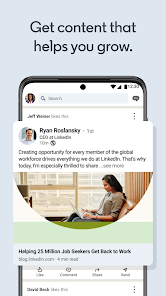
After you get past the sign-up, the real experience is pretty straightforward but comes with a learning curve. The home feed shows you a mix of posts from people you follow, recommended articles, and updates from companies you might be interested in. You can scroll through, like or comment on posts, and share your own updates if that's your thing. The main navigation at the bottom gives you quick access to your feed, your network requests, job postings, and your messages. One thing I noticed is that the app does a decent job of notifying you about job recommendations that actually match your profile, but you do have to tweak your preferences sometimes to get rid of irrelevant roles. The search function is actually useful, you can look for people by name, job title, or company, and filter results by location or connections. The onboarding is pretty fast, it just walks you through a few steps like following companies or inviting contacts, but you can skip most of it if you want. A small tip is to turn off push notifications for "profile views" unless you really care about that, because it can get spammy fast.
After using LinkedIn for a while, I think it's one of those apps you either keep because you have to or delete because you can't stand it. For job seekers, especially in corporate fields like tech, finance, or marketing, it's practically essential. A lot of recruiters use it as their primary tool, and if your profile isn't there, you might miss opportunities. On the other hand, if you're in a trade or a creative field where portfolio work matters more, you might find it less useful than something like Behance or Indeed. What makes LinkedIn different from general job boards is the networking side, you can directly message hiring managers or get introduced through mutual connections. That said, the app can feel like a non-stop stream of humble brags and self-promotion, which gets tiring. People either love it or treat it like a necessary evil. I've kept it installed because it's easier to check jobs on mobile, but I can see why someone would uninstall it if they weren't actively looking.
features
- ✨ LinkedIn's job search is tightly integrated with your profile. When you apply, it pulls your experience and skills directly, so you don't have to retype your resume. LinkedIn Jobs on the other hand feels like a separate entity, and its "Quick Apply" feature doesn't always carry over all your info.
- ✨ The "Open to Work" banner is a small but smart touch. You can signal you're looking without making it obvious to your current employer if you don't want to. Similar apps like Indeed or Glassdoor don't really have an equivalent feature that works this quietly.
- ✨ Skill assessments are a nice bonus. You can take short tests to earn badges for things like Excel or Python, and those show up on your profile. It's a quick way to add credibility without a formal certificate. Most other job apps don't bother with this kind of verification.
- ✨ The built-in news feed keeps you updated on industry trends and company announcements. It's basically a customized business news aggregator. Other job platforms like Monster or ZipRecruiter focus purely on listings and miss this whole layer of professional context.
pros
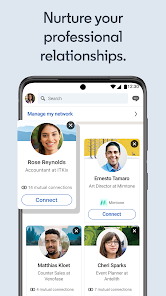
- 👍 The network effect is hard to beat. Once you've built a decent connection list, your profile gets more visibility, and recruiters start reaching out. For long-term career growth, being visible here matters more than on sites like Indeed, where you're just one of many applicants.
- 👍 Your profile doubles as a living resume. You can add recommendations, endorsements, and examples of your work. It feels more complete than the typical two-page PDF you'd upload to a job board.
- 👍 The messaging system is practical. You can send a quick note to a recruiter or a colleague without needing their personal email. LinkedIn is better for this than Xing, which is more regional and has fewer active users outside Europe.
cons
- 👎 It's inundated with recruiter spam. You'll get messages for roles that have nothing to do with your background, and it can be distracting. I don't get that kind of noise on a simpler platform like Indeed where I just search what I want.
- 👎 The free version is very limited. You can't see who viewed your profile unless you pay, and InMail messages are capped. Compared to LinkedIn Jobs or Glassdoor, the free tier here feels like a teaser for the premium subscription.
- 👎 The feed often feels more like a popularity contest than a professional space. People post motivational quotes or vague success stories, and it gets repetitive. Other apps like Handshake stick to job listings and avoid this clutter.
- 👎 The mobile app drains battery and data pretty fast if you leave notifications on. I've noticed it runs in the background more than most job apps, and it's not as lightweight as something like Jobvite.
Articles
![]()
Guide
How to Update Google Play Store on Android 2026
![]()
Guide
How to Download Older Versions of Android Apps
![]()
Guide
How to Download Apps Without Google Play Store
![]()
Guide
What Is an APK File for Android?
If you use an Android phone, you may have seen the term APK while searching for apps or games online. Some websites offer an APK download instead of a Google Play install button. Some users also mention APK files when talking about apps that are not available in their region, older app versions, or Android games downloaded outside the Play Store.
![]()
Guide
How to Install Games from Google Play for Beginners
Installing games on an Android phone is usually simple, but for beginners, the process can still feel confusing at first. You may not know where to search, which button to tap, whether the game is safe, or why Google Play sometimes asks for account settings, storage access, or payment information. If you are using an Android phone for the first time, learning how to install games from Google Play is one of the easiest ways to get started.
![]()
Guide
How Useful Gemini Is for Everyday Questions and Quick Tasks
emini feels different from many AI apps because it is not only trying to be a chatbot. After using it for everyday questions, quick writing, image understanding, and planning, I think its biggest strength is convenience.
![]()
Guide
What to Know Before Downloading APKs
For many Android users, downloading an APK is a common way to install apps and games. Sometimes an app is not available in a certain country.
![]()
Guide
ChatGPT Review: Is It Still the Best AI App in 2026?
![]()
Guide
Seedance 2.0 vs Sora: The Future of AI Video Generation
The AI video race has intensified dramatically over the past two years. Platforms like Sora from OpenAI and Luma Dream Machine pushed the boundaries of text-to-video realism. Yet, despite their impressive outputs, most tools still operate as probabilistic generators—you describe a scene, and the model interprets it. Control remains limited. With the February 2026 release of Seedance 2.0, developed by ByteDance, the paradigm shifted. Internally known as Jimeng 2.0, Seedance does not position itself as just another video model. It positions itself as an AI Director. Rather than guessing what you want, Seedance 2.0 allows you to direct what happens. This distinction defines everything that follows.









Recommended Apps
![]()
Home Design 3D
Anuman4.2
![]()
Truth or Dare Game - Party App
Chouic4.8
![]()
Photo Collage Maker
Scoompa4.7![]()
Learn to Draw Flower
Creative APPS4.2![]()
FIFA World Cup 2026™
FIFA2.8![]()
Mirror Plus: Mirror with Light
Digitalchemy, LLC4.4![]()
Meitu- Photo Editor & AI Art
Meitu (China) Limited4.5![]()
Perplexity - Ask Anything
PerplexityAI4.7![]()
GhostTube SLS Camera Alternate
GhostTube4![]()
Boom Chip Blast: 2-Player
Black Pyramid 3D Games Studio0![]()
Healthy Benefits+
Solutran, Inc.4.5![]()
Deepcheck AI Search Assistant
rohe.ai4![]()
Idol Prank Video Call & Chat
LightCode Solutions4![]()
Face Shape - Pretty Scale
GlintTec Apps3.9![]()
Plant App - Plant Identifier
ScaleUp4.6












































