

Photo Collage Maker & Editor

100M+
Installs
Lyrebird Studio
Developer
-
Video Players & Editors
Category
-
Rated for 3+
Content Rating
-
lyrebirdstudio@gmail.com
Developer Email
-
http://lyrebirdstudio.net/privacy_policy.htm
Privacy Policy
Screenshots
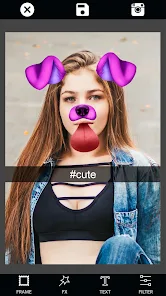
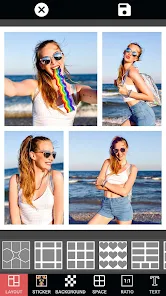
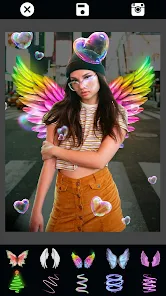
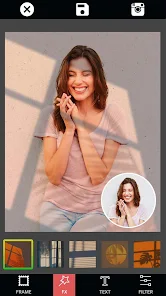
editor reviews
Photo Collage Maker & Editor from Lyrebird Studio is one of those apps you grab when you need to throw together a bunch of photos without opening a full editing suite. It's basically a collage builder and lightweight photo editor rolled into one, sitting squarely in the photography and graphics category on both Google Play and the App Store. A lot of people download it when they want to make Instagram grids, memory boards, or quick gift collages. After installing it, the first thing you notice is how clean and bright everything looks. There's no overwhelming dashboard or endless pop-ups. You just tap to pick photos, and the app starts suggesting layouts immediately. It feels fast and unintimidating, which is likely why it keeps grabbing new users. It's free to download, though there are in-app purchases for unlocking extra templates and removing watermarks. Ads show up from time to time, but they're usually skippable after a few seconds.
Using the app is pretty straightforward. Once it launches, you pick photos from your gallery, and it instantly shows you a grid of layout options. You can swipe through different frames, adjust borders, and change backgrounds with a few taps. What I liked is that you can pinch to zoom each photo inside its frame without messing up the overall layout. That kind of control makes a real difference when you're trying to get faces or details to line up right. The sticker library is decent but not overwhelming, and there are a handful of text fonts that look modern enough for casual posts. During my first few collages, I found the interface snappy, though occasionally I hit a lag when applying filters across multiple images at once. A small tip: if you finish a collage and want to re-edit it later, make sure you save the project file inside the app. Otherwise, you might lose the layout and have to start over.
After using this for a few weeks, I'd say it's best for people who want to make collages quickly without fussing over every pixel. It's not going to replace something like Canva or PicsArt for serious design work, but it doesn't try to. What stands out is how accessible it feels. My mom, who isn't great with phones, figured it out in minutes. That said, if you're someone who needs high-resolution exports for printing or wants deep editing like layers and masks, you'll outgrow this app pretty fast. Compared to something like Layout from Instagram, this offers more freedom in frame customization and backgrounds. Compared to PhotoGrid, it feels cleaner and less cluttered. I kept it installed because it's handy for those moments when I want to make a quick family collage or a thank-you card style image. But if you only make one collage every few months, you might not miss it after uninstalling.
features
- 🖼️ Layout variety is surprisingly broad. You get over a hundred frame combinations, from classic grids to freeform scrapbook-style arrangements. That beats many rivals like Layout from Instagram, which only offers a handful of fixed patterns. You can also mix frame sizes in ways that feel more natural and less boxy.
- 🎨 Background customization goes beyond solid colors. The app gives you blurred backgrounds, gradient options, and even patterns. Most basic collage apps stop at white or black, so this is a nice step up. It helps your photos pop more without needing extra editing apps.
- ✂️ The editing tools inside each frame are solid. You can rotate, flip, and zoom each photo independently without affecting others. Unlike some apps that just crop everything to fit, this one lets you control exactly what part of the image shows in each slot. That single feature makes the collages look far more polished.
pros
- 🌟 The app is lightweight and loads fast even on older phones. I tested it on a four-year-old Android device, and it opened in under two seconds without any crash. Apps like PicsArt tend to bloat over time, but this one stays lean.
- 🌟 Export quality is better than expected. You can save collages at full resolution without compression, as long as you skip the free watermarked version. That's rare among free apps in this niche, where most force a heavy downgrade.
- 🌟 The sticker and text placement feels intuitive. You can drag, resize, and rotate elements freely without fighting the interface. Canva does this well too, but Canva requires an account and internet to work smoothly. This app works fine offline for basic collages.
cons
- 💢 The free version watermarks every export unless you pay. That's not unusual, but the watermark is placed right in the center and covers a decent chunk of the image. Apps like PhotoGrid place theirs in the corner, which is far less annoying for casual sharing.
- 💢 Sticker and font libraries feel dated. There aren't many trendy options, and the font selection leans towards basic cursive and bold styles. If you want something more modern or artistic, you'll need to bring in text from another app like PicsArt.
- 💢 No cloud backup or multi-device sync. If you switch phones, your saved project files disappear unless you manually transfer them. Canva and Adobe Express handle this much better with their cloud storage integration.
- 💢 Layer management is missing entirely. You can't stack elements behind or in front of each other. That's fine for simple collages, but if you want to place a sticker behind a photo, you're out of luck. Most competing editors at least offer basic layer ordering.
Articles
![]()
Guide
How to Update Google Play Store on Android 2026
![]()
Guide
How to Download Older Versions of Android Apps
![]()
Guide
How to Download Apps Without Google Play Store
![]()
Guide
What Is an APK File for Android?
If you use an Android phone, you may have seen the term APK while searching for apps or games online. Some websites offer an APK download instead of a Google Play install button. Some users also mention APK files when talking about apps that are not available in their region, older app versions, or Android games downloaded outside the Play Store.
![]()
Guide
How to Install Games from Google Play for Beginners
Installing games on an Android phone is usually simple, but for beginners, the process can still feel confusing at first. You may not know where to search, which button to tap, whether the game is safe, or why Google Play sometimes asks for account settings, storage access, or payment information. If you are using an Android phone for the first time, learning how to install games from Google Play is one of the easiest ways to get started.
![]()
Guide
How Useful Gemini Is for Everyday Questions and Quick Tasks
emini feels different from many AI apps because it is not only trying to be a chatbot. After using it for everyday questions, quick writing, image understanding, and planning, I think its biggest strength is convenience.
![]()
Guide
What to Know Before Downloading APKs
For many Android users, downloading an APK is a common way to install apps and games. Sometimes an app is not available in a certain country.
![]()
Guide
ChatGPT Review: Is It Still the Best AI App in 2026?
![]()
Guide
Seedance 2.0 vs Sora: The Future of AI Video Generation
The AI video race has intensified dramatically over the past two years. Platforms like Sora from OpenAI and Luma Dream Machine pushed the boundaries of text-to-video realism. Yet, despite their impressive outputs, most tools still operate as probabilistic generators—you describe a scene, and the model interprets it. Control remains limited. With the February 2026 release of Seedance 2.0, developed by ByteDance, the paradigm shifted. Internally known as Jimeng 2.0, Seedance does not position itself as just another video model. It positions itself as an AI Director. Rather than guessing what you want, Seedance 2.0 allows you to direct what happens. This distinction defines everything that follows.









Recommended Apps
![]()
Home Design 3D
Anuman4.2
![]()
Truth or Dare Game - Party App
Chouic4.8
![]()
Photo Collage Maker
Scoompa4.7![]()
Learn to Draw Flower
Creative APPS4.2![]()
FIFA World Cup 2026™
FIFA2.8![]()
Mirror Plus: Mirror with Light
Digitalchemy, LLC4.4![]()
Meitu- Photo Editor & AI Art
Meitu (China) Limited4.5![]()
Perplexity - Ask Anything
PerplexityAI4.7![]()
GhostTube SLS Camera Alternate
GhostTube4![]()
Boom Chip Blast: 2-Player
Black Pyramid 3D Games Studio0![]()
Healthy Benefits+
Solutran, Inc.4.5![]()
Deepcheck AI Search Assistant
rohe.ai4![]()
Idol Prank Video Call & Chat
LightCode Solutions4![]()
Face Shape - Pretty Scale
GlintTec Apps3.9![]()
Plant App - Plant Identifier
ScaleUp4.6












































