

Passport Parking

5M+
Installs
Passport Labs, Inc.
Developer
-
Productivity
Category
-
Everyone
Content Rating
-
support@passportinc.com
Developer Email
-
https://passportinc.com/privacy-policy/
Privacy Policy
Screenshots
editor reviews
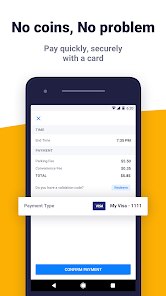
Passport Parking is one of those apps you end up installing because you have to, not because you want to. It's a mobile payment tool for parking meters and lots, used in hundreds of cities across North America. You download it from Google Play or the App Store for free, connect a payment method, and then use it to pay for parking without needing coins or a physical kiosk. The install count is in the millions, but nobody really celebrates that. My first impression after launching it was a bit mixed. The interface looks dated, with a blue and white color scheme that feels like something from a decade ago. Still, the app did exactly what it promised from the start. I entered my license plate, added a credit card, and within two minutes I was ready to park.
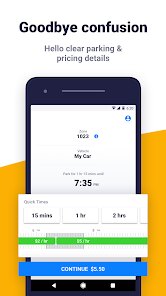
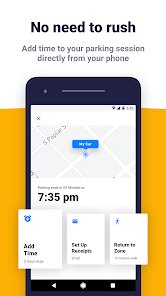
Actually using Passport Parking is straightforward once you get past the initial setup. You open the app, it tries to detect your location automatically, and you select the zone number posted on nearby signs. Some newer lots use Bluetooth beacons, so the app can sometimes sense where you are without typing anything. That part is slick. But there are also moments where the GPS is way off and you have to manually type in a zone code you squinted at through a dirty windshield. After picking your time limit and paying, a little timer runs in the app, showing how much time you have left. You can extend your parking remotely from wherever you are, which has saved me from a ticket more than once. One small practical tip: the app saves your recent zones, so if you park in the same lot daily, you barely tap the screen. The interface isn't crash-happy, but it's not snappy either. Occasional loading circles creep up, especially when you're rushing.
After using it for a few months in two different cities, I can say Passport Parking is fine for what it does. It doesn't try to be flashy, and it doesn't need to be. People who hate fiddling with coins in the rain will appreciate it, and anyone who forgets to feed the meter will love the remote extension feature. That said, if your city supports ParkMobile, you may find that app feels more polished and has a much cleaner interface. Passport works, but it lacks the modern touch and faster responsiveness of its main competitor. I kept it installed because the town where I park most only accepts Passport, so I'm stuck with it. If my city ever switched over to ParkMobile, I'd delete Passport without a second thought. It's a functional utility app, nothing more, nothing less. It doesn't ask for more than it needs, and it doesn't give more than required.
features
- 🔑 Zone-based parking without QR codes: Instead of scanning a sticker on a meter, you just type in the zone number from a sign. That works well when signs are visible but becomes annoying when the sticker peels off or gets faded. ParkMobile does the same thing, but Passport's zone detection feels slower.
- ⏱ Remote time extension: This is the killer feature. You can add more time from your phone, from anywhere, without walking back to the car. ParkMobile has this too, but Passport's extension button is easy to find and works smoothly even in lots that don't have mobile signal. You just need an internet connection when you first pay.
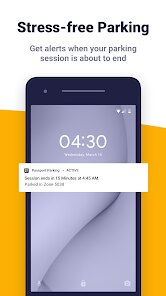
- 🔔 Push notifications before expiry: The app sends a reminder 15 minutes before your parking runs out. That push comes reliably, even when the app is running in the background. ParkMobile does the same, but Passport's notification includes the exact zone and plate number so you don't mix up cars.
- 👥 Multiple vehicle support: You can add several license plates and switch between them before each session. Handy if you share a car with a family member or drive different vehicles on different days. ParkMobile requires you to log out and back in to switch vehicles, which is more tedious.
pros
- ✅ No coins needed anywhere: Even in old-school metered spots that don't have card readers, Passport works. ParkMobile covers similar territory, but Passport is used in more municipal lots where other apps aren't accepted.
- ✅ Simple user interface for a utility: You enter a zone, pick a time, and pay. There's no unnecessary gamification or social features. ParkMobile buries some options in menus, but Passport keeps the core actions upfront.
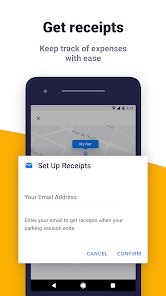
- ✅ Reliable session history: You can see every past parking session, including exact timestamps and amounts paid. That helps with expense tracking if you park for work. ParkMobile also offers this, but Passport's export feature works better.
cons
- ❌ Dated visual design: The app looks like it hasn't been redesigned since 2015. Icons are pixelated on newer phones, and the font choices feel odd. ParkMobile looks significantly better and more modern.
- ❌ Inconsistent GPS detection: Sometimes the app detects the zone automatically, other times it doesn't even try. On a rainy day, I had to type the zone code four times before the app accepted it. ParkMobile's GPS is faster and more accurate.
- ❌ No in-app map of parking zones: You can't see where zones are located within the app. If you're unfamiliar with an area, you have to look for signs on the street. ParkMobile shows a map with zone boundaries, which is much more helpful.
- ❌ Occasional payment processing delays: A few times, the payment screen hung after I confirmed the charge, and I had to force close and reopen to confirm it went through. ParkMobile's payment flow feels more stable and rarely hangs.
Articles
![]()
Guide
How to Update Google Play Store on Android 2026
![]()
Guide
How to Download Older Versions of Android Apps
![]()
Guide
How to Download Apps Without Google Play Store
![]()
Guide
What Is an APK File for Android?
If you use an Android phone, you may have seen the term APK while searching for apps or games online. Some websites offer an APK download instead of a Google Play install button. Some users also mention APK files when talking about apps that are not available in their region, older app versions, or Android games downloaded outside the Play Store.
![]()
Guide
How to Install Games from Google Play for Beginners
Installing games on an Android phone is usually simple, but for beginners, the process can still feel confusing at first. You may not know where to search, which button to tap, whether the game is safe, or why Google Play sometimes asks for account settings, storage access, or payment information. If you are using an Android phone for the first time, learning how to install games from Google Play is one of the easiest ways to get started.
![]()
Guide
How Useful Gemini Is for Everyday Questions and Quick Tasks
emini feels different from many AI apps because it is not only trying to be a chatbot. After using it for everyday questions, quick writing, image understanding, and planning, I think its biggest strength is convenience.
![]()
Guide
What to Know Before Downloading APKs
For many Android users, downloading an APK is a common way to install apps and games. Sometimes an app is not available in a certain country.
![]()
Guide
ChatGPT Review: Is It Still the Best AI App in 2026?
![]()
Guide
Seedance 2.0 vs Sora: The Future of AI Video Generation
The AI video race has intensified dramatically over the past two years. Platforms like Sora from OpenAI and Luma Dream Machine pushed the boundaries of text-to-video realism. Yet, despite their impressive outputs, most tools still operate as probabilistic generators—you describe a scene, and the model interprets it. Control remains limited. With the February 2026 release of Seedance 2.0, developed by ByteDance, the paradigm shifted. Internally known as Jimeng 2.0, Seedance does not position itself as just another video model. It positions itself as an AI Director. Rather than guessing what you want, Seedance 2.0 allows you to direct what happens. This distinction defines everything that follows.









Recommended Apps
![]()
Home Design 3D
Anuman4.2
![]()
Truth or Dare Game - Party App
Chouic4.8
![]()
Photo Collage Maker
Scoompa4.7![]()
Learn to Draw Flower
Creative APPS4.2![]()
FIFA World Cup 2026™
FIFA2.8![]()
Mirror Plus: Mirror with Light
Digitalchemy, LLC4.4![]()
Meitu- Photo Editor & AI Art
Meitu (China) Limited4.5![]()
Perplexity - Ask Anything
PerplexityAI4.7![]()
GhostTube SLS Camera Alternate
GhostTube4![]()
Boom Chip Blast: 2-Player
Black Pyramid 3D Games Studio0![]()
Healthy Benefits+
Solutran, Inc.4.5![]()
Deepcheck AI Search Assistant
rohe.ai4![]()
Idol Prank Video Call & Chat
LightCode Solutions4![]()
Face Shape - Pretty Scale
GlintTec Apps3.9![]()
Plant App - Plant Identifier
ScaleUp4.6












































