

Step Tracker - Pedometer

10M+
Installs
Leap Fitness Group
Developer
-
Health & Fitness
Category
-
Rated for 3+
Content Rating
-
support@leap.app
Developer Email
-
https://leap.app/privacypolicy.html?pkg=steptracker.healthandfitness.walkingtracker.pedometer
Privacy Policy
Screenshots
editor reviews
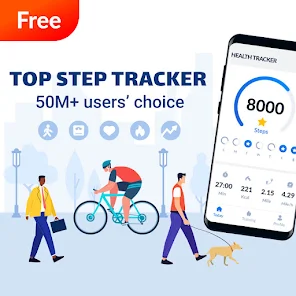
Step Tracker is a straightforward health and fitness app that focuses on one simple thing—counting your steps using your phone's built-in sensors. Leap Fitness Group, the team behind it, has put out a pretty polished tool here, and it's exactly what it sounds like: a pedometer that tracks your daily walking and running. With over 50 million downloads on Google Play, it's clearly hitting a nerve with people who want a no-fuss way to monitor their activity. When you first open the app after downloading it for free, it's a clean and welcoming experience—no aggressive sign-up demands or confusing menus. You just grant permission for motion tracking, and you're off. It's refreshingly simple, which already sets a good first impression compared to other fitness apps that throw a dozen features in your face right away.
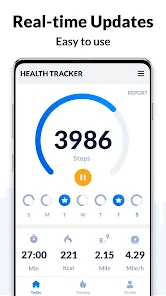
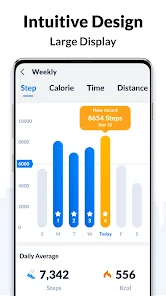
Once you start using it, the app feels very hands-off after the initial setup. The main screen shows your step count, distance, calories burned, and active time in a tidy dashboard. You don't need to tap around much—just carry your phone in your pocket or bag, and the pedometer does its work quietly. The onboarding is minimal, explaining how the sensor tracking works and suggesting you keep the app running in the background for accuracy. My experience was mostly smooth, but I did notice that on a few occasions, the step count seemed slightly off after driving, even though they advertise that the algorithm filters out non-walking movements. A practical tip: you can set a daily goal and get gentle reminders to move, which I found helpful on lazy afternoons. The interface is simple enough for daily use, though I wish there was a quicker way to view weekly trends without scrolling through screens.
After spending a few weeks with Step Tracker, I think it's great for someone who just wants to see their step count without any fluff. If you're someone who hates calorie counting or meal logging—I am that person—this app feels like a relief. It's less invasive than Samsung Health, which nags you to log food and sleep, and quieter than Google Fit. The main thing that keeps it installed on my phone is the battery efficiency; it rarely drains the battery, unlike some pedometer apps that hog resources. However, I can imagine someone who wants more coaching or workout routines might uninstall it quickly. It's not trying to be a full fitness tracker, and that's fine. The app stands out by staying in its lane—reliable, free, and easy. It's hard to complain about something that just works.
features
- 🍃 Step accuracy filter: The app uses your phone's accelerometer and claims to filter out false steps from driving or hand movements. In my own tests, it did a decent job, but it's not perfect—sometimes walking slowly confused it. Compared to Pacer, which also uses the phone sensor, Step Tracker felt more consistent during regular jogs but less reliable during grocery cart pushing.
- 🍃 Battery-friendly tracking: Unlike Google Fit, which can be a battery hog after hours, Step Tracker sips juice gracefully. I left it running for a full day and noticed only a 5% drop in battery from the app. That's rare for a step counter.
- 🍃 Clean goal system: Setting a step target is quick, and the app shows your progress with a friendly circle widget. Others like Runkeeper clutter this with notifications for streaks. Step Tracker keeps it simple—no pressure, just data.
- 🍃 Free with no hidden paywalls: Many pedometer apps hide features like history or charts behind premium subscriptions. Leap Fitness makes the core step tracking entirely free, which is its standout feature over apps like StepsApp.
pros
- ✅ Simple setup with no registration: You can start stepping instantly without creating an account. Samsung Health demands login, which can feel tedious.
- ✅ Clean interface without ads cluttering the screen: The free version shows very few ads, unlike Pacer which pushes one every two screens.
- ✅ Solid offline tracking: Works fine without internet connection. Some competitors like Google Fit give up accuracy when phone is in airplane mode.
cons
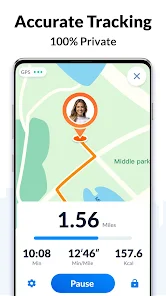
- ❌ No GPS route mapping: If you want to see where you walked, you need something like Strava. Step Tracker shows distance but no map.
- ❌ Limited customization: Lacks widgets or watch face options available in apps like Pedometer++. It feels basic compared to more flexible options.
- ❌ Occasional false tracking: The sensor filter isn't perfect. During daily commutes in a car, it counted around 200 steps incorrectly.
- ❌ No social features: You can't share progress or compete with friends like in Fitbit's platform. It's a lonely experience if you like motivation from others.
Articles
![]()
Guide
How to Update Google Play Store on Android 2026
![]()
Guide
How to Download Older Versions of Android Apps
![]()
Guide
How to Download Apps Without Google Play Store
![]()
Guide
What Is an APK File for Android?
If you use an Android phone, you may have seen the term APK while searching for apps or games online. Some websites offer an APK download instead of a Google Play install button. Some users also mention APK files when talking about apps that are not available in their region, older app versions, or Android games downloaded outside the Play Store.
![]()
Guide
How to Install Games from Google Play for Beginners
Installing games on an Android phone is usually simple, but for beginners, the process can still feel confusing at first. You may not know where to search, which button to tap, whether the game is safe, or why Google Play sometimes asks for account settings, storage access, or payment information. If you are using an Android phone for the first time, learning how to install games from Google Play is one of the easiest ways to get started.
![]()
Guide
How Useful Gemini Is for Everyday Questions and Quick Tasks
emini feels different from many AI apps because it is not only trying to be a chatbot. After using it for everyday questions, quick writing, image understanding, and planning, I think its biggest strength is convenience.
![]()
Guide
What to Know Before Downloading APKs
For many Android users, downloading an APK is a common way to install apps and games. Sometimes an app is not available in a certain country.
![]()
Guide
ChatGPT Review: Is It Still the Best AI App in 2026?
![]()
Guide
Seedance 2.0 vs Sora: The Future of AI Video Generation
The AI video race has intensified dramatically over the past two years. Platforms like Sora from OpenAI and Luma Dream Machine pushed the boundaries of text-to-video realism. Yet, despite their impressive outputs, most tools still operate as probabilistic generators—you describe a scene, and the model interprets it. Control remains limited. With the February 2026 release of Seedance 2.0, developed by ByteDance, the paradigm shifted. Internally known as Jimeng 2.0, Seedance does not position itself as just another video model. It positions itself as an AI Director. Rather than guessing what you want, Seedance 2.0 allows you to direct what happens. This distinction defines everything that follows.









Recommended Apps
![]()
Home Design 3D
Anuman4.2
![]()
Truth or Dare Game - Party App
Chouic4.8
![]()
Photo Collage Maker
Scoompa4.7![]()
Learn to Draw Flower
Creative APPS4.2![]()
FIFA World Cup 2026™
FIFA2.8![]()
Mirror Plus: Mirror with Light
Digitalchemy, LLC4.4![]()
Meitu- Photo Editor & AI Art
Meitu (China) Limited4.5![]()
Perplexity - Ask Anything
PerplexityAI4.7![]()
GhostTube SLS Camera Alternate
GhostTube4![]()
Boom Chip Blast: 2-Player
Black Pyramid 3D Games Studio0![]()
Healthy Benefits+
Solutran, Inc.4.5![]()
Deepcheck AI Search Assistant
rohe.ai4![]()
Idol Prank Video Call & Chat
LightCode Solutions4![]()
Face Shape - Pretty Scale
GlintTec Apps3.9![]()
Plant App - Plant Identifier
ScaleUp4.6












































