

Loudest Air Horn (Prank)

10M+
Installs
Avar Apps
Developer
-
Entertainment
Category
-
Rated for 7+
Content Rating
-
avarmg@gmail.com
Developer Email
-
http://avargames.com/android/privacy_policy/
Privacy Policy
Screenshots
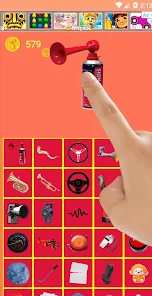
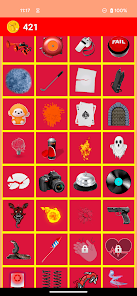
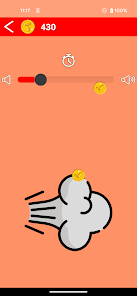
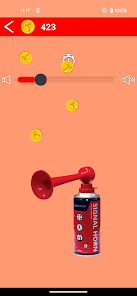
editor reviews
So, Loudest Air Horn (Prank) by Avar Apps is exactly what it sounds like – a fake air horn app for your phone. It sits in the Entertainment category on Google Play (I haven't checked the App Store, but I assume it's there too) and is mostly meant for pulling quick, loud pranks on friends or just annoying people in a funny way. The install count seems decent for a prank app, and it's free to download, though I noticed there's a small banner ad at the bottom when you first open it. You don't need to register or create an account, which is nice. The first impression after launching is pretty straightforward: a big red button in the middle of the screen, looking like a classic air horn canister. No confusing menus, no tutorials – it's just “press here to blast noise.” Honestly, that simplicity is why someone would grab it, but you wonder if it'll wear thin fast.
When you actually start using it, the hands-on experience is super basic. You tap the button, and a super loud air horn sound plays through your phone's speaker. There's no vibration or visual effects except a little animation of the horn moving. The onboarding is literally nonexistent – you install it, open it, and you're ready. The main action is just tapping that button repeatedly, which can be fun for a minute or two until you realize it's basically a one-trick pony. A small tip: if you have your phone volume maxed out, it genuinely startles people, which is the point. But the interface isn't smooth at all – there's no slider for volume control, no way to change the sound, no countdown timer for pranks. It's just noise on demand. I also noticed the ad pops up every few taps, which kills the flow if you're trying to use it repeatedly.
After using it for a while, I'd say this is a very niche app. Kids or teenagers might love it for a laugh with friends, but most adults will uninstall it after showing it off once. What makes it different from similar apps like Air Horn or Soundboard apps? Those usually offer multiple sounds, customizations, or even widget support. This one forces you to stick to just one horn noise. That's its main flaw. On the flip side, it's so simple that it's almost foolproof – no learning curve, no permissions needed, no account. But honestly, I'm leaning toward uninstalling it because it's just not versatile enough. If you're looking for a cheap prank that'll get a scream from your buddy for five seconds, download it. If you want something more useful, skip it.
features
- ✅ One-Tap Operation: Unlike ZEdge's \"Air Horn\" app, which buries options in a cluttered menu, this one gives you a single, giant red button. You press it, and it blasts immediately – no fumbling around for a settings panel. Perfect for instant reactions.✅ True Loudness: The sound sample isn't compressed to death like in many free soundboard apps I've tried, including \"Prank Soundboard.\" It actually reaches a startlingly realistic pitch, thanks to Avar Apps' focus on raw audio quality over extra features.✅ No Storage Wastage: This app installs at under 10 MB, while competitors like \"Sound Effects Free\" often balloon to 50+ MB with bloatware. You don't need to clear space for a prank tool – just grab it, use it, and forget it without clogging your phone.
pros
- 🔥 Immediate Usability: After opening, there are zero sign-up forms or permission requests – unlike \"Real Sound Effects,\" which asks for storage access upfront. You can hand your phone to a friend and have them rip out a horn sound in seconds.🔥 Lightweight Performance: It doesn't hammer your battery or CPU like \"Super Loud Horn\" does with its constant background animations. This app runs cleanly in the foreground and closes completely when you hit back.🔥 Focused Appeal: If you need a single, reliable air horn for live pranks (like at parties or dorm rooms), this beats generic soundboards that offer hundreds of mediocre clips. You get one job, done well.
cons
- 💩 No Sound Variety: Unlike \"Soundboard Studio\" or \"Prank Sounds Collection\", which offer dozens of horn effects, sirens, and laughs, you're stuck with one tone here. After the second blast, novelty fades fast.💩 Persistent Ads: Every few taps, a full-screen video ad interrupts the flow – worse than \"Air Horn Pro\" (which only shows a subtle banner). It kills any momentum for sequential pranks.💩 No Timer Feature: Apps like \"Fart Prank\" include a delay function to spook someone later, but this one lacks that entirely. You must tap live, limiting its stealth prank potential.💩 Limited Volume Control: There's no slider to adjust loudness – compare with \"Sound Manager\" or \"Equalizer & Bass Booster\" that let you fine-tune. It's either max blast or muted silence.
Articles
![]()
Guide
How to Update Google Play Store on Android 2026
![]()
Guide
How to Download Older Versions of Android Apps
![]()
Guide
How to Download Apps Without Google Play Store
![]()
Guide
What Is an APK File for Android?
If you use an Android phone, you may have seen the term APK while searching for apps or games online. Some websites offer an APK download instead of a Google Play install button. Some users also mention APK files when talking about apps that are not available in their region, older app versions, or Android games downloaded outside the Play Store.
![]()
Guide
How to Install Games from Google Play for Beginners
Installing games on an Android phone is usually simple, but for beginners, the process can still feel confusing at first. You may not know where to search, which button to tap, whether the game is safe, or why Google Play sometimes asks for account settings, storage access, or payment information. If you are using an Android phone for the first time, learning how to install games from Google Play is one of the easiest ways to get started.
![]()
Guide
How Useful Gemini Is for Everyday Questions and Quick Tasks
emini feels different from many AI apps because it is not only trying to be a chatbot. After using it for everyday questions, quick writing, image understanding, and planning, I think its biggest strength is convenience.
![]()
Guide
What to Know Before Downloading APKs
For many Android users, downloading an APK is a common way to install apps and games. Sometimes an app is not available in a certain country.
![]()
Guide
ChatGPT Review: Is It Still the Best AI App in 2026?
![]()
Guide
Seedance 2.0 vs Sora: The Future of AI Video Generation
The AI video race has intensified dramatically over the past two years. Platforms like Sora from OpenAI and Luma Dream Machine pushed the boundaries of text-to-video realism. Yet, despite their impressive outputs, most tools still operate as probabilistic generators—you describe a scene, and the model interprets it. Control remains limited. With the February 2026 release of Seedance 2.0, developed by ByteDance, the paradigm shifted. Internally known as Jimeng 2.0, Seedance does not position itself as just another video model. It positions itself as an AI Director. Rather than guessing what you want, Seedance 2.0 allows you to direct what happens. This distinction defines everything that follows.









Recommended Apps
![]()
Home Design 3D
Anuman4.2
![]()
Truth or Dare Game - Party App
Chouic4.8
![]()
Photo Collage Maker
Scoompa4.7![]()
Learn to Draw Flower
Creative APPS4.2![]()
FIFA World Cup 2026™
FIFA2.8![]()
Mirror Plus: Mirror with Light
Digitalchemy, LLC4.4![]()
Meitu- Photo Editor & AI Art
Meitu (China) Limited4.5![]()
Perplexity - Ask Anything
PerplexityAI4.7![]()
GhostTube SLS Camera Alternate
GhostTube4![]()
Boom Chip Blast: 2-Player
Black Pyramid 3D Games Studio0![]()
Healthy Benefits+
Solutran, Inc.4.5![]()
Deepcheck AI Search Assistant
rohe.ai4![]()
Idol Prank Video Call & Chat
LightCode Solutions4![]()
Face Shape - Pretty Scale
GlintTec Apps3.9![]()
Plant App - Plant Identifier
ScaleUp4.6











































