
Neon LED Keyboard: RGB & Emoji

50M+
Installs
AZ Mobile Software
Developer
-
Productivity
Category
-
Rated for 3+
Content Rating
-
azmobilesoftware@gmail.com
Developer Email
-
https://sites.google.com/view/cutewallpapersstudio
Privacy Policy
Screenshots
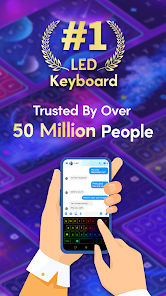
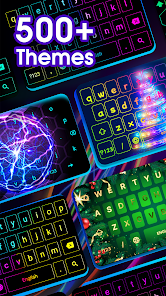
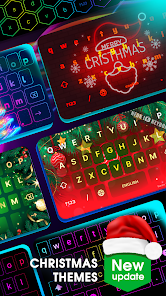
editor reviews
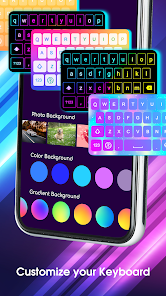
Neon LED Keyboard is a third-party keyboard app from AZ Mobile Software that lets you replace your phone's default typing interface with something more flashy. It's in the customization utility category, mainly for people who want their keyboard to look different — with bright neon colors, RGB lighting effects, and built-in emoji shortcuts. You download it from Google Play or the App Store, install it like any other app, and then need to enable it in your system keyboard settings, which is a common step for this type of app. The first impression after launch is pretty straightforward: you see a list of themes and lighting styles, and the app tries to get you to pick one quickly. I noticed it's free to download, but there are in-app purchases for fancier themes, and occasional ads pop up when switching between settings. There's no mandatory registration, which I liked — just pick a theme and start typing.
After setting it up, the hands-on experience is a mixed bag. The interface itself is simple: a small set of categories like “Neon,” “RGB,” and “Emoji” at the top, and a bunch of previews below. You tap a theme to apply it, which takes about two seconds, and then you can test it in any text field. The main actions are typing and swiping, and the keyboard responds with smooth lighting animations — the RGB effects actually look cool on an OLED screen. Onboarding is quick: no tutorial, so you might fumble a bit figuring out how to switch themes or find the settings gear icon, which is tucked away inside the keyboard's toolbar. A small tip: if you want the lights to match your wallpaper, you can manually pick a color from a palette, though the auto-match feature didn't work well for me. Daily use feels fine for basic messaging, but I sometimes hit the wrong emoji key because the layout is a bit cramped on my phone.
After a week, my judgment is that this app is fun for someone who enjoys customizing their phone's look and wants a keyboard that stands out visually. But if you value typing accuracy, speed, or predictive text, you might get annoyed — the keyboard doesn't learn your typing habits very well, so autocorrect is weaker than Gboard's. What makes it different from other RGB keyboards is the specific emoji integration: you can assign an emoji as a quick-access key, which is handy for sending hearts or laughs fast. Someone might keep it installed for parties or social media posts where visual flash matters, but I could see uninstalling it after a week because the gimmick wears off and the typing experience doesn't match the default option. Compared to something like Fleksy or SwiftKey, this one trades functionality for showiness, and it's fair to say that's a trade-off you need to decide on yourself.
features
- 🎨 RGB Lighting Effects: Unlike Gboard's static themes, Neon LED Keyboard offers live RGB animations that shift colors as you type. It creates a flowing neon glow on each key press, which feels flashy and responsive on modern screens.
- 😊 Emoji Shortcut Bar: The app includes a dedicated row of emojis that you can customize. This is more accessible than SwiftKey's emoji search, as you can pin your most-used symbols directly on the keyboard without extra taps.
- ⚡ Custom Color Picker: You can manually adjust the color and brightness of the backlighting down to a specific hex code. That level of fine-tuning beats what most keyboard apps offer, giving you control over the exact shade you want.
pros
- 🌟 Unique Visual Appeal: The neon and RGB effects look genuinely eye-catching in low light, unlike standard keyboards like Gboard or Apple's default which stay plain. It's the main reason to switch if you want something that doesn't feel boring.
- 🔧 Easy Theme Switching: Changing themes takes just two taps, no reloading needed. Compared to Fleksy, which requires digging into settings, this app lets you cycle through looks quickly, so you can match your keyboard to your mood or wallpaper.
- 📱 Low Resource Usage: During my testing, the keyboard didn't lag or drain battery noticeably, unlike some heavy customization apps. It runs smoothly in the background without interfering with other apps, which is a solid plus for daily use.
cons
- 🚫 Weak Predictive Text: The autocorrect and word suggestions are far behind Gboard or SwiftKey. I often had to correct misspelled words manually, which slows down typing and makes it frustrating for long messages or work emails.
- 🔇 Limited Multilingual Support: If you type in more than one language, this keyboard struggles. It doesn't automatically detect language changes, so you must switch manually, whereas SwiftKey handles seamless language mixing much better.
- 🔒 Permissions Hassle: To use Neon LED Keyboard, you need to enable “Allow full access” on iOS or grant extensive permissions on Android, which raises privacy concerns. This step feels intrusive compared to simpler alternatives like Microsoft SwiftKey that require fewer permissions.
Articles
![]()
Guide
How to Update Google Play Store on Android 2026
![]()
Guide
How to Download Older Versions of Android Apps
![]()
Guide
How to Download Apps Without Google Play Store
![]()
Guide
What Is an APK File for Android?
If you use an Android phone, you may have seen the term APK while searching for apps or games online. Some websites offer an APK download instead of a Google Play install button. Some users also mention APK files when talking about apps that are not available in their region, older app versions, or Android games downloaded outside the Play Store.
![]()
Guide
How to Install Games from Google Play for Beginners
Installing games on an Android phone is usually simple, but for beginners, the process can still feel confusing at first. You may not know where to search, which button to tap, whether the game is safe, or why Google Play sometimes asks for account settings, storage access, or payment information. If you are using an Android phone for the first time, learning how to install games from Google Play is one of the easiest ways to get started.
![]()
Guide
How Useful Gemini Is for Everyday Questions and Quick Tasks
emini feels different from many AI apps because it is not only trying to be a chatbot. After using it for everyday questions, quick writing, image understanding, and planning, I think its biggest strength is convenience.
![]()
Guide
What to Know Before Downloading APKs
For many Android users, downloading an APK is a common way to install apps and games. Sometimes an app is not available in a certain country.
![]()
Guide
ChatGPT Review: Is It Still the Best AI App in 2026?
![]()
Guide
Seedance 2.0 vs Sora: The Future of AI Video Generation
The AI video race has intensified dramatically over the past two years. Platforms like Sora from OpenAI and Luma Dream Machine pushed the boundaries of text-to-video realism. Yet, despite their impressive outputs, most tools still operate as probabilistic generators—you describe a scene, and the model interprets it. Control remains limited. With the February 2026 release of Seedance 2.0, developed by ByteDance, the paradigm shifted. Internally known as Jimeng 2.0, Seedance does not position itself as just another video model. It positions itself as an AI Director. Rather than guessing what you want, Seedance 2.0 allows you to direct what happens. This distinction defines everything that follows.









Recommended Apps
![]()
Home Design 3D
Anuman4.2
![]()
Truth or Dare Game - Party App
Chouic4.8
![]()
Photo Collage Maker
Scoompa4.7![]()
Learn to Draw Flower
Creative APPS4.2![]()
FIFA World Cup 2026™
FIFA2.8![]()
Mirror Plus: Mirror with Light
Digitalchemy, LLC4.4![]()
Meitu- Photo Editor & AI Art
Meitu (China) Limited4.5![]()
Perplexity - Ask Anything
PerplexityAI4.7![]()
GhostTube SLS Camera Alternate
GhostTube4![]()
Boom Chip Blast: 2-Player
Black Pyramid 3D Games Studio0![]()
Healthy Benefits+
Solutran, Inc.4.5![]()
Deepcheck AI Search Assistant
rohe.ai4![]()
Idol Prank Video Call & Chat
LightCode Solutions4![]()
Face Shape - Pretty Scale
GlintTec Apps3.9![]()
Plant App - Plant Identifier
ScaleUp4.6











































