
Voice Recorder

10,000,000+
Installs
quality apps (recorder, weather, music)
Developer
-
Entertainment
Category
-
Rated for 3+
Content Rating
-
summer.mobile.apps@gmail.com
Developer Email
-
https://sites.google.com/view/voicerecorderpivacy
Privacy Policy
Screenshots
editor reviews
So, I needed a simple way to catch voice memos during meetings and random reminders. I stumbled upon the Voice Recorder app from a developer called "quality apps" on Google Play. It's exactly what it sounds like — a basic audio recording tool. You just download, install, and it's free to launch. The first thing I noticed after opening it is how straightforward the layout is: a big red button and a list of past recordings below. No complicated menus or account setup. That's a huge plus if you, like me, hate apps that demand a registration before you even hit record. It just lets you get straight to the point.
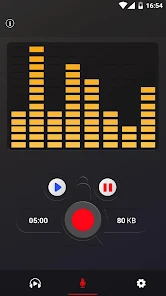
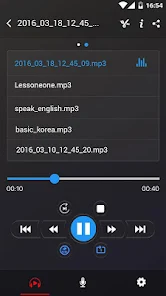
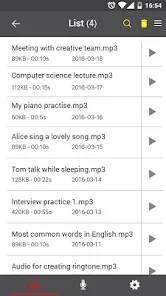
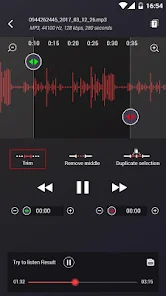
Tapping that red button starts a recording immediately, which is super satisfying. The interface stays simple while you're recording: you see a timer, a pause button, and a waveform that bounces along. After you stop, the file gets saved into a list with a date and time stamp. I did find myself wishing for the ability to rename recordings on the spot, since you have to tap into each one later to change its name. Playing back is seamless, and there's even a small speaker icon to switch to speakerphone. One weird moment: I accidentally tapped the pause button mid-recording, and the file split into two separate clips, which confused me at first. Otherwise, the whole flow is smooth for quick captures.
After a few weeks, I feel like this app is perfectly fine for someone who just needs a no-frills recorder. It's not flashy, but it does the job without bugs or ads popping up mid-recording, which is a win. Compared to something like Smart Recorder or even Google's own Recorder app on Pixels, this one lacks the automatic transcription features or cloud backups. So, if you're the type who loves organizing notes by text, you'd probably prefer those. But for straight-up capturing audio without any learning curve, this stays on my home screen. I'll probably keep it until I need something fancier, but right now, it's doing exactly what I downloaded it for.
features
- 📁 One-touch recording: The app's standout feature isn't a fancy algorithm — it's the fact that you press one big button and audio starts immediately. Other recorders like RecForge II require you to mess with input sources or formats first. Here, there's zero setup.
- 🎧 Background recording works reliably: You can lock your phone, switch to other apps, or let the screen turn off, and the recording keeps going without cutting out. I've had some cheaper recorders stop when the screen dims, but this one held up solidly for an hour-long meeting.
- 🔄 Simple file management: No cloud nonsense or tagging — just a list sorted by date. You can share, delete, or rename from that screen. Compared to Easy Voice Recorder, which buries files in folders, this feels way cleaner.
- 📈 Lightweight performance: The app barely uses battery or storage. Even with a dozen recordings, it doesn't slow down your phone, unlike some bloated apps that sneak in audio processing tools you never asked for.
pros
- 📲 Completely free and ad-light: Unlike apps like Smart Voice Recorder that throw full-screen ads after every save, this one only shows a small banner bar at the bottom. It never interrupts your actual recordings.
- ⚡ Instant launch speed: Tapping the icon gets you to the record button in under a second. Other recorders often load a splash screen or check for updates, which feels slow when you need to catch a sudden thought.
- 🔇 No forced permissions: This app doesn't demand access to your contacts, location, or photos. That's a huge plus compared to some sketchy recorder apps that ask for everything just to save an audio file.
cons
- 🔊 No voice-activated mode: If you're recording a lecture and only want the speaker's audio, you'll end up with minutes of silence in between. Apps like Parrot Auto Recorder trim that automatically, but here you just get one long file.
- 🏷️ Limited file naming: Every recording defaults to "recording_date_time," which gets messy fast. You can rename them one by one later, but there's no option to type a title before you press record. Dolby On lets you tag recordings upfront.
- 📤 Poor sharing options: When you hit share, it only opens the standard Android share sheet set to "audio/mp4". Some apps can't handle that format, so your recipient might get a weird file. Other recorders let you choose MP3 or WAV before sending.
- 🔒 No password protection: If you hand your phone to someone, they can open the app and listen to everything. For secure recordings, you'd need something like Voice Recorder Pro with a PIN lock. Here, privacy is nonexistent within the app.
Articles
![]()
Guide
How to Update Google Play Store on Android 2026
![]()
Guide
How to Download Older Versions of Android Apps
![]()
Guide
How to Download Apps Without Google Play Store
![]()
Guide
What Is an APK File for Android?
If you use an Android phone, you may have seen the term APK while searching for apps or games online. Some websites offer an APK download instead of a Google Play install button. Some users also mention APK files when talking about apps that are not available in their region, older app versions, or Android games downloaded outside the Play Store.
![]()
Guide
How to Install Games from Google Play for Beginners
Installing games on an Android phone is usually simple, but for beginners, the process can still feel confusing at first. You may not know where to search, which button to tap, whether the game is safe, or why Google Play sometimes asks for account settings, storage access, or payment information. If you are using an Android phone for the first time, learning how to install games from Google Play is one of the easiest ways to get started.
![]()
Guide
How Useful Gemini Is for Everyday Questions and Quick Tasks
emini feels different from many AI apps because it is not only trying to be a chatbot. After using it for everyday questions, quick writing, image understanding, and planning, I think its biggest strength is convenience.
![]()
Guide
What to Know Before Downloading APKs
For many Android users, downloading an APK is a common way to install apps and games. Sometimes an app is not available in a certain country.
![]()
Guide
ChatGPT Review: Is It Still the Best AI App in 2026?
![]()
Guide
Seedance 2.0 vs Sora: The Future of AI Video Generation
The AI video race has intensified dramatically over the past two years. Platforms like Sora from OpenAI and Luma Dream Machine pushed the boundaries of text-to-video realism. Yet, despite their impressive outputs, most tools still operate as probabilistic generators—you describe a scene, and the model interprets it. Control remains limited. With the February 2026 release of Seedance 2.0, developed by ByteDance, the paradigm shifted. Internally known as Jimeng 2.0, Seedance does not position itself as just another video model. It positions itself as an AI Director. Rather than guessing what you want, Seedance 2.0 allows you to direct what happens. This distinction defines everything that follows.









Recommended Apps
![]()
Home Design 3D
Anuman4.2
![]()
Truth or Dare Game - Party App
Chouic4.8
![]()
Photo Collage Maker
Scoompa4.7![]()
Learn to Draw Flower
Creative APPS4.2![]()
FIFA World Cup 2026™
FIFA2.8![]()
Mirror Plus: Mirror with Light
Digitalchemy, LLC4.4![]()
Meitu- Photo Editor & AI Art
Meitu (China) Limited4.5![]()
Perplexity - Ask Anything
PerplexityAI4.7![]()
GhostTube SLS Camera Alternate
GhostTube4![]()
Boom Chip Blast: 2-Player
Black Pyramid 3D Games Studio0![]()
Healthy Benefits+
Solutran, Inc.4.5![]()
Deepcheck AI Search Assistant
rohe.ai4![]()
Idol Prank Video Call & Chat
LightCode Solutions4![]()
Face Shape - Pretty Scale
GlintTec Apps3.9![]()
Plant App - Plant Identifier
ScaleUp4.6











































