
Beauty Camera -Selfie, Sticker

10M+
Installs
Leopard V7
Developer
-
Video Players & Editors
Category
-
Everyone
Content Rating
-
leopard.v7@gmail.com
Developer Email
-
https://leopardpolicy.ijoysoftconnect.com/camera/AppPrivacy.html
Privacy Policy
Screenshots
editor reviews
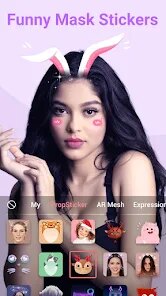
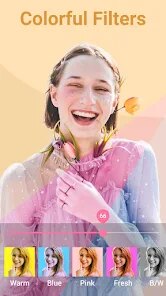
I stumbled upon Beauty Camera -Selfie, Sticker on the Play Store when I was looking for something to quickly brighten up my selfies without diving into heavy editing tools. It is a straightforward beauty and filter app, pretty typical for the genre, and it promises a bunch of stickers and retouching options for your face. The first thing I noticed after installing it was the clean layout, which gave me a decent first impression. It is free to download, which is great, and while you can jump right in, there are the usual in-app purchases for extra sticker packs and filters. It felt like one of those apps you pick up when you just want to take a quick picture and make your skin look a little smoother without much hassle.
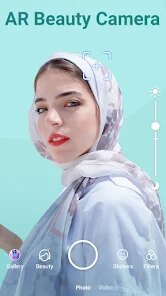
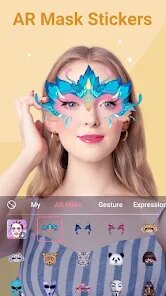
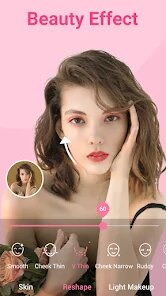
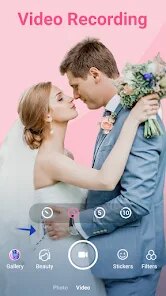
Using the app feels pretty straightforward, honestly. Once you open it, you can hit the camera button or pick a photo from your gallery, which is what I did most of the time. The main screen has a few sliders for things like skin smoothing, whitening, and a little face slimming feature that caught my eye. I tried a few of the stickers, and they latched onto my face pretty quickly. The app guides you through the editing with simple icons, so you are never really lost. A small tip for anyone using it, keep the smoothing effect lower, because at full strength it can make your face look a little too plastic. It works smoothly for casual selfies, but if you try to apply the same effects to a group photo, things can get a bit laggy and the face detection gets confused.
After spending a few days using this app, I think it is fine for what it is, but it is not something I would keep on my phone long-term. It is great for someone who just wants to snap a quick selfie with a fun sticker and post it right away without thinking too much about the settings. But if you are someone who likes more control over your edits, like adjusting shadows or fine-tuning colors, this app will feel too basic. Compared to something like YouCam Perfect, this one feels less polished and the sticker selection is much smaller. I ended up uninstalling it because I used it a couple of times and then just forgot about it. It is not a bad app by any means, but it does not really stand out in a crowd of similar beauty apps.
features
- ✨ The app has a real-time beauty preview before you take the shot, which is great for seeing how you'll look without going back and forth.
- ✨ Sticker integration with face tracking stands out compared to apps like Candy Camera, where stickers sometimes drift away if you move your head too fast.
- ✨ The one-tap slimming tool works well for simple face shape adjustments without needing to manually warp the image, something you often have to do in PicsArt.
- ✨ Skin smoothing is surprisingly natural at lower levels compared to BeautyPlus, which tends to overdo it even on the minimum setting.
pros
- 👍 The low learning curve is a big plus, you can edit and save a selfie in under 30 seconds, which is faster than setting up a full edit in Facetune.
- 👍 The gallery selection feature is convenient because you can apply all the beauty filters to existing pictures, while apps like Meitu often push you to only use the camera.
- 👍 It doesn't nag you with ads as much as Retrica does, so you can actually take a few pictures without constant interruptions.
cons
- 👎 The app lacks any kind of background editing or blur tool, so if you want to change the background, you have to use another app like Snapseed.
- 👎 The sticker library feels outdated compared to Snow, which updates its collection weekly with trending themes.
- 👎 It crashed on me twice when I tried to save a high-resolution image, which is frustrating if you spent time perfecting a selfie.
- 👎 The beauty effects cannot be adjusted precisely enough for portraits taken in low light, unlike Lightroom's selective editing tools.
Articles
![]()
Guide
How to Update Google Play Store on Android 2026
![]()
Guide
How to Download Older Versions of Android Apps
![]()
Guide
How to Download Apps Without Google Play Store
![]()
Guide
What Is an APK File for Android?
If you use an Android phone, you may have seen the term APK while searching for apps or games online. Some websites offer an APK download instead of a Google Play install button. Some users also mention APK files when talking about apps that are not available in their region, older app versions, or Android games downloaded outside the Play Store.
![]()
Guide
How to Install Games from Google Play for Beginners
Installing games on an Android phone is usually simple, but for beginners, the process can still feel confusing at first. You may not know where to search, which button to tap, whether the game is safe, or why Google Play sometimes asks for account settings, storage access, or payment information. If you are using an Android phone for the first time, learning how to install games from Google Play is one of the easiest ways to get started.
![]()
Guide
How Useful Gemini Is for Everyday Questions and Quick Tasks
emini feels different from many AI apps because it is not only trying to be a chatbot. After using it for everyday questions, quick writing, image understanding, and planning, I think its biggest strength is convenience.
![]()
Guide
What to Know Before Downloading APKs
For many Android users, downloading an APK is a common way to install apps and games. Sometimes an app is not available in a certain country.
![]()
Guide
ChatGPT Review: Is It Still the Best AI App in 2026?
![]()
Guide
Seedance 2.0 vs Sora: The Future of AI Video Generation
The AI video race has intensified dramatically over the past two years. Platforms like Sora from OpenAI and Luma Dream Machine pushed the boundaries of text-to-video realism. Yet, despite their impressive outputs, most tools still operate as probabilistic generators—you describe a scene, and the model interprets it. Control remains limited. With the February 2026 release of Seedance 2.0, developed by ByteDance, the paradigm shifted. Internally known as Jimeng 2.0, Seedance does not position itself as just another video model. It positions itself as an AI Director. Rather than guessing what you want, Seedance 2.0 allows you to direct what happens. This distinction defines everything that follows.









Recommended Apps
![]()
Home Design 3D
Anuman4.2
![]()
Truth or Dare Game - Party App
Chouic4.8
![]()
Photo Collage Maker
Scoompa4.7![]()
Learn to Draw Flower
Creative APPS4.2![]()
FIFA World Cup 2026™
FIFA2.8![]()
Mirror Plus: Mirror with Light
Digitalchemy, LLC4.4![]()
Meitu- Photo Editor & AI Art
Meitu (China) Limited4.5![]()
Perplexity - Ask Anything
PerplexityAI4.7![]()
GhostTube SLS Camera Alternate
GhostTube4![]()
Boom Chip Blast: 2-Player
Black Pyramid 3D Games Studio0![]()
Healthy Benefits+
Solutran, Inc.4.5![]()
Deepcheck AI Search Assistant
rohe.ai4![]()
Idol Prank Video Call & Chat
LightCode Solutions4![]()
Face Shape - Pretty Scale
GlintTec Apps3.9![]()
Plant App - Plant Identifier
ScaleUp4.6












































