

Sider AI: All-in-One Companion

1M+
Installs
Vidline Inc.
Developer
-
Generative AI
Category
-
Everyone
Content Rating
-
care@sider.ai
Developer Email
-
https://sider.ai/policies/privacy
Privacy Policy
Screenshots



editor reviews
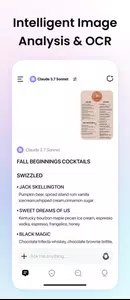
So I gave Sider AI a shot on my phone after seeing it pop up in the Play Store with a pretty decent install count. It's basically one of those all-in-one AI assistant apps that tries to bundle together a chatbot, image generator, writing helper, and code assistant into a single interface. You can download it for free, and there's no registration wall at first—you open it and can start asking questions right away. My first impression was that it looked clean but a bit crowded, with too many options on the home screen vying for attention. The app doesn't force you into any payments immediately, but it didn't take long to notice the subscription prompts for advanced models sneaking in.
After actually using it for a few days, I got the hang of the flow. You can pick between different AI models—like GPT-4, Claude, or their own default—from a dropdown at the top, which is nice if you want variety. The main chat feels pretty standard: you type a question, it answers, and you can continue the conversation. What caught me off guard was how the app handles tasks like image generation or web search—it switches into a separate mode, and sometimes it's not super obvious where the results go. The interface is smooth but not always intuitive; for instance, finding the history of your past chats took me a minute. One small thing I liked was the built-in prompt library, which helps if you're stuck on how to ask for something. Overall, the experience is decent but lacks that polished, effortless feel you'd want from a daily driver.
After a week with Sider, I can say it's a solid middle-ground option for people who want multiple AI tools in one place without juggling separate apps. It's probably best for casual users who dabble in chatting, writing, and generating images now and then. But if you're a power user who needs deep integration or speed, you might find yourself frustrated by the occasional lag and clunky navigation. Compared to something like ChatGPT or Perplexity, Sider feels more feature-packed but less refined. The main reason you might uninstall it is if you keep running into the paywalls for premium models—or if the free-tier limits feel too tight. I'm keeping it installed for now, mostly because the prompt library and model switching are handy, but it's not blowing my mind.
features
- 🎨 Multi-model switching is a standout here—you can jump between GPT-4, Claude, and others in the same chat, which most single-purpose apps don't offer. Compare that to ChatGPT, which locks you into one model unless you pay more, and you can see the appeal for users who like variety.
- 📄 Built-in image generation is part of the package, not a separate module. Unlike apps like Midjourney that require a separate subscription and interface, Sider lets you generate images right within the conversation, making it convenient for quick visual tasks.
- 🔍 Web search integration feels practical, pulling live data from the internet. Apps like Perplexity do this natively and better, but Sider at least includes it as an option without leaving the chat, which is nice for fact-checking.
- 🛠️ The prompt library is a thoughtful addition for beginners, offering ready-to-use templates. It's not a game-changer, but it reduces the friction of figuring out how to phrase a request, which is more than what most basic AI chat apps provide.
pros
- 💡 Sider offers more free-tier flexibility than many competitors. For example, ChatGPT restricts free users to GPT-3.5, while Sider lets you test premium models intermittently without paying—a real perk for casual experimentation.
- 🔐 No account sign-up required to start using it. Compared to apps like Claude or Gemini that often push for registration upfront, Sider makes it easier to jump in and try things out, which lowers the barrier to entry.
- 📱 The all-in-one design saves storage space. Instead of downloading separate apps for chat, image generation, and writing help, you get everything in one download—handy for people with limited phone memory.
cons
- 🚫 The interface can feel cluttered with too many options. Apps like ChatGPT have a simpler, more focused design, while Sider overwhelms new users with multiple tabs, buttons, and modes that aren't always clearly labeled.
- 💰 Premium features are aggressively pushed after initial use. Unlike Perplexity, which keeps its free version generous, Sider locks many helpful models behind a paywall, making you feel nickel-and-dimed after a few conversations.
- 🐌 Response speed varies a lot—sometimes it's snappy, other times it lags noticeably. Competitors like Gemini maintain more consistent performance, so this unevenness can be frustrating if you're in a hurry.
- 🔗 Integration with other apps is practically nonexistent. While tools like Notion AI or Copilot work seamlessly across platforms, Sider feels isolated, without easy ways to export chats or use results elsewhere.
Articles
![]()
Guide
How to Update Google Play Store on Android 2026
![]()
Guide
How to Download Older Versions of Android Apps
![]()
Guide
How to Download Apps Without Google Play Store
![]()
Guide
What Is an APK File for Android?
If you use an Android phone, you may have seen the term APK while searching for apps or games online. Some websites offer an APK download instead of a Google Play install button. Some users also mention APK files when talking about apps that are not available in their region, older app versions, or Android games downloaded outside the Play Store.
![]()
Guide
How to Install Games from Google Play for Beginners
Installing games on an Android phone is usually simple, but for beginners, the process can still feel confusing at first. You may not know where to search, which button to tap, whether the game is safe, or why Google Play sometimes asks for account settings, storage access, or payment information. If you are using an Android phone for the first time, learning how to install games from Google Play is one of the easiest ways to get started.
![]()
Guide
How Useful Gemini Is for Everyday Questions and Quick Tasks
emini feels different from many AI apps because it is not only trying to be a chatbot. After using it for everyday questions, quick writing, image understanding, and planning, I think its biggest strength is convenience.
![]()
Guide
What to Know Before Downloading APKs
For many Android users, downloading an APK is a common way to install apps and games. Sometimes an app is not available in a certain country.
![]()
Guide
ChatGPT Review: Is It Still the Best AI App in 2026?
![]()
Guide
Seedance 2.0 vs Sora: The Future of AI Video Generation
The AI video race has intensified dramatically over the past two years. Platforms like Sora from OpenAI and Luma Dream Machine pushed the boundaries of text-to-video realism. Yet, despite their impressive outputs, most tools still operate as probabilistic generators—you describe a scene, and the model interprets it. Control remains limited. With the February 2026 release of Seedance 2.0, developed by ByteDance, the paradigm shifted. Internally known as Jimeng 2.0, Seedance does not position itself as just another video model. It positions itself as an AI Director. Rather than guessing what you want, Seedance 2.0 allows you to direct what happens. This distinction defines everything that follows.









Recommended Apps
![]()
Home Design 3D
Anuman4.2
![]()
Truth or Dare Game - Party App
Chouic4.8
![]()
Photo Collage Maker
Scoompa4.7![]()
Learn to Draw Flower
Creative APPS4.2![]()
FIFA World Cup 2026™
FIFA2.8![]()
Mirror Plus: Mirror with Light
Digitalchemy, LLC4.4![]()
Meitu- Photo Editor & AI Art
Meitu (China) Limited4.5![]()
Perplexity - Ask Anything
PerplexityAI4.7![]()
GhostTube SLS Camera Alternate
GhostTube4![]()
Boom Chip Blast: 2-Player
Black Pyramid 3D Games Studio0![]()
Healthy Benefits+
Solutran, Inc.4.5![]()
Deepcheck AI Search Assistant
rohe.ai4![]()
Idol Prank Video Call & Chat
LightCode Solutions4![]()
Face Shape - Pretty Scale
GlintTec Apps3.9![]()
Plant App - Plant Identifier
ScaleUp4.6











































