

Google Voice

10,000,000+
Installs
Google LLC
Developer
-
Social
Category
-
Rated for 3+
Content Rating
-
apps-help@google.com
Developer Email
-
http://www.google.com/policies/privacy
Privacy Policy
Screenshots
editor reviews
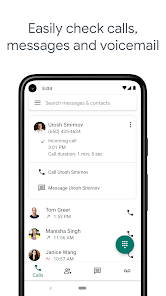
Google Voice is a telecommunications app that gives users a real phone number tied to their Google account rather than a specific device or carrier. It's not quite a replacement for your regular phone service, but more like a smart layer on top of it. People mainly use it for call forwarding, voicemail transcription, and managing multiple phones under one number. A lot of folks download it from the Google Play or App Store because they want to separate their work and personal calls without carrying two phones. The first impression after launching the app is surprisingly clean — it feels more like a messaging app than a traditional dialer, with a simple three-tab layout for calls, messages, and voicemail. There's no required registration if you already have a Google account, just a quick number setup. As of now, the app is free to download with no ads, though some outbound international calls require credit. It's not the flashiest app, but it gets the job done without clutter.
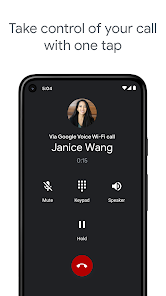
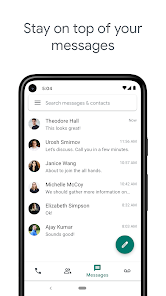
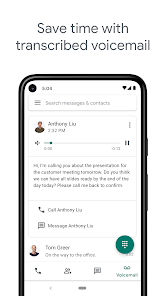
Using Google Voice day-to-day feels a lot like using a secondary messaging app, which can be both good and confusing. The interface mimics Google's Material Design, so the buttons and menus feel familiar if you've used Gmail or Google Chat. Onboarding walks you through picking a new number or porting an existing one, and that process takes maybe five minutes. The main actions are placing calls, sending texts, and checking voicemail, all of which work smoothly over Wi-Fi or mobile data. One thing I noticed is that call quality depends heavily on your internet connection — it's fine on strong Wi-Fi but can lag on spotty data. The voicemail transcription feature is handy, though it sometimes mangles names or acronyms. A small tip: you can set rules for specific contacts, like sending their calls straight to voicemail during certain hours, which is a lifesaver for telemarketers. The app also integrates with your phone's native dialer for call forwarding, which is nice but occasionally leads to duplicate notifications if you're not careful with settings.
After using Google Voice for a while, I'd say it's best for people who juggle multiple devices or need a second number without paying for a second line. It's not for anyone who relies on crystal-clear call quality 100% of the time or wants a rich feature set like FaceTime or WhatsApp integration. Compared to something like Skype, Google Voice wins on simplicity and free domestic calls, but loses on video calling and chat features. What really makes it stand out is the tight integration with Google's ecosystem — transcripts show up in Gmail, calls ring across all your devices, and it's essentially free to maintain. That said, I could see someone uninstalling it if they find the call quality too inconsistent or if they never use more than one phone. Personally, I keep it installed because the spam filtering and custom call routing are genuinely useful, even if the app isn't perfect.
features
- 📞 Google Voice gives you a single number that rings on all your devices, so you won't miss a call whether you're on your phone, tablet, or computer. Skype, by contrast, requires you to be logged into the app on each device separately, and outgoing caller ID isn't as flexible. The standout here is the ability to forward calls to multiple numbers simultaneously — something most competitors like Burner or Sideline don't offer without an extra fee.
- ✉️ Voicemail transcription is built-in and free, and the text shows up in your Gmail inbox automatically. With Skype, voicemail is tied to your Skype number and costs extra, and you don't get that seamless Gmail integration. Google Voice also lets you set custom greetings per contact, which is a nice touch for work versus personal callers.
- 🔇 Spam call filtering is surprisingly aggressive and effective. Google automatically flags suspected spam callers, and you can block numbers right from the call log. Skype has little to no native spam protection, and apps like TextNow rely on community reporting. This feature alone makes Google Voice feel more secure for daily use.
- 📋 Call recording is available (in select regions) with a simple keypress during a call, and it saves directly to your account. Most similar apps, including Skype, don't offer native recording without third-party add-ons. It's not perfect — you have to announce it, and it's not available everywhere — but it's a rare convenience in this space.
pros
- 👍 Cost: Google Voice gives you a free US number, free domestic calls, and cheap international rates. In contrast, Burner charges per number and per credit pack, while Sideline requires a monthly subscription just to keep your number active. For light users, this is a no-brainer.
- 👍 Cross-platform sync: Your calls, texts, and voicemails sync across the web, Android, and iOS instantly. Apps like TextNow do sync, but often with ads or limits on how many devices you can use. Google Voice feels seamless because it's tied to your Google account.
- 👍 Gmail integration: Voicemail transcriptions, call logs, and even missed call notifications appear in your Gmail sidebar. No other similar app — not Skype, not Burner — offers this kind of deep inbox integration. It turns your email into a central hub for communication.
cons
- 👎 Call quality depends on internet: Unlike traditional carrier calling or even Skype's voice-over-IP, Google Voice can get choppy or drop calls when your connection is weak. Sideline uses carrier-grade lines and is more reliable for business calls. If you're in a spotty area, this app can be frustrating.
- 👎 No video calling: Google Voice is purely voice and text. Skype, FaceTime, and even WhatsApp offer video calls built into the same interface. You'll need to switch to another app for face-to-face chats, which adds friction.
- 👎 Limited MMS support: Sending photos works, but group messages can be flaky, and video files often compress poorly. Apps like TextNow handle multimedia better, and Skype's messaging is richer. If group chats are your thing, Google Voice feels outdated.
- 👎 Number porting is slow: Moving your existing number to Google Voice can take days and requires a temporary forwarding number. Burner lets you set up a new number instantly, and Sideline ports numbers within hours. The wait is annoying if you need to switch quickly.
Articles
![]()
Guide
How to Update Google Play Store on Android 2026
![]()
Guide
How to Download Older Versions of Android Apps
![]()
Guide
How to Download Apps Without Google Play Store
![]()
Guide
What Is an APK File for Android?
If you use an Android phone, you may have seen the term APK while searching for apps or games online. Some websites offer an APK download instead of a Google Play install button. Some users also mention APK files when talking about apps that are not available in their region, older app versions, or Android games downloaded outside the Play Store.
![]()
Guide
How to Install Games from Google Play for Beginners
Installing games on an Android phone is usually simple, but for beginners, the process can still feel confusing at first. You may not know where to search, which button to tap, whether the game is safe, or why Google Play sometimes asks for account settings, storage access, or payment information. If you are using an Android phone for the first time, learning how to install games from Google Play is one of the easiest ways to get started.
![]()
Guide
How Useful Gemini Is for Everyday Questions and Quick Tasks
emini feels different from many AI apps because it is not only trying to be a chatbot. After using it for everyday questions, quick writing, image understanding, and planning, I think its biggest strength is convenience.
![]()
Guide
What to Know Before Downloading APKs
For many Android users, downloading an APK is a common way to install apps and games. Sometimes an app is not available in a certain country.
![]()
Guide
ChatGPT Review: Is It Still the Best AI App in 2026?
![]()
Guide
Seedance 2.0 vs Sora: The Future of AI Video Generation
The AI video race has intensified dramatically over the past two years. Platforms like Sora from OpenAI and Luma Dream Machine pushed the boundaries of text-to-video realism. Yet, despite their impressive outputs, most tools still operate as probabilistic generators—you describe a scene, and the model interprets it. Control remains limited. With the February 2026 release of Seedance 2.0, developed by ByteDance, the paradigm shifted. Internally known as Jimeng 2.0, Seedance does not position itself as just another video model. It positions itself as an AI Director. Rather than guessing what you want, Seedance 2.0 allows you to direct what happens. This distinction defines everything that follows.









Recommended Apps
![]()
Home Design 3D
Anuman4.2
![]()
Truth or Dare Game - Party App
Chouic4.8
![]()
Photo Collage Maker
Scoompa4.7![]()
Learn to Draw Flower
Creative APPS4.2![]()
FIFA World Cup 2026™
FIFA2.8![]()
Mirror Plus: Mirror with Light
Digitalchemy, LLC4.4![]()
Meitu- Photo Editor & AI Art
Meitu (China) Limited4.5![]()
Perplexity - Ask Anything
PerplexityAI4.7![]()
GhostTube SLS Camera Alternate
GhostTube4![]()
Boom Chip Blast: 2-Player
Black Pyramid 3D Games Studio0![]()
Healthy Benefits+
Solutran, Inc.4.5![]()
Deepcheck AI Search Assistant
rohe.ai4![]()
Idol Prank Video Call & Chat
LightCode Solutions4![]()
Face Shape - Pretty Scale
GlintTec Apps3.9![]()
Plant App - Plant Identifier
ScaleUp4.6











































