

Toyota

5M+
Installs
Toyota Motor North America, Inc.
Developer
-
Auto & Vehicles
Category
-
Everyone
Content Rating
-
CT-AppSupport@toyota.com
Developer Email
-
https://www.toyota.com/support/privacy-rights
Privacy Policy
Screenshots

editor reviews
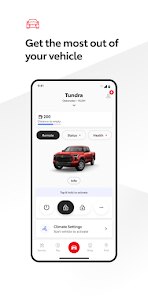
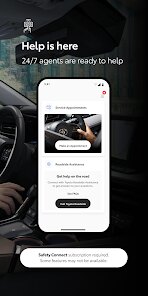
Toyota, the app created by Toyota Motor North America, Inc., serves as a digital companion for Toyota vehicle owners. Available for free on Google Play, it helps manage car-related tasks like service scheduling, remote start, and vehicle status checks. While the download itself costs nothing, certain features require an active subscription or compatible hardware. The app includes minimal ads, mostly related to Toyota promotions, and in-app purchases exist for connected services. Its main goal is to centralize vehicle management in one place rather than relying on separate tools or dealer calls.
Logging in connects the app to your Toyota account and vehicle data, assuming your car supports connectivity. The home screen displays fuel level, tire pressure, and mileage, updated based on recent trips. For service, you can browse dealer availability, book appointments, and receive reminders. Remote functions like locking doors or starting the engine work through the app, though response time varies. I found the navigation straightforward, with menus logically organized, though some deep settings took a moment to locate. Overall, the interaction feels smooth for basic tasks, but the reliance on internet connectivity can occasionally delay updates.
Compared to similar apps from Honda or Ford, Toyota's design leans toward a cleaner, more minimalist layout. HondaLink offers more detailed trip analytics, while FordPass focuses heavily on remote commands. Toyota strikes a middle ground, balancing essential features without overwhelming users. From my perspective, this makes it approachable for less tech-savvy owners, but those wanting deeper data might find it lacking. The app updates regularly, which helps fix bugs and add functions, keeping it competitive in this crowded space.
features
- Service scheduling stands out for its integration with local dealers. Browsing available slots and booking directly saves phone call hassle. Compared to Honda's system, which sometimes redirects to dealer websites, Toyota keeps everything in-app, making the process feel more seamless during use.
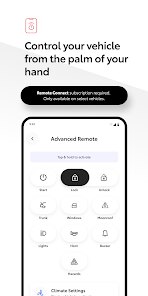
- Remote start works reliably most of the time, though range depends on cellular coverage. I appreciate the two-step confirmation to prevent accidental activation. FordPass offers a similar feature, but Toyota's interface feels slightly faster in responding to commands, based on my experience.
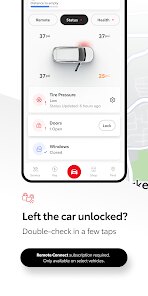
- Vehicle health alerts provide useful warnings, like low tire pressure or maintenance needs. The notifications appear promptly, though occasional false alerts for minor issues can be slightly annoying. Still, it beats manually checking dash indicators.
- The connected services dashboard shows trip history and driving efficiency, but data syncs only when the car is on. For comparison, some third-party apps offer real-time tracking, which would be a welcome addition here.
pros
- Scheduling service appointments in a few taps eliminates phone calls and waiting, which has saved me time during busy weeks.
- Remote start from anywhere with cell service is great for warming or cooling the car before entering, especially in extreme weather.
- Fuel and mileage tracking help plan refueling stops, reducing range anxiety on longer trips without extra effort.
cons
- App login occasionally fails and requires re-entering credentials, which can interrupt quick checks of vehicle status.
- Some features, like remote start, require a subscription after the initial free period, adding ongoing cost for full functionality.
- Notification settings are limited, so you get alerts for every minor change, leading to some unnecessary distractions during the day.
Articles
![]()
Guide
How to Update Google Play Store on Android 2026
![]()
Guide
How to Download Older Versions of Android Apps
![]()
Guide
How to Download Apps Without Google Play Store
![]()
Guide
What Is an APK File for Android?
If you use an Android phone, you may have seen the term APK while searching for apps or games online. Some websites offer an APK download instead of a Google Play install button. Some users also mention APK files when talking about apps that are not available in their region, older app versions, or Android games downloaded outside the Play Store.
![]()
Guide
How to Install Games from Google Play for Beginners
Installing games on an Android phone is usually simple, but for beginners, the process can still feel confusing at first. You may not know where to search, which button to tap, whether the game is safe, or why Google Play sometimes asks for account settings, storage access, or payment information. If you are using an Android phone for the first time, learning how to install games from Google Play is one of the easiest ways to get started.
![]()
Guide
How Useful Gemini Is for Everyday Questions and Quick Tasks
emini feels different from many AI apps because it is not only trying to be a chatbot. After using it for everyday questions, quick writing, image understanding, and planning, I think its biggest strength is convenience.
![]()
Guide
What to Know Before Downloading APKs
For many Android users, downloading an APK is a common way to install apps and games. Sometimes an app is not available in a certain country.
![]()
Guide
ChatGPT Review: Is It Still the Best AI App in 2026?
![]()
Guide
Seedance 2.0 vs Sora: The Future of AI Video Generation
The AI video race has intensified dramatically over the past two years. Platforms like Sora from OpenAI and Luma Dream Machine pushed the boundaries of text-to-video realism. Yet, despite their impressive outputs, most tools still operate as probabilistic generators—you describe a scene, and the model interprets it. Control remains limited. With the February 2026 release of Seedance 2.0, developed by ByteDance, the paradigm shifted. Internally known as Jimeng 2.0, Seedance does not position itself as just another video model. It positions itself as an AI Director. Rather than guessing what you want, Seedance 2.0 allows you to direct what happens. This distinction defines everything that follows.









Recommended Apps
![]()
Home Design 3D
Anuman4.2
![]()
Truth or Dare Game - Party App
Chouic4.8
![]()
Photo Collage Maker
Scoompa4.7![]()
Learn to Draw Flower
Creative APPS4.2![]()
FIFA World Cup 2026™
FIFA2.8![]()
Mirror Plus: Mirror with Light
Digitalchemy, LLC4.4![]()
Meitu- Photo Editor & AI Art
Meitu (China) Limited4.5![]()
Perplexity - Ask Anything
PerplexityAI4.7![]()
GhostTube SLS Camera Alternate
GhostTube4![]()
Boom Chip Blast: 2-Player
Black Pyramid 3D Games Studio0![]()
Healthy Benefits+
Solutran, Inc.4.5![]()
Deepcheck AI Search Assistant
rohe.ai4![]()
Idol Prank Video Call & Chat
LightCode Solutions4![]()
Face Shape - Pretty Scale
GlintTec Apps3.9![]()
Plant App - Plant Identifier
ScaleUp4.6











































