

Period Tracker

10M+
Installs
GP International LLC
Developer
-
Health & Fitness
Category
-
Rated for 3+
Content Rating
-
support+android@gpapps.com
Developer Email
-
http://gpapps.com/support/eula/
Privacy Policy
Screenshots
editor reviews
Period Tracker, developed by GP International LLC, is a health and wellness app focused entirely on menstrual cycle tracking. I first downloaded it from the Google Play Store because I wanted something simple to monitor my cycle without all the extra social features that some other apps push. The install count is high, and it's free to download, which caught my attention right away. Once I launched the app, the first thing I noticed was how clean and straightforward the interface looked — no flashy graphics, just a clear calendar view that made sense immediately. There is the option to register an account, but I didn't feel forced into it, which was a relief. I also spotted a few in-app purchases and occasional ads, but nothing that ruined that first impression of a no-nonsense period tracker.
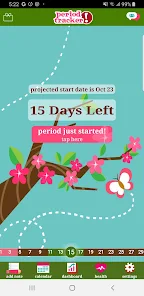
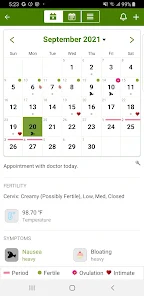
After using Period Tracker for a few weeks, I got a real feel for how it works day to day. The onboarding was quick — I just entered my last period start date, cycle length, and period length, and the app predicted my next fertile window and ovulation date automatically. The main screen shows a monthly calendar with little dots marking predicted periods, and you tap on any day to log symptoms, flow level, mood, or notes. What I found especially smooth was how the logging feels less like a chore — the icons are simple and the process takes less than a minute. There was one moment where I got confused trying to edit a past entry, but after poking around the settings, I figured it out. A practical tip: use the notes section to track PMS symptoms or energy changes because the app doesn't have a huge built-in list, so writing your own helps you see patterns over time.
After a month of consistent use, I can say Period Tracker does exactly what it promises without extra fluff. I think people who just want a reliable, basic tracker will enjoy it — it's perfect if you don't need social feeds, fertility coaching, or community forums like what Clue or Flo offer. Where it stands out is in its simplicity and battery-friendly design; it doesn't drain your phone or demand constant updates. That said, anyone looking for advanced ovulation predictions or detailed health insights might find it too limited. I can see myself keeping it installed because it takes zero effort to use, but if I wanted deeper analytics or more educational content, I'd probably switch to something like Clue. It's a fair trade-off — you get a clean tool that works, but you give up the fancy extras.
features
- 📅 The calendar-based interface is the heart of the app — you can see your entire cycle at a glance, and predictions for future periods, fertile windows, and ovulation are generated automatically after you log a few cycles. Compared to Clue, which uses a timeline view, this feels more natural for people who think visually about their month.
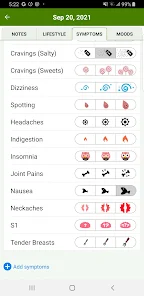
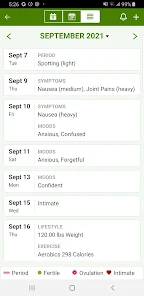
- 📝 Symptom logging is surprisingly detailed despite the simple look — you can track everything from cramps and bloating to skin changes and sleep quality, plus add custom notes. This is one area where it beats Flo, because Flo can get cluttered with too many categories, while Period Tracker keeps it tidy.
- 📊 Cycle length analysis is the standout feature here — the app shows you your average cycle length, period length, and how regular you are over time in a simple chart. Apple Health integration is also built in, so your data can sync automatically, which is a big plus for anyone already using that ecosystem.
pros
- ⭐ Lightweight and fast — Period Tracker barely uses any storage or battery compared to Clue, which can feel heavy after updates. It loads instantly even on older phones, which really matters when you just want to log something quickly.
- ⭐ No social distractions — Unlike Flo, which pushes community posts and articles, this app stays focused on tracking. If you just want your data and nothing else, that's a huge win for daily use.
- ⭐ Customizable predictions — The app lets you adjust cycle length and period length manually, so if your body changes, you can tweak things without waiting for the algorithm to catch up. It's a small touch, but apps like Eve sometimes lock you into their predicted ranges.
cons
- ⚠️ Lack of educational content — Period Tracker has no articles or health explanations. If you're someone who likes learning about your cycle through the app itself, Clue does a much better job offering science-based reads directly inside the interface.
- ⚠️ No community or support features — There's no forum or chat, so users dealing with irregular cycles or health questions have to look elsewhere. Flo's community aspect can be genuinely helpful for emotional support, which this app completely skips.
- ⚠️ Basic design can feel too minimal — Some people might find the interface a little dull after a while. Apps like Eve use more color and playful icons, which makes logging feel less clinical. Period Tracker is undeniably plain in comparison.
Articles
![]()
Guide
How to Update Google Play Store on Android 2026
![]()
Guide
How to Download Older Versions of Android Apps
![]()
Guide
How to Download Apps Without Google Play Store
![]()
Guide
What Is an APK File for Android?
If you use an Android phone, you may have seen the term APK while searching for apps or games online. Some websites offer an APK download instead of a Google Play install button. Some users also mention APK files when talking about apps that are not available in their region, older app versions, or Android games downloaded outside the Play Store.
![]()
Guide
How to Install Games from Google Play for Beginners
Installing games on an Android phone is usually simple, but for beginners, the process can still feel confusing at first. You may not know where to search, which button to tap, whether the game is safe, or why Google Play sometimes asks for account settings, storage access, or payment information. If you are using an Android phone for the first time, learning how to install games from Google Play is one of the easiest ways to get started.
![]()
Guide
How Useful Gemini Is for Everyday Questions and Quick Tasks
emini feels different from many AI apps because it is not only trying to be a chatbot. After using it for everyday questions, quick writing, image understanding, and planning, I think its biggest strength is convenience.
![]()
Guide
What to Know Before Downloading APKs
For many Android users, downloading an APK is a common way to install apps and games. Sometimes an app is not available in a certain country.
![]()
Guide
ChatGPT Review: Is It Still the Best AI App in 2026?
![]()
Guide
Seedance 2.0 vs Sora: The Future of AI Video Generation
The AI video race has intensified dramatically over the past two years. Platforms like Sora from OpenAI and Luma Dream Machine pushed the boundaries of text-to-video realism. Yet, despite their impressive outputs, most tools still operate as probabilistic generators—you describe a scene, and the model interprets it. Control remains limited. With the February 2026 release of Seedance 2.0, developed by ByteDance, the paradigm shifted. Internally known as Jimeng 2.0, Seedance does not position itself as just another video model. It positions itself as an AI Director. Rather than guessing what you want, Seedance 2.0 allows you to direct what happens. This distinction defines everything that follows.









Recommended Apps
![]()
Home Design 3D
Anuman4.2
![]()
Truth or Dare Game - Party App
Chouic4.8
![]()
Photo Collage Maker
Scoompa4.7![]()
Learn to Draw Flower
Creative APPS4.2![]()
FIFA World Cup 2026™
FIFA2.8![]()
Mirror Plus: Mirror with Light
Digitalchemy, LLC4.4![]()
Meitu- Photo Editor & AI Art
Meitu (China) Limited4.5![]()
Perplexity - Ask Anything
PerplexityAI4.7![]()
GhostTube SLS Camera Alternate
GhostTube4![]()
Boom Chip Blast: 2-Player
Black Pyramid 3D Games Studio0![]()
Healthy Benefits+
Solutran, Inc.4.5![]()
Deepcheck AI Search Assistant
rohe.ai4![]()
Idol Prank Video Call & Chat
LightCode Solutions4![]()
Face Shape - Pretty Scale
GlintTec Apps3.9![]()
Plant App - Plant Identifier
ScaleUp4.6












































