

Lensa: photo editor & AI art

10M+
Installs
Prisma Labs, Inc.
Developer
-
Video Players & Editors
Category
-
Rated for 3+
Content Rating
-
hello@lensa-ai.com
Developer Email
-
https://tos.lensa-ai.com/privacy
Privacy Policy
Screenshots
editor reviews
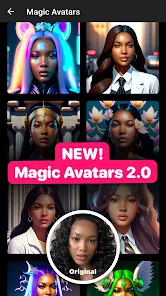
Lensa is a photo editing app that's been making the rounds lately, mostly because it's got that AI art generation feature built right in. It's developed by Prisma Labs, the same team behind the original Prisma photo filter app, so it's not some random fly-by-night thing. You can grab it for free on both Google Play and the App Store, though I noticed it's been downloaded over 10 million times on Android alone, which is pretty impressive. When you first open Lensa, it hits you with that sleek, modern interface that feels more like a professional tool than a casual toy. It does ask you to sign up or log in right away, which was a bit of a buzzkill for me, but once you're in, you see it's built around two main things: polishing up your regular photos and generating wild AI avatars from your selfies. The free download gets you a taste, but you'll quickly bump into the in-app purchases and subscription prompts if you want the full experience, especially for those AI magic shots.
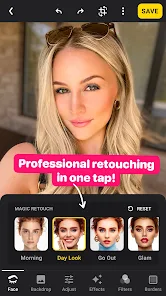
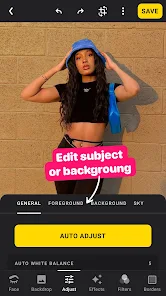
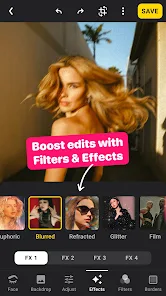
Actually using Lensa feels pretty smooth once you get past the initial registration wall. The onboarding walks you through the basics with a few tooltips, but honestly, I just started poking around on my own. For regular photo editing, you import a picture and then see the editing toolbar at the bottom with options like "Beauty," "Adjust," and "Effects." Beauty mode is the standout — you can smooth skin, whiten teeth, or even reshape your face with sliders, which is kind of creepy but also useful if you're into that. The AI art feature, though, is where the fun really kicks in. You upload 10 to 20 selfies, pick a style from a list of themes like "Fantasy" or "Anime," and then wait a few minutes while it churns out a batch of generated portraits. The first time I tried it, I was blown away by the quality, but I also hit a snag — it's not instant, and you can't just swipe through results without buying a pack. A practical tip: make sure your selfies have good lighting and no weird angles, or the AI spits out some freaky-looking faces. On the plus side, the interface is clean, and you can undo edits easily, but the subscription pop-ups do get annoying after a while.
After spending a few weeks with Lensa, I'd say it's a solid pick for anyone who loves playing with their photos or wants to create unique social media profile pics without learning Photoshop. The AI avatar generator is definitely the headliner here, and it's what sets Lensa apart from other editors like Snapseed or even FaceApp — those are more about basic filters or face swaps, not full-on art generation. But here's the thing: if you're just someone who wants to crop or adjust brightness, Lensa is overkill, and the subscription costs will probably turn you off. It starts at around $7 per week for the AI features, which feels steep unless you're really into it. I also noticed it drains battery pretty fast on my phone during those AI rendering sessions. What keeps me from uninstalling it is the quality of the tool — the skin smoothing and background blur tools are genuinely top-notch, and the AI art is fun enough to show off to friends. But I can see myself deleting it once the novelty wears off, especially since similar apps like Remini do face enhancement for free. For now, it stays on my phone, but only because I'm still hooked on those fantasy avatars.
features
- 👾 AI Avatar Generation vs FaceApp: Lensa's AI avatar feature is way more advanced than FaceApp's simple style swaps. Instead of just adding a beard or changing hair color, you upload a batch of selfies and get fully generated art in styles like sci-fi or steampunk. FaceApp can't touch that level of creativity — it feels like comparing a crayon drawing to a digital painting. 👾 Precision Editing Tools vs Snapseed: The "Beauty" tools in Lensa are fine-tuned for faces. You can adjust individual features like eye size or jawline with slider controls, while Snapseed only offers broad retouching like healing or basic smoothing. For selfie perfectionists, Lensa gives you way more control without needing a degree in photo editing. 👾 Integrated AI Suite vs Prisma: Prisma, the older app from the same devs, is just about applying artistic filters to photos. Lensa bundles that with AI avatar generation and retouching, so you get three tools in one. It's like upgrading from a single-function app to a Swiss Army knife for your pics, and the quality of the AI output is noticeably sharper.
pros
- 🌟 High-Quality AI Output: Lensa's AI avatars often look stunning with detailed textures and coherent faces, unlike apps like Remini which can produce blurry or distorted results. The consistency across different styles is impressive — you don't get weird eyes or misshapen noses most of the time. 🌟 User-Friendly Interface: Navigating between editing and AI generation is intuitive, even for first-time users. Apps like Adobe Photoshop Express have cluttered menus, but Lensa keeps things simple with a bottom tab bar and clear buttons, making it easy to jump between tasks without frustration. 🌟 Fast Rendering Times: Compared to Midjourney or even some web-based AI tools, Lensa processes your photo edits and avatar batches relatively quickly on-device. You're not waiting forever for a single filter to apply, which is a big plus when you're just messing around during a coffee break.
cons
- 💔 Aggressive Subscription Model: Lensa pushes paid plans hard, and the free tier is very limited. FaceApp offers more free filters and tools, while Lensa locks most AI features behind a $7/week paywall. If you don't want to pay, you're stuck with basic edits that other apps give away for nothing. 💔 Privacy Concerns: Uploading 10-20 selfies for AI generation feels risky since you're giving away facial data to the cloud. Apps like Snapseed keep all processing offline, so there's no need to trust a server with your photos. Lensa's privacy policy is a bit vague on data retention, which bugs me. 💔 Inconsistent AI Results: While the avatars can be amazing, they also fail sometimes. Bad lighting in your uploads leads to distorted faces with extra limbs or warped backgrounds — something Remini handles more reliably with its single-image enhancement. You have to carefully curate your photos to avoid duds. 💔 Battery and Performance Hit: Running AI generation drains my phone battery fast and can cause overheating on older models. Snapseed or basic editors run smoothly without killing your device, making Lensa less practical for quick edits on the go unless you're plugged in.
Articles
![]()
Guide
How to Update Google Play Store on Android 2026
![]()
Guide
How to Download Older Versions of Android Apps
![]()
Guide
How to Download Apps Without Google Play Store
![]()
Guide
What Is an APK File for Android?
If you use an Android phone, you may have seen the term APK while searching for apps or games online. Some websites offer an APK download instead of a Google Play install button. Some users also mention APK files when talking about apps that are not available in their region, older app versions, or Android games downloaded outside the Play Store.
![]()
Guide
How to Install Games from Google Play for Beginners
Installing games on an Android phone is usually simple, but for beginners, the process can still feel confusing at first. You may not know where to search, which button to tap, whether the game is safe, or why Google Play sometimes asks for account settings, storage access, or payment information. If you are using an Android phone for the first time, learning how to install games from Google Play is one of the easiest ways to get started.
![]()
Guide
How Useful Gemini Is for Everyday Questions and Quick Tasks
emini feels different from many AI apps because it is not only trying to be a chatbot. After using it for everyday questions, quick writing, image understanding, and planning, I think its biggest strength is convenience.
![]()
Guide
What to Know Before Downloading APKs
For many Android users, downloading an APK is a common way to install apps and games. Sometimes an app is not available in a certain country.
![]()
Guide
ChatGPT Review: Is It Still the Best AI App in 2026?
![]()
Guide
Seedance 2.0 vs Sora: The Future of AI Video Generation
The AI video race has intensified dramatically over the past two years. Platforms like Sora from OpenAI and Luma Dream Machine pushed the boundaries of text-to-video realism. Yet, despite their impressive outputs, most tools still operate as probabilistic generators—you describe a scene, and the model interprets it. Control remains limited. With the February 2026 release of Seedance 2.0, developed by ByteDance, the paradigm shifted. Internally known as Jimeng 2.0, Seedance does not position itself as just another video model. It positions itself as an AI Director. Rather than guessing what you want, Seedance 2.0 allows you to direct what happens. This distinction defines everything that follows.









Recommended Apps
![]()
Home Design 3D
Anuman4.2
![]()
Truth or Dare Game - Party App
Chouic4.8
![]()
Photo Collage Maker
Scoompa4.7![]()
Learn to Draw Flower
Creative APPS4.2![]()
FIFA World Cup 2026™
FIFA2.8![]()
Mirror Plus: Mirror with Light
Digitalchemy, LLC4.4![]()
Meitu- Photo Editor & AI Art
Meitu (China) Limited4.5![]()
Perplexity - Ask Anything
PerplexityAI4.7![]()
GhostTube SLS Camera Alternate
GhostTube4![]()
Boom Chip Blast: 2-Player
Black Pyramid 3D Games Studio0![]()
Healthy Benefits+
Solutran, Inc.4.5![]()
Deepcheck AI Search Assistant
rohe.ai4![]()
Idol Prank Video Call & Chat
LightCode Solutions4![]()
Face Shape - Pretty Scale
GlintTec Apps3.9![]()
Plant App - Plant Identifier
ScaleUp4.6











































