

Photo Frames

10M+
Installs
Csmartworld
Developer
-
Video Players & Editors
Category
-
Everyone
Content Rating
-
csmartworld@gmail.com
Developer Email
-
https://sites.google.com/view/csmartworld/home
Privacy Policy
Screenshots

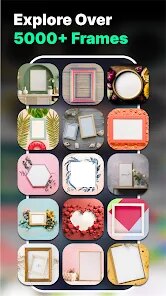
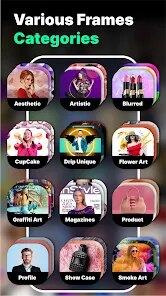


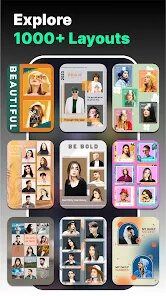
editor reviews
Among the many photo editing tools available on Google Play, Photo Frames by Csmartworld offers a straightforward way to add decorative borders to your pictures. The app focuses specifically on frame templates rather than providing a full suite of editing features. It is free to download and install, though it does include ads and offers in-app purchases for additional frame packs.
The interface is simple and gets straight to the point. After granting gallery access, you pick an image and scroll through a collection of themed frame categories like floral, vintage, or holiday designs. Tapping a frame applies it instantly, and you can pinch to resize or reposition the photo behind the frame. The preview updates in real time, which makes the whole process feel responsive. I found the save function quick, and the exported image kept decent resolution.
Other apps like PicsArt or Canva offer more advanced layering and editing tools, but they can feel overwhelming if you only need a quick frame. Photo Frames strips away everything else and focuses purely on borders. This makes it faster for simple tasks, though the design of some frames feels a bit dated compared to what you'd see in more polished competitors. Still, for a quick decorative touch, it serves its purpose well enough.
features
- The frame library covers a wide range of themes. There are categories for birthdays, weddings, nature, and even seasonal events. I was surprised to find over a hundred options included by default. However, many frames share similar visual styles, so the variety isn't as broad as it first appears.
- Adjusting the photo behind the frame works smoothly. You can drag the image with one finger and use two fingers to resize, which is intuitive. The crop area stays confined to the frame window, so you can see exactly how the final result will look without guesswork.
- Compared to an app like Framify, Csmartworld's version offers more categories but fewer customization options. Framify lets you adjust frame thickness and color, while this app locks you into preset designs. That trade-off keeps things simple but limits creative control.
- The save dialog provides multiple resolution options, from low to high. This is handy when you want to share quickly without waiting for a large file to export. I generally use the medium setting for social media posts and it works well.
pros
- Great for quickly adding a decorative touch to photos without learning complex editing tools.
- Saves time when preparing images for social media posts or greeting cards.
- Works well for creating themed collages when you need consistent frame styles across multiple pictures.
- No account registration required, so you can start using it right after installation.
cons
- Free version shows ads between frame categories, which can interrupt your workflow.
- Some frame designs look low-resolution when applied to larger photos, especially on newer phone screens.
- Limited editing options mean you cannot adjust frame colors or add text inside the frames.
- In-app purchase prompts appear frequently, which might frustrate users who prefer the free content.
Articles
![]()
Guide
How to Update Google Play Store on Android 2026
![]()
Guide
How to Download Older Versions of Android Apps
![]()
Guide
How to Download Apps Without Google Play Store
![]()
Guide
What Is an APK File for Android?
If you use an Android phone, you may have seen the term APK while searching for apps or games online. Some websites offer an APK download instead of a Google Play install button. Some users also mention APK files when talking about apps that are not available in their region, older app versions, or Android games downloaded outside the Play Store.
![]()
Guide
How to Install Games from Google Play for Beginners
Installing games on an Android phone is usually simple, but for beginners, the process can still feel confusing at first. You may not know where to search, which button to tap, whether the game is safe, or why Google Play sometimes asks for account settings, storage access, or payment information. If you are using an Android phone for the first time, learning how to install games from Google Play is one of the easiest ways to get started.
![]()
Guide
How Useful Gemini Is for Everyday Questions and Quick Tasks
emini feels different from many AI apps because it is not only trying to be a chatbot. After using it for everyday questions, quick writing, image understanding, and planning, I think its biggest strength is convenience.
![]()
Guide
What to Know Before Downloading APKs
For many Android users, downloading an APK is a common way to install apps and games. Sometimes an app is not available in a certain country.
![]()
Guide
ChatGPT Review: Is It Still the Best AI App in 2026?
![]()
Guide
Seedance 2.0 vs Sora: The Future of AI Video Generation
The AI video race has intensified dramatically over the past two years. Platforms like Sora from OpenAI and Luma Dream Machine pushed the boundaries of text-to-video realism. Yet, despite their impressive outputs, most tools still operate as probabilistic generators—you describe a scene, and the model interprets it. Control remains limited. With the February 2026 release of Seedance 2.0, developed by ByteDance, the paradigm shifted. Internally known as Jimeng 2.0, Seedance does not position itself as just another video model. It positions itself as an AI Director. Rather than guessing what you want, Seedance 2.0 allows you to direct what happens. This distinction defines everything that follows.









Recommended Apps
![]()
Home Design 3D
Anuman4.2
![]()
Truth or Dare Game - Party App
Chouic4.8
![]()
Photo Collage Maker
Scoompa4.7![]()
Learn to Draw Flower
Creative APPS4.2![]()
FIFA World Cup 2026™
FIFA2.8![]()
Mirror Plus: Mirror with Light
Digitalchemy, LLC4.4![]()
Meitu- Photo Editor & AI Art
Meitu (China) Limited4.5![]()
Perplexity - Ask Anything
PerplexityAI4.7![]()
GhostTube SLS Camera Alternate
GhostTube4![]()
Boom Chip Blast: 2-Player
Black Pyramid 3D Games Studio0![]()
Healthy Benefits+
Solutran, Inc.4.5![]()
Deepcheck AI Search Assistant
rohe.ai4![]()
Idol Prank Video Call & Chat
LightCode Solutions4![]()
Face Shape - Pretty Scale
GlintTec Apps3.9![]()
Plant App - Plant Identifier
ScaleUp4.6











































