
starryai - AI Art Generator

1M+
Installs
starryai Inc.
Developer
-
Generative AI
Category
-
Rated for 18+
Content Rating
-
support@starryai.com
Developer Email
-
https://www.starryai.com/privacy
Privacy Policy
Screenshots
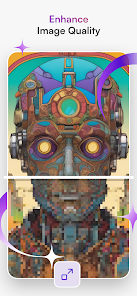
editor reviews
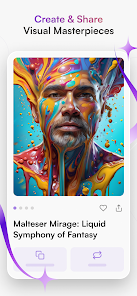
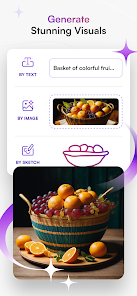
Starryai is an AI art generator that turns text prompts into digital images, falling squarely into the creative tools category on the App Store and Google Play. You type in a description of what you want to see, pick a style, and the app generates artwork for you. It's got over a million installs and is free to download, though it operates on a credit system — you get a handful of free credits when you start, and then you either wait for daily bonuses or pay for more. The first impression after launching is clean but a little overwhelming, with a bright interface and lots of style options upfront. It immediately feels like a tool for people who want quick, polished visuals without needing to learn complicated software.
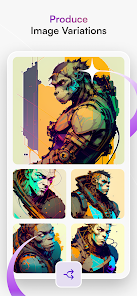
Using Starryai is straightforward once you get the hang of the credit system. You start by typing a prompt, then you choose from preset art styles like "cinematic," "fantasy," or "anime" before hitting generate. The app processes the image on its servers, so there's a short wait, but the results usually load within 30 seconds. The interface is smooth and well-organized, though the onboarding could be clearer about how credits work — I almost wasted a few early ones on random tests. A practical tip: use the "remix" button on any image you like to tweak it without starting over. That feature alone saves credits and makes the app feel less restrictive. There are ads, but they don't pop up mid-generation, which is nice.
After a few weeks of use, Starryai feels like a solid entry-level AI art tool but not the best for serious creators. It's great if you want eye-catching social media graphics or concept art without much effort, but it falls short for someone who needs fine control or hires workflows. Compared to apps like Midjourney or Leonardo AI, Starryai is simpler and more accessible, but the credit system feels stingy once you start generating more than a few images a day. I'd keep it installed for quick inspiration or when I want to visualize an idea fast, but I can see casual users deleting it after the free credits run out. It's a fair trade-off if you prefer polish over power.
features
- 🎨 Credit-based generation with daily free credits — Starryai runs on a "pay or wait" system, unlike DALL-E 3 which gives you a set number of free prompts per day without a wait. You get 5 free credits daily, which is decent for casual use, but you'll need to buy more if you're experimenting heavily. The outstanding feature here is the "remix" option, which lets you regenerate a version of an existing image for only one credit instead of starting a new generation from scratch.
- 🖼️ Preset art styles and quick selection — The app offers over 20 styles like "oil painting," "3D render," and "cyberpunk," chosen from a simple grid before generation. This is more accessible than apps like NightCafe, where style settings are buried in menus. The standout feature is the "style transfer" slider, which lets you blend styles on a scale from subtle to extreme without needing to tweak the prompt.
- ⚡ Server-side processing with fast results — Starryai doesn't run on your device locally, which means you don't need a powerful phone, but it also means you need an internet connection. Compared to Stable Diffusion on mobile, which requires downloading models, Starryai wins on convenience. The unique feature is the "upscale" button that increases resolution after generation, available for a fraction of a credit, making it easy to get print-ready images without extra costs.
pros
- ✅ Simple and polished interface — Starryai is easier to pick up than Midjourney, which requires Discord commands and a learning curve. The visual style picker and straightforward text box make it friendly for beginners.
- ✅ Reliable output quality — The generated images look cohesive and artistic even with short prompts, unlike Wombo Dream which often produces messy or abstract results. Starryai consistently delivers usable visuals.
- ✅ Credit rollover and daily bonuses — You can save unused credits from one day to the next, and completing simple tasks like watching an ad gives you extra credits. This is more generous than Dream by Wombo, which resets your free credits completely each day.
cons
- ❌ Expensive credit system for heavy use — Buying credits adds up quickly, with a starter pack costing around $7 for 50 credits. Apps like Leonardo AI offer a free tier with 25 daily generations, which is more flexible for frequent experimentation.
- ❌ Limited control over the generation process — You can't adjust the seed, guidance scale, or negative prompts like you can in Stable Diffusion apps. This makes it hard to refine specific details or avoid repeated styles.
- ❌ No cloud gallery or collaboration tools — Generated images are stored only on your device unless you manually share them. Midjourney allows you to browse and remix others' creations, while Starryai feels isolated in comparison.
Articles
![]()
Guide
How to Update Google Play Store on Android 2026
![]()
Guide
How to Download Older Versions of Android Apps
![]()
Guide
How to Download Apps Without Google Play Store
![]()
Guide
What Is an APK File for Android?
If you use an Android phone, you may have seen the term APK while searching for apps or games online. Some websites offer an APK download instead of a Google Play install button. Some users also mention APK files when talking about apps that are not available in their region, older app versions, or Android games downloaded outside the Play Store.
![]()
Guide
How to Install Games from Google Play for Beginners
Installing games on an Android phone is usually simple, but for beginners, the process can still feel confusing at first. You may not know where to search, which button to tap, whether the game is safe, or why Google Play sometimes asks for account settings, storage access, or payment information. If you are using an Android phone for the first time, learning how to install games from Google Play is one of the easiest ways to get started.
![]()
Guide
How Useful Gemini Is for Everyday Questions and Quick Tasks
emini feels different from many AI apps because it is not only trying to be a chatbot. After using it for everyday questions, quick writing, image understanding, and planning, I think its biggest strength is convenience.
![]()
Guide
What to Know Before Downloading APKs
For many Android users, downloading an APK is a common way to install apps and games. Sometimes an app is not available in a certain country.
![]()
Guide
ChatGPT Review: Is It Still the Best AI App in 2026?
![]()
Guide
Seedance 2.0 vs Sora: The Future of AI Video Generation
The AI video race has intensified dramatically over the past two years. Platforms like Sora from OpenAI and Luma Dream Machine pushed the boundaries of text-to-video realism. Yet, despite their impressive outputs, most tools still operate as probabilistic generators—you describe a scene, and the model interprets it. Control remains limited. With the February 2026 release of Seedance 2.0, developed by ByteDance, the paradigm shifted. Internally known as Jimeng 2.0, Seedance does not position itself as just another video model. It positions itself as an AI Director. Rather than guessing what you want, Seedance 2.0 allows you to direct what happens. This distinction defines everything that follows.









Recommended Apps
![]()
Home Design 3D
Anuman4.2
![]()
Truth or Dare Game - Party App
Chouic4.8
![]()
Photo Collage Maker
Scoompa4.7![]()
Learn to Draw Flower
Creative APPS4.2![]()
FIFA World Cup 2026™
FIFA2.8![]()
Mirror Plus: Mirror with Light
Digitalchemy, LLC4.4![]()
Meitu- Photo Editor & AI Art
Meitu (China) Limited4.5![]()
Perplexity - Ask Anything
PerplexityAI4.7![]()
GhostTube SLS Camera Alternate
GhostTube4![]()
Boom Chip Blast: 2-Player
Black Pyramid 3D Games Studio0![]()
Healthy Benefits+
Solutran, Inc.4.5![]()
Deepcheck AI Search Assistant
rohe.ai4![]()
Idol Prank Video Call & Chat
LightCode Solutions4![]()
Face Shape - Pretty Scale
GlintTec Apps3.9![]()
Plant App - Plant Identifier
ScaleUp4.6











































