

Notepad, Notes, Easy Notebook

10M+
Installs
Simple Design Ltd.
Developer
-
Productivity
Category
-
Everyone
Content Rating
-
support@simpledesign.ltd
Developer Email
-
https://simpledesign.ltd/privacypolicy.html?pkg=notes.notepad.checklist.calendar.todolist.notebook
Privacy Policy
Screenshots
editor reviews
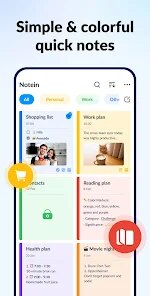
If you are looking for a straightforward note-taking solution without the bells and whistles of modern productivity suites, Easy Notebook by Simple Design Ltd. offers a stripped-down alternative. Available on Google Play for free download, the app focuses purely on capturing and organizing text, with an optional ad-supported experience and an in-app purchase to remove those ads. Its design philosophy seems to cater to users who want a digital notepad that closely mimics the behavior of a physical one, prioritizing speed of capture over formatting complexity.
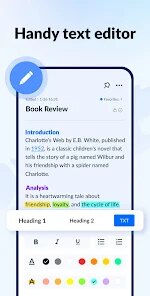
After installing the app, the core interaction is immediate: tapping the prominent compose button opens a clean editor. There is a toolbar sitting at the top with basic formatting options like bold, italic, and lists, but the default view is refreshingly uncluttered. I noticed the app opens directly to your list of notes, and swiping left on a note reveals options to delete or pin it, making list management quite efficient. The search function works across all notes, which is usually the first thing I test, and it returned results quickly during my use, even with a few hundred test entries stored.
Where Easy Notebook distinguishes itself from apps like Google Keep or Microsoft OneNote is in its deliberate simplicity. Keep integrates tightly with Google services and offers reminders and labels, while OneNote provides extensive formatting and notebook structures. This app, in contrast, strips away almost everything except the text itself and a basic folder system. Some might perceive this as a limitation, but I see it as a feature for those who find themselves distracted by organizational overhead. The visual design is also flatter and less colorful than most competitors, which gives it a quieter, more focused feel.
features
- The folder system works well for basic categorization, but the hierarchy is limited to a single level—no subfolders are supported. This is fine for grouping topics like work, personal, or recipes, but if you prefer nested organization, you will feel constrained pretty quickly.
- Formatting options are present but minimal compared to other apps. You can bold, italicize, create headers, and make lists, which covers most basic needs, but the lack of highlighting or colored text felt noticeable when I tried to visually separate different types of information within a single note.
- The share-to-notebook feature from other apps works seamlessly, which is more than many similar entries can claim. When I share a link or text from a browser, Easy Notebook captures it cleanly and saves it as a new note without adding extra clutter or formatting noise.
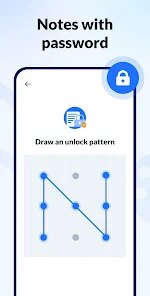
- I found the password protection for individual notes to be a reliable addition that is often missing in simpler apps. It uses a master password, and the implementation locks editing rather than just viewing, which provides an extra layer of security for sensitive text content.
pros
- The quick search across all notes saved me time when I needed to find a specific recipe or code snippet from months ago, and it works on partial keywords too.
- Pinning frequently referenced notes to the top of the list kept my most visited content within easy reach without having to scroll through dozens of other entries.
- The dark mode option is comfortable for late-night use, and it applies consistently to both the note list and the editor without needing to toggle separate settings.
cons
- There is no web or desktop version, so your notes are entirely confined to mobile unless you manually export or sync through an external service.
- The export options are limited to plain text and a simple backup file, which lacks the formatting preservation that some users may expect if they ever switch to another app.
- Occasionally, the app refreshes the note list after returning from another app, which can be slightly disorienting if you were in the middle of browsing a long list of entries.
Articles
![]()
Guide
How to Update Google Play Store on Android 2026
![]()
Guide
How to Download Older Versions of Android Apps
![]()
Guide
How to Download Apps Without Google Play Store
![]()
Guide
What Is an APK File for Android?
If you use an Android phone, you may have seen the term APK while searching for apps or games online. Some websites offer an APK download instead of a Google Play install button. Some users also mention APK files when talking about apps that are not available in their region, older app versions, or Android games downloaded outside the Play Store.
![]()
Guide
How to Install Games from Google Play for Beginners
Installing games on an Android phone is usually simple, but for beginners, the process can still feel confusing at first. You may not know where to search, which button to tap, whether the game is safe, or why Google Play sometimes asks for account settings, storage access, or payment information. If you are using an Android phone for the first time, learning how to install games from Google Play is one of the easiest ways to get started.
![]()
Guide
How Useful Gemini Is for Everyday Questions and Quick Tasks
emini feels different from many AI apps because it is not only trying to be a chatbot. After using it for everyday questions, quick writing, image understanding, and planning, I think its biggest strength is convenience.
![]()
Guide
What to Know Before Downloading APKs
For many Android users, downloading an APK is a common way to install apps and games. Sometimes an app is not available in a certain country.
![]()
Guide
ChatGPT Review: Is It Still the Best AI App in 2026?
![]()
Guide
Seedance 2.0 vs Sora: The Future of AI Video Generation
The AI video race has intensified dramatically over the past two years. Platforms like Sora from OpenAI and Luma Dream Machine pushed the boundaries of text-to-video realism. Yet, despite their impressive outputs, most tools still operate as probabilistic generators—you describe a scene, and the model interprets it. Control remains limited. With the February 2026 release of Seedance 2.0, developed by ByteDance, the paradigm shifted. Internally known as Jimeng 2.0, Seedance does not position itself as just another video model. It positions itself as an AI Director. Rather than guessing what you want, Seedance 2.0 allows you to direct what happens. This distinction defines everything that follows.









Recommended Apps
![]()
Home Design 3D
Anuman4.2
![]()
Truth or Dare Game - Party App
Chouic4.8
![]()
Photo Collage Maker
Scoompa4.7![]()
Learn to Draw Flower
Creative APPS4.2![]()
FIFA World Cup 2026™
FIFA2.8![]()
Mirror Plus: Mirror with Light
Digitalchemy, LLC4.4![]()
Meitu- Photo Editor & AI Art
Meitu (China) Limited4.5![]()
Perplexity - Ask Anything
PerplexityAI4.7![]()
GhostTube SLS Camera Alternate
GhostTube4![]()
Boom Chip Blast: 2-Player
Black Pyramid 3D Games Studio0![]()
Healthy Benefits+
Solutran, Inc.4.5![]()
Deepcheck AI Search Assistant
rohe.ai4![]()
Idol Prank Video Call & Chat
LightCode Solutions4![]()
Face Shape - Pretty Scale
GlintTec Apps3.9![]()
Plant App - Plant Identifier
ScaleUp4.6











































