

Artplay - AI Photo & Video

1M+
Installs
Hideaway Technology Limited
Developer
-
Video Players & Editors
Category
-
Everyone
Content Rating
-
lucadavis212@gmail.com
Developer Email
-
https://sites.google.com/view/artplay-privacypolicy
Privacy Policy
Screenshots

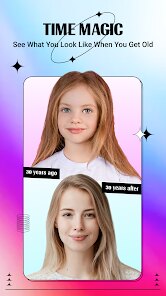
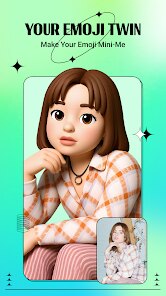

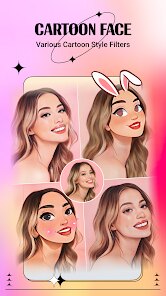
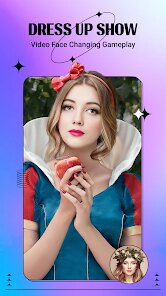
editor reviews
Artplay is an AI-driven photo and video editing app that positions itself at the intersection of creativity and automation. It's the kind of tool you grab when you want to transform a regular snapshot into something that looks like a painting or a stylized animation without needing any actual art skills. On Google Play and the App Store, it's a free download with a decent number of installs, though exact figures aren't disclosed. The first thing you notice after launching it is the sheer amount of filters and styles thrown at you, from watercolor and oil painting to cyberpunk and anime. It feels overwhelming at first, like walking into a candy store, but the initial wow factor is real because you can immediately test any effect on a demo photo provided by the app.
Once you start using Artplay for real, the experience is a mixed bag. The interface is clean but packed, with the main editing screen showing your photo and a row of style categories at the bottom. You tap one, wait a few seconds for the AI to process, and then see a preview. Some results look stunning, almost like a professional artist worked on them, while others come out muddy or miss the mark entirely, especially with complex backgrounds. The app guides you to upload a face photo first, then choose a style, and after a short processing time, you can save or share the result. There's also a video feature where you can apply consistent effects to every frame, but that takes considerably longer and sometimes produces flickering. A practical tip I found useful: always crop your photo tightly around the main subject before applying a style, because the AI handles simpler compositions much better.
After spending a few weeks with Artplay, I'd say it's a fun toy rather than a professional tool. People who love posting stylized selfies or creative profile pictures will probably enjoy it, especially those who don't want to learn complex software like Photoshop or even mobile apps like PicsArt. However, if you need consistent, high-quality edits for work or serious projects, the randomness in output quality becomes frustrating. What sets Artplay apart from similar apps like Prisma or B612 is its focus on video effects, which is still a niche feature. But the free version is plastered with ads, and the watermark on exported files pushes you toward the subscription, which costs around $7.99 per month. I kept it installed for the first week, playing with different styles, but eventually uninstalled it because I realized I was only using one or two favorite filters, and the ads between every save got on my nerves.
features
- 🎨 Artplay offers a huge library of artistic filters, from classic oil painting to surreal dreamscapes, which is far more extensive than what you get in most free photo editors. In comparison, Meitu's selection feels smaller and more focused on beauty enhancements.
- 🎥 The ability to apply consistent AI styles to video clips is a standout feature that few competitors like Prisma offer effectively. You can turn a 10-second video of a walk in the park into a stop-motion animation, which is fun for social media sharing.
- 🎭 Artplay's real-time preview is impressively fast for static images, often generating a result within 3–5 seconds, whereas PicsArt's similar effects take longer and require more manual tweaking to achieve comparable quality.
pros
- ✅ Artplay's style variety is genuinely impressive, easily beating Meitu in the number of creative filters, and the results often look more artistic than what you get from basic editors in Instagram.
- ✅ The video feature is a unique selling point; no other mainstream app in this price range offers such seamless style transfer for moving footage, making it a solid choice for short-form content creators.
- ✅ Processing speed for photos is a big plus, as it rarely lags even on mid-range phones, unlike Prisma which can freeze during heavy renders.
cons
- ❌ The free version's watermark is obnoxiously large and placed right in the center of the image, which feels more aggressive than what B612 or PicsArt do, and the only way to remove it is a paid subscription.
- ❌ Video processing is inconsistent; sometimes the style shifts between frames, creating a jarring blinking effect that ruins the clip, whereas simpler apps like CapCut handle basic filters more reliably.
- ❌ The app crashes occasionally when you try to save a high-resolution output, especially on older phones, and this doesn't happen with lighter competitors like YouCam Perfect.
- ❌ Subscription pricing is steep for what you get, at around $7.99 per month, compared to PicsArt's more comprehensive free tier that includes many similar artistic effects without a watermark.
Articles
![]()
Guide
How to Update Google Play Store on Android 2026
![]()
Guide
How to Download Older Versions of Android Apps
![]()
Guide
How to Download Apps Without Google Play Store
![]()
Guide
What Is an APK File for Android?
If you use an Android phone, you may have seen the term APK while searching for apps or games online. Some websites offer an APK download instead of a Google Play install button. Some users also mention APK files when talking about apps that are not available in their region, older app versions, or Android games downloaded outside the Play Store.
![]()
Guide
How to Install Games from Google Play for Beginners
Installing games on an Android phone is usually simple, but for beginners, the process can still feel confusing at first. You may not know where to search, which button to tap, whether the game is safe, or why Google Play sometimes asks for account settings, storage access, or payment information. If you are using an Android phone for the first time, learning how to install games from Google Play is one of the easiest ways to get started.
![]()
Guide
How Useful Gemini Is for Everyday Questions and Quick Tasks
emini feels different from many AI apps because it is not only trying to be a chatbot. After using it for everyday questions, quick writing, image understanding, and planning, I think its biggest strength is convenience.
![]()
Guide
What to Know Before Downloading APKs
For many Android users, downloading an APK is a common way to install apps and games. Sometimes an app is not available in a certain country.
![]()
Guide
ChatGPT Review: Is It Still the Best AI App in 2026?
![]()
Guide
Seedance 2.0 vs Sora: The Future of AI Video Generation
The AI video race has intensified dramatically over the past two years. Platforms like Sora from OpenAI and Luma Dream Machine pushed the boundaries of text-to-video realism. Yet, despite their impressive outputs, most tools still operate as probabilistic generators—you describe a scene, and the model interprets it. Control remains limited. With the February 2026 release of Seedance 2.0, developed by ByteDance, the paradigm shifted. Internally known as Jimeng 2.0, Seedance does not position itself as just another video model. It positions itself as an AI Director. Rather than guessing what you want, Seedance 2.0 allows you to direct what happens. This distinction defines everything that follows.









Recommended Apps
![]()
Home Design 3D
Anuman4.2
![]()
Truth or Dare Game - Party App
Chouic4.8
![]()
Photo Collage Maker
Scoompa4.7![]()
Learn to Draw Flower
Creative APPS4.2![]()
FIFA World Cup 2026™
FIFA2.8![]()
Mirror Plus: Mirror with Light
Digitalchemy, LLC4.4![]()
Meitu- Photo Editor & AI Art
Meitu (China) Limited4.5![]()
Perplexity - Ask Anything
PerplexityAI4.7![]()
GhostTube SLS Camera Alternate
GhostTube4![]()
Boom Chip Blast: 2-Player
Black Pyramid 3D Games Studio0![]()
Healthy Benefits+
Solutran, Inc.4.5![]()
Deepcheck AI Search Assistant
rohe.ai4![]()
Idol Prank Video Call & Chat
LightCode Solutions4![]()
Face Shape - Pretty Scale
GlintTec Apps3.9![]()
Plant App - Plant Identifier
ScaleUp4.6












































