

Horoscope of Birth

1M+
Installs
Denimaks
Developer
-
Lifestyle
Category
-
Rated for 3+
Content Rating
-
support@denimaks.com
Developer Email
-
http://denimaks.com/gen-privacy-policy.htm
Privacy Policy
Screenshots
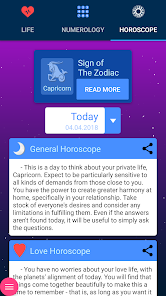
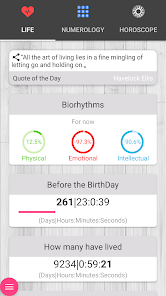

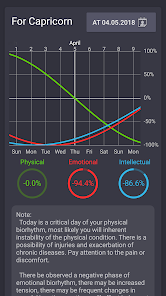
editor reviews
Horoscope of Birth is a personalized astrology app that generates detailed natal chart reports based on your birth time, date, and location. It falls under the lifestyle and spiritual tools category, mostly used by people curious about cosmic influences on their personality or life path. I picked this up from Google Play after noticing it had a solid download count and no upfront payment wall. The first impression after launching is clean but slightly dense. You immediately see a circular chart with planetary symbols, aspect lines, and house divisions. It feels serious rather than flashy, which fits if you already know what a rising sign or a moon trine means. The app asks for birth data right away, but you can skip registration entirely. There are some in-app purchases if you want deeper interpretations, but the basic chart view stays free. Ads pop up occasionally, though not aggressively.
Once you input your birth details, the app generates a full natal wheel and a list of planetary placements with short descriptions. Navigating around feels straightforward most of the time. The main screen shows your chart with draggable sections, and tapping any planet reveals an interpretation popup. I found the onboarding not really necessary because the app expects you to know a bit about astrology signs and aspects. A practical tip: if you hold your finger on any aspect line, it shows the exact angle and orb in degrees. This helps when you want to track tight aspects. The daily usage steps typically go like this: open app, glance at current transit overlays, check your personal planets for the day, and maybe read the interpretation for a specific transit. One slightly confusing moment was figuring out how to compare charts. The option exists but it's tucked inside a submenu. The app handles multiple saved charts well, so you can switch between profiles quickly without reloading data.
After using Horoscope of Birth for a few weeks, I would say it appeals to people who already have some familiarity with astrology placements. Beginners might feel lost because there's no tutorial explaining what a twelfth house stellium or a retrograde Mercury actually means. The deep chart calculations and the clean visual layout stand out compared to other chart apps like Co-Star or Time Nomad. Co-Star gives you daily pushes and social features, while Horoscope of Birth stays focused on the raw chart without the notification overload. Time Nomad offers more transit targeting and professional tools, but this app feels simpler and more affordable for casual chart reading. I keep it installed because the free version actually gives useful information for several saved charts. I might uninstall it later if I want more detailed transit timing or a smoother interface. But for its price and focus, it fills a decent spot in the astrology toolkit niche.
features
- ✅ Instant natal chart generation with full wheel view and draggable interface. The chart updates in real time as you adjust birth time, unlike apps like Co-Star which lock the chart behind a daily interpretation wall. You can zoom and rotate the wheel freely to inspect any aspect or house.
- ✅ Transit overlay mode shows current planetary movements against your natal placements. This works without premium features, while similar apps like Time Nomad hide transit details behind a paywall or only show one transit at a time.
- ✅ Aspect orb customization lets you set the exact degree range for tighter interpretations. Most free apps ignore this, but here you can tighten or widen minor aspects like quintiles or quincunxes directly from settings.
- ✅ Offline chart storage saves your complete profile with birth data and aspect details. You do not need constant internet access after the initial download, which beats most competitors that require online checks every time you tap a planet.
pros
- ✅ Free core chart interpretation without daily limits. Many astrology apps restrict deeper readings to paid subscribers, but Horoscope of Birth gives you the basic breakdown for each planet and house without asking for payment upfront.
- ✅ Birth time accuracy checker included. The app lets you manually validate or correct birth time errors before generating a chart. Co-Star and AstroMatrix assume your input is correct and do not offer this sanity check.
- ✅ Multiple profiles saved easily. You can store charts for family and friends without extra steps. Time Nomad requires separate files or sessions for each profile, which feels slower.
cons
- ❌ No daily push notifications or guidance. The app stays silent unless you open it, while Co-Star sends personalized daily messages that help beginners understand transits in context.
- ❌ Interpretation text is brief and generic. The popup text for each planet or aspect reads like standard astrology dictionary entries. Time Nomad provides more nuanced explanations with reference to real-life patterns.
- ❌ Interface feels dated on larger screens. Buttons and text look small on tablets, and the dark theme lacks contrast options. Compared to the modern design of Co-Star, this app looks like it stopped updating years ago.
Articles
![]()
Guide
How to Update Google Play Store on Android 2026
![]()
Guide
How to Download Older Versions of Android Apps
![]()
Guide
How to Download Apps Without Google Play Store
![]()
Guide
What Is an APK File for Android?
If you use an Android phone, you may have seen the term APK while searching for apps or games online. Some websites offer an APK download instead of a Google Play install button. Some users also mention APK files when talking about apps that are not available in their region, older app versions, or Android games downloaded outside the Play Store.
![]()
Guide
How to Install Games from Google Play for Beginners
Installing games on an Android phone is usually simple, but for beginners, the process can still feel confusing at first. You may not know where to search, which button to tap, whether the game is safe, or why Google Play sometimes asks for account settings, storage access, or payment information. If you are using an Android phone for the first time, learning how to install games from Google Play is one of the easiest ways to get started.
![]()
Guide
How Useful Gemini Is for Everyday Questions and Quick Tasks
emini feels different from many AI apps because it is not only trying to be a chatbot. After using it for everyday questions, quick writing, image understanding, and planning, I think its biggest strength is convenience.
![]()
Guide
What to Know Before Downloading APKs
For many Android users, downloading an APK is a common way to install apps and games. Sometimes an app is not available in a certain country.
![]()
Guide
ChatGPT Review: Is It Still the Best AI App in 2026?
![]()
Guide
Seedance 2.0 vs Sora: The Future of AI Video Generation
The AI video race has intensified dramatically over the past two years. Platforms like Sora from OpenAI and Luma Dream Machine pushed the boundaries of text-to-video realism. Yet, despite their impressive outputs, most tools still operate as probabilistic generators—you describe a scene, and the model interprets it. Control remains limited. With the February 2026 release of Seedance 2.0, developed by ByteDance, the paradigm shifted. Internally known as Jimeng 2.0, Seedance does not position itself as just another video model. It positions itself as an AI Director. Rather than guessing what you want, Seedance 2.0 allows you to direct what happens. This distinction defines everything that follows.









Recommended Apps
![]()
Home Design 3D
Anuman4.2
![]()
Truth or Dare Game - Party App
Chouic4.8
![]()
Photo Collage Maker
Scoompa4.7![]()
Learn to Draw Flower
Creative APPS4.2![]()
FIFA World Cup 2026™
FIFA2.8![]()
Mirror Plus: Mirror with Light
Digitalchemy, LLC4.4![]()
Meitu- Photo Editor & AI Art
Meitu (China) Limited4.5![]()
Perplexity - Ask Anything
PerplexityAI4.7![]()
GhostTube SLS Camera Alternate
GhostTube4![]()
Boom Chip Blast: 2-Player
Black Pyramid 3D Games Studio0![]()
Healthy Benefits+
Solutran, Inc.4.5![]()
Deepcheck AI Search Assistant
rohe.ai4![]()
Idol Prank Video Call & Chat
LightCode Solutions4![]()
Face Shape - Pretty Scale
GlintTec Apps3.9![]()
Plant App - Plant Identifier
ScaleUp4.6












































