
Cool Fonts Keyboard & Themes

500K+
Installs
Art Maker Studio
Developer
-
Productivity
Category
-
Rated for 3+
Content Rating
-
yushaojian11@gmail.com
Developer Email
-
https://wallpaper-4da20.web.app/privacy_policy
Privacy Policy
Screenshots


editor reviews
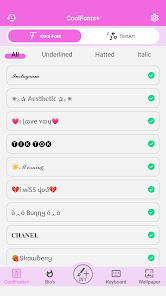
So I stumbled upon this app called Cool Fonts Keyboard & Themes from Art Maker Studio after getting bored with my phone's default typing look. It's basically a keyboard customization tool that lets you swap out the standard font style for something more quirky or fancy. You download it from the Play Store, install it, and when you open it up, you're hit with a bunch of different font previews. There's no forced registration or upfront payment, which is nice, though they do push some ads now and then. The first impression is pretty straightforward: pick a font, apply it, and your keyboard suddenly looks like it belongs to a different era of texting.
Once you actually start using it, things are mostly smooth. You choose a font from the gallery, tap apply, and then you enable the app's keyboard in your phone's settings. That step tripped me up a little at first because I wasn't sure where to go, but the app gives you a clear guide after you select a font. After it's set up, typing feels different depending on the font you pick. Some are super clear and crisp, others are more decorative and kind of hard to read at small sizes. I ended up sticking with a clean cursive one because it looked stylish but didn't make my autocorrect go crazy. There's also a theme section with colored backgrounds and patterns, so you can match your keyboard to your phone's wallpaper if you're into that.
After using it for a couple weeks, I think it's a fun app if you're tired of the stock keyboard look and just want something fresh. But it's not for everyone. If you rely heavily on swipe typing or need super fast autocorrect, this might slow you down compared to Gboard or SwiftKey, which have way more predictive features. The fonts here are purely cosmetic, and some of them mess with the spacing between keys, making typos more common. Still, I kept it installed because it makes texting feel a bit more personal. I can see someone uninstalling it pretty fast if they value speed over style, but for me, it's a nice change of pace.
features
- ✏️ Font variety is the main draw here. You get dozens of styles ranging from elegant scripts to bold block letters. Gboard gives you a couple font options, but Cool Fonts Keyboard has way more unique choices for decorative typing.
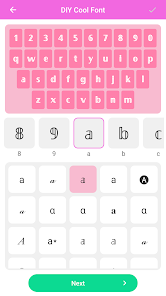
- ✏️ Theme integration is decent. Each font can be paired with different background colors and patterns. The customization feels more flexible than what you get in standard keyboards, especially since you can preview everything before applying.
- ✏️ Ease of setup is simple once you follow the guide. Other apps like Font Keyboard often bury the setup instructions, but this one takes you through enabling it step by step, which saves frustration.
- ✏️ Ad-supported free model means you don't have to pay upfront. Competitors like Stylish Text Keyboard lock premium fonts behind a paywall, but here most fonts are accessible without spending anything.
pros
- 🌟 The font selection is genuinely impressive. I've tried other keyboard customization apps, and none of them offer this many distinct styles that actually work across different texting apps without glitching.
- 🌟 It doesn't require a constant internet connection. Some similar apps like FancyKey need you to be online to download new fonts, but this one works offline after initial setup, which is great for low-data users.
- 🌟 The themes feel cohesive. Unlike some cheap keyboard apps where fonts clash with backgrounds, the presets here look visually balanced, making your keyboard feel like a designed product rather than a messy experiment.
cons
- ⚠️ Typing accuracy takes a hit with decorative fonts. When you pick a script or overly stylized font, the keys become harder to distinguish, which leads to more errors compared to using Gboard or SwiftKey with their cleaner designs.
- ⚠️ Autocorrect is less responsive. The app doesn't handle corrections as smoothly as mainstream keyboards, so if you're someone who relies on that feature, you'll notice a downgrade in typing speed.
- ⚠️ Ads can be intrusive. To unlock the full font set or remove ads, you'd need to either watch videos or pay, and the frequency of pop-ups gets annoying during extended typing sessions.
- ⚠️ No swipe typing support. Most modern keyboards let you glide your finger across letters, but this app lacks that feature entirely, making it slower for one-handed or quick typing.
Articles
![]()
Guide
How to Update Google Play Store on Android 2026
![]()
Guide
How to Download Older Versions of Android Apps
![]()
Guide
How to Download Apps Without Google Play Store
![]()
Guide
What Is an APK File for Android?
If you use an Android phone, you may have seen the term APK while searching for apps or games online. Some websites offer an APK download instead of a Google Play install button. Some users also mention APK files when talking about apps that are not available in their region, older app versions, or Android games downloaded outside the Play Store.
![]()
Guide
How to Install Games from Google Play for Beginners
Installing games on an Android phone is usually simple, but for beginners, the process can still feel confusing at first. You may not know where to search, which button to tap, whether the game is safe, or why Google Play sometimes asks for account settings, storage access, or payment information. If you are using an Android phone for the first time, learning how to install games from Google Play is one of the easiest ways to get started.
![]()
Guide
How Useful Gemini Is for Everyday Questions and Quick Tasks
emini feels different from many AI apps because it is not only trying to be a chatbot. After using it for everyday questions, quick writing, image understanding, and planning, I think its biggest strength is convenience.
![]()
Guide
What to Know Before Downloading APKs
For many Android users, downloading an APK is a common way to install apps and games. Sometimes an app is not available in a certain country.
![]()
Guide
ChatGPT Review: Is It Still the Best AI App in 2026?
![]()
Guide
Seedance 2.0 vs Sora: The Future of AI Video Generation
The AI video race has intensified dramatically over the past two years. Platforms like Sora from OpenAI and Luma Dream Machine pushed the boundaries of text-to-video realism. Yet, despite their impressive outputs, most tools still operate as probabilistic generators—you describe a scene, and the model interprets it. Control remains limited. With the February 2026 release of Seedance 2.0, developed by ByteDance, the paradigm shifted. Internally known as Jimeng 2.0, Seedance does not position itself as just another video model. It positions itself as an AI Director. Rather than guessing what you want, Seedance 2.0 allows you to direct what happens. This distinction defines everything that follows.









Recommended Apps
![]()
Home Design 3D
Anuman4.2
![]()
Truth or Dare Game - Party App
Chouic4.8
![]()
Photo Collage Maker
Scoompa4.7![]()
Learn to Draw Flower
Creative APPS4.2![]()
FIFA World Cup 2026™
FIFA2.8![]()
Mirror Plus: Mirror with Light
Digitalchemy, LLC4.4![]()
Meitu- Photo Editor & AI Art
Meitu (China) Limited4.5![]()
Perplexity - Ask Anything
PerplexityAI4.7![]()
GhostTube SLS Camera Alternate
GhostTube4![]()
Boom Chip Blast: 2-Player
Black Pyramid 3D Games Studio0![]()
Healthy Benefits+
Solutran, Inc.4.5![]()
Deepcheck AI Search Assistant
rohe.ai4![]()
Idol Prank Video Call & Chat
LightCode Solutions4![]()
Face Shape - Pretty Scale
GlintTec Apps3.9![]()
Plant App - Plant Identifier
ScaleUp4.6











































