

LINE Sticker Maker

5M+
Installs
LINE (LY Corporation)
Developer
-
Video Players & Editors
Category
-
Rated for 3+
Content Rating
-
line-support@line.me
Developer Email
-
https://line.me/terms/policy/
Privacy Policy
Screenshots

editor reviews
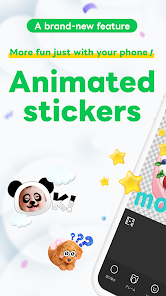
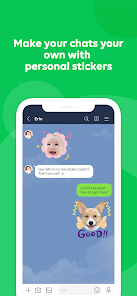
LINE Sticker Maker is exactly what it sounds like—an official app from LINE Corporation that lets you turn your own photos into custom stickers for use within the LINE messaging platform. It falls under the “creativity” or “personalization” genre, more of a companion tool for LINE users than a standalone app. So why would a normal person download this? If you've ever felt limited by the sticker packs already available on LINE's store, or you want to make something truly personal for friends and family, this is your way in. The first impression after launch is actually pretty clean and straightforward. It throws you right into a simple interface with a “Create New” button, no overwhelming clutter. The app is free to download from both Google Play and the App Store, and I didn't notice any forced registration right away, though you'll eventually need a LINE account to export and use your stickers. It does have some in-app purchases for extra features like removing backgrounds, and there are occasional ads, but they aren't pushy. For what it is, the setup feels surprisingly polished.
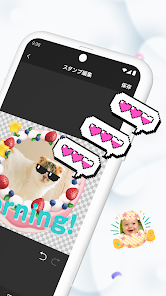
Actually using the app is a breeze for the most part. You start by picking a photo from your gallery or taking a new one through the app's camera. The main action is pretty simple: you cut out the part of the photo you want to turn into a sticker. The app offers a few tools like a magic wand for automatic background removal and a manual eraser for fine-tuning. As you move through the process, you'll notice the app guides you step-by-step—select area, adjust edges, add text or doodles on top if you want, and then save. A smooth moment is how quickly you can preview what the sticker will look like on a chat background. A slightly confusing part is that the automatic selection isn't perfect on complex images, so you may end up spending extra time cleaning up edges. A practical tip: use photos with high contrast backgrounds for the best results, and don't forget you can add simple text overlays to make your stickers even more fun. Once you're done, you export the pack directly to LINE, where it appears in your sticker collection. It's all very intuitive once you get the hang of it.
After using LINE Sticker Maker for a while, my judgment is that it's a decent tool for a specific crowd. If you're a heavy LINE user who loves sending personalized reactions or in-jokes, this will feel like a great addition. People who don't use LINE much will have no use for it, obviously. What makes it different from some other sticker makers out there is that it's official and integrates seamlessly with LINE, so you never have to worry about compatibility or upload limits. A similar app like Sticker Maker Studio is more flexible across platforms but doesn't feel as smooth within LINE's ecosystem. Why keep it installed? If you frequently update your sticker packs, it's convenient. But if you only make one pack and never touch it again, it'll just sit there taking up space. I'd say it's a solid download for LINE enthusiasts, but not a must-have for everyone.
features
- 🖼️ Photo-to-Sticker Conversion – The core feature is turning any photo from your camera roll into a sticker. You can use the automatic background removal or the manual eraser tool to refine edges. Compared to apps like Sticker Maker Studio, which requires you to manually trace everything, LINE Sticker Maker's auto-selection is smarter and faster for simple images.
- ✏️ Text and Doodle Overlay – You can add text captions or freehand drawings on top of your stickers. This is helpful for adding funny captions or speech bubbles. Other apps like Gboard Stickers don't offer this level of direct editing within the sticker creation flow.
- 📦 Direct Export to LINE – Once you finish editing, you can export the sticker pack straight into LINE's sticker collection without needing to save files manually or use third-party tools. Sticker Maker Studio makes you jump through hoops to get stickers into LINE, which makes this feature a clear winner for LINE users.
pros
- ✅ Official LINE Integration – Since it's developed by LINE itself, the stickers work flawlessly in chats without any upload errors or size limitations. Third-party apps like Sticker.ly require extra steps to import.
- ✅ Simple Onboarding – The app doesn't force you to watch tutorials or sign up before use. You can start creating immediately. Rival tools like Sticker Maker Pro bury features behind menus.
- ✅ Free Base Functionality – Creating and using stickers is completely free. You only pay if you want to remove ads or unlock premium background removal tools. Many similar apps charge upfront for basic use.
cons
- ❌ Background Removal Inconsistency – The auto-select tool struggles with busy backgrounds or hair detail, forcing you to manually clean up edges. Other apps like Photoshop Express offer more precise selection algorithms.
- ❌ Limited Editing Tools – You can't adjust brightness, contrast, or apply filters to your photos within the app. Sticker Maker Studio provides basic photo enhancement features before cropping.
- ❌ LINE-Only Ecosystem – The stickers can't be exported as images to use on WhatsApp or other platforms without third-party workarounds. Apps like Gboard Stickers let you create cross-platform stickers.
- ❌ Occasional Ads – While the app is free, banner ads appear between steps, which can break the flow during creation. Paid alternatives like Sticker Maker Pro are ad-free from the start.
Articles
![]()
Guide
How to Update Google Play Store on Android 2026
![]()
Guide
How to Download Older Versions of Android Apps
![]()
Guide
How to Download Apps Without Google Play Store
![]()
Guide
What Is an APK File for Android?
If you use an Android phone, you may have seen the term APK while searching for apps or games online. Some websites offer an APK download instead of a Google Play install button. Some users also mention APK files when talking about apps that are not available in their region, older app versions, or Android games downloaded outside the Play Store.
![]()
Guide
How to Install Games from Google Play for Beginners
Installing games on an Android phone is usually simple, but for beginners, the process can still feel confusing at first. You may not know where to search, which button to tap, whether the game is safe, or why Google Play sometimes asks for account settings, storage access, or payment information. If you are using an Android phone for the first time, learning how to install games from Google Play is one of the easiest ways to get started.
![]()
Guide
How Useful Gemini Is for Everyday Questions and Quick Tasks
emini feels different from many AI apps because it is not only trying to be a chatbot. After using it for everyday questions, quick writing, image understanding, and planning, I think its biggest strength is convenience.
![]()
Guide
What to Know Before Downloading APKs
For many Android users, downloading an APK is a common way to install apps and games. Sometimes an app is not available in a certain country.
![]()
Guide
ChatGPT Review: Is It Still the Best AI App in 2026?
![]()
Guide
Seedance 2.0 vs Sora: The Future of AI Video Generation
The AI video race has intensified dramatically over the past two years. Platforms like Sora from OpenAI and Luma Dream Machine pushed the boundaries of text-to-video realism. Yet, despite their impressive outputs, most tools still operate as probabilistic generators—you describe a scene, and the model interprets it. Control remains limited. With the February 2026 release of Seedance 2.0, developed by ByteDance, the paradigm shifted. Internally known as Jimeng 2.0, Seedance does not position itself as just another video model. It positions itself as an AI Director. Rather than guessing what you want, Seedance 2.0 allows you to direct what happens. This distinction defines everything that follows.









Recommended Apps
![]()
Home Design 3D
Anuman4.2
![]()
Truth or Dare Game - Party App
Chouic4.8
![]()
Photo Collage Maker
Scoompa4.7![]()
Learn to Draw Flower
Creative APPS4.2![]()
FIFA World Cup 2026™
FIFA2.8![]()
Mirror Plus: Mirror with Light
Digitalchemy, LLC4.4![]()
Meitu- Photo Editor & AI Art
Meitu (China) Limited4.5![]()
Perplexity - Ask Anything
PerplexityAI4.7![]()
GhostTube SLS Camera Alternate
GhostTube4![]()
Boom Chip Blast: 2-Player
Black Pyramid 3D Games Studio0![]()
Healthy Benefits+
Solutran, Inc.4.5![]()
Deepcheck AI Search Assistant
rohe.ai4![]()
Idol Prank Video Call & Chat
LightCode Solutions4![]()
Face Shape - Pretty Scale
GlintTec Apps3.9![]()
Plant App - Plant Identifier
ScaleUp4.6











































