
Monster DIY: Mix Beats

1M+
Installs
HIGAME GLOBAL
Developer
-
Music
Category
-
Rated for 12+
Content Rating
-
playstore.hi3@gmail.com
Developer Email
-
https://higameglobal.com/privacy/
Privacy Policy
Screenshots
editor reviews
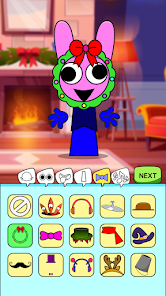
Monster DIY: Mix Beats is a rhythm-based music creation game that feels like a playground for anyone who's ever wanted to mess around with beats and melodies without needing a degree in music theory. It's available exclusively on mobile devices, specifically through the Google Play Store for Android and the App Store for iOS, so don't expect to fire this up on Steam, Xbox, or Switch. The game first launched in 2023 on Google Play and the App Store, and it's already racked up over 1 million installs on Android alone, which shows it's got some traction. It's completely free to download and install, but like a lot of mobile titles, it includes in-app purchases and optional ads. In-app purchases typically range from $0.99 to $9.99 for things like extra sound packs, beat presets, or cosmetic items for the monsters. The ads are mostly optional—you can watch them to unlock bonuses or skip waits, but they don't force you into them every few seconds, which is a nice touch.
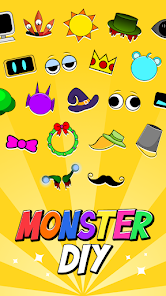
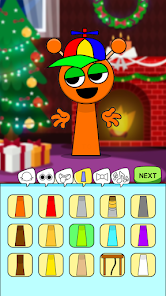
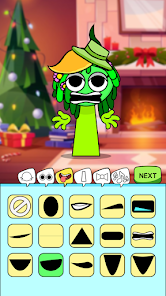
When you jump into the app, the gameplay revolves around dragging and dropping musical elements onto cute, customizable monsters, which then "perform" the track you've built. It's simple and tactile, perfect for quick sessions on the bus or during a break. The best part is how accessible it is—you don't need any experience with music software to create something that actually sounds decent. My favorite part of playing this game is the monster customization; you can change their colors, hats, and expressions, and then watch them react to the beats you've assigned. It's surprisingly addictive because you're not just making music—you're also building a little band of quirky characters. The loop is straightforward: you mix a track, unlock new sounds, and then tweak your monsters to match your vibe. It's not a deep simulation, but for a mobile rhythm game, it nails the balance between creativity and fun.
Compared to similar games like Beat Maker Go or the more complex FL Studio Mobile, Monster DIY stands out because it's focused on fun over precision. Beat Maker Go feels like a stripped-down DAW (digital audio workstation) that expects you to know what you're doing, whereas this app throws you in with a colorful interface and monster mascots that make the process feel like play rather than work. Another app, Incredibox, shares some DNA here with its drag-and-drop vocal loops, but Monster DIY adds a layer of visual progression with the monsters that feels more engaging for casual gamers. I'd recommend this app over its rivals because it's lower-stakes and more rewarding from the start. You can literally spend five minutes and walk away with a track that doesn't sound like a mess. It's not going to replace professional tools, but as a time-waster or a creative outlet on Android, it's a solid pick, especially since the Google Play download is free and doesn't require a huge install.
features
- Monster-Driven Beat Creation 🎵: Unlike standard rhythm games where you just tap along, this app lets you assign loops, drums, and effects to different monsters, who then perform them. It's more interactive than Beat Maker Go's grid-based approach, because you see your music come to life visually as the monsters dance and react.
- Customization Without Limits 🎨: You can tweak each monster's look—think swapping colors, adding glasses, or changing outfits—which ties into the creative process. Other apps like Incredibox stick to fixed characters, but here you can personalize them, making your tracks feel like your own little band.
- Intuitive UI for Non-Musicians 🖱️: The drag-and-drop mechanics are stupid simple compared to Google Play's more technical music apps. You don't need to understand BPM or key signatures; just drop a bass loop on a red monster or a synth line on a blue one, and it works. This lowers the barrier for entry big time.
pros
- Accessible and Fun Gameplay 🎮: This app makes music creation approachable for everyone. Unlike FL Studio Mobile, which can feel like boot camp on Android, Monster DIY lets you jump in and make something listenable in minutes. It's all about experimentation without pressure.
- Visual Rewards Keep You Engaged 👾: The monsters react to your beats with animations and facial expressions, which is something Beat Maker Go totally lacks. That feedback loop makes you want to tweak and test more, just to see a goofy monster headbang to a kick drum you added.
- Free to Download with Fair Monetization 💸: The Google Play and App Store installs are free, and while there are in-app purchases, they're not shoved down your throat. You can play for hours without spending a dime, unlike some rhythm games that lock basic features behind paywalls. This app's model respects your time and wallet.
cons
- Limited Depth for Veterans 🔄: If you've used apps like GarageBand or Beat Maker Go, you'll hit a wall fast. The monster DIY mechanics don't allow for fine-tuning note velocity, pitch, or timing. It's great for casual fun on mobile, but not for serious production, and that can feel restrictive after a while.
- Lack of Export Options 📤: You can't easily save or share your tracks outside the app—no MP3 export or direct sharing to social media. Competitors like Incredibox let you record and share mixes, so this omission feels like a missed opportunity, especially since you're creating music you might want to keep.
- Performance on Older Devices 🐢: On lower-end Android devices, the app can lag when you load multiple monsters or sound layers. I've noticed frame drops in Google Play downloads on my older phone, which isn't an issue with simpler apps like Beat Maker Go. This stutters the creative flow and can be frustrating.
Articles
![]()
Guide
How to Update Google Play Store on Android 2026
![]()
Guide
How to Download Older Versions of Android Apps
![]()
Guide
How to Download Apps Without Google Play Store
![]()
Guide
What Is an APK File for Android?
If you use an Android phone, you may have seen the term APK while searching for apps or games online. Some websites offer an APK download instead of a Google Play install button. Some users also mention APK files when talking about apps that are not available in their region, older app versions, or Android games downloaded outside the Play Store.
![]()
Guide
How to Install Games from Google Play for Beginners
Installing games on an Android phone is usually simple, but for beginners, the process can still feel confusing at first. You may not know where to search, which button to tap, whether the game is safe, or why Google Play sometimes asks for account settings, storage access, or payment information. If you are using an Android phone for the first time, learning how to install games from Google Play is one of the easiest ways to get started.
![]()
Guide
How Useful Gemini Is for Everyday Questions and Quick Tasks
emini feels different from many AI apps because it is not only trying to be a chatbot. After using it for everyday questions, quick writing, image understanding, and planning, I think its biggest strength is convenience.
![]()
Guide
What to Know Before Downloading APKs
For many Android users, downloading an APK is a common way to install apps and games. Sometimes an app is not available in a certain country.
![]()
Guide
ChatGPT Review: Is It Still the Best AI App in 2026?
![]()
Guide
Seedance 2.0 vs Sora: The Future of AI Video Generation
The AI video race has intensified dramatically over the past two years. Platforms like Sora from OpenAI and Luma Dream Machine pushed the boundaries of text-to-video realism. Yet, despite their impressive outputs, most tools still operate as probabilistic generators—you describe a scene, and the model interprets it. Control remains limited. With the February 2026 release of Seedance 2.0, developed by ByteDance, the paradigm shifted. Internally known as Jimeng 2.0, Seedance does not position itself as just another video model. It positions itself as an AI Director. Rather than guessing what you want, Seedance 2.0 allows you to direct what happens. This distinction defines everything that follows.









Recommended Apps
![]()
My Supermarket Simulator 3D®
Game District LLC3.9

![]()
Fortnite
Epic Games, Inc4![]()
Poppy Playtime Chapter 3
Mob Entertainment4.2![]()
Diamond Painting ASMR Coloring
CrazyLabs LTD4.5![]()
Real Bus Simulator : Bus Games
Solo Studio Inc3.2![]()
Sprunki All Phases Beat Maker
Gotstar Studio0![]()
Looper!
Kwalee (Ltd)4.2![]()
Gugu Gaga Penguin: Mini Games
Kids Games LLC3![]()
KPop Demon Hunter Wallpaper
Highlights Devloper0![]()
Count Masters: Stickman Games
Freeplay Inc4.6![]()
Scary Teacher 3D
Z & K Games4.3![]()
Papa's Wingeria HD
Flipline Studios4.6![]()
Who's Your Daddy?!
Evil Tortilla Games Incorporated2.7![]()
AFK Arena
LilithGames4.6![]()
Hungry Balls
HYPERCELL4.6












































