
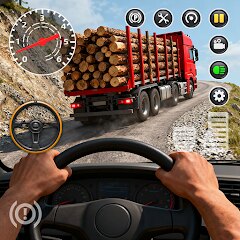
Real Driving: Vehicle & Park

10M+
Installs
XGAME STUDIO
Developer
-
Simulation
Category
-
Everyone
Content Rating
-
wrx8192@gmail.com
Developer Email
-
https://h5gameprivacy-1300797998.file.myqcloud.com/xgame/xgame_studio_privacy_agreement.html
Privacy Policy
Screenshots


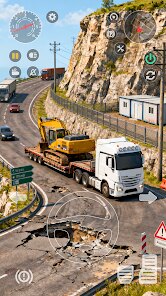
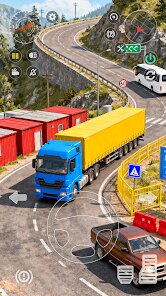
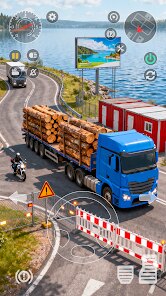

editor reviews
So you've just installed Real Driving: Vehicle & Park on your Android, and you're probably wondering what this game is all about. Let me break it down from a fellow gamer's perspective. This is a free-to-play driving simulator that you can download straight from the Google Play Store. It's a pure mobile game, meaning there's no PC version on Steam or console ports for Xbox or Switch, which is a bit of a bummer if you like a bigger screen. The game first launched a while back, and it's been slowly climbing the install charts—currently sitting at over 10 million downloads, which shows it's got a decent following. The good news? It's completely free to download and play, no initial cost at all. But here's the catch: there are in-app purchases and plenty of in-app ads. The purchases aren't too crazy; you'll find options ranging from a couple of dollars to maybe ten bucks for some premium vehicle packs or to remove ads. Honestly, the ads can be a bit intrusive if you're just trying to cruise around, but that's the trade-off for a free app on the Google Play Store.
When you first jump in, the core gameplay is pretty straightforward: you drive various vehicles through different environments, complete parking challenges, and explore open maps. What I love most is the sheer variety of vehicles—you're not just stuck with boring sedans; there are trucks, SUVs, and even some sporty cars. The best part for me is the parking mode. It sounds simple, but maneuvering a big rig into a tight spot actually takes some skill, and the physics feel surprisingly solid for a mobile game. My favorite moment was nailing a parallel park in a long truck after failing like five times—it gave me that real sense of accomplishment. The controls are touch-based, with options for tilt steering or on-screen buttons, which is nice for customization. I usually stick with the buttons because they feel more precise. The maps are decently sized, and you can free-roam to practice before tackling missions, which is a huge plus if you're new to driving games on your phone.
Compared to other driving sims on Android, like Car Parking Multiplayer or Dr. Driving, Real Driving: Vehicle & Park holds its own but doesn't blow you away. Car Parking Multiplayer has a stronger multiplayer component, which is great if you want to cruise with friends, but Real Driving feels more polished in terms of vehicle handling. Dr. Driving is more arcade-like, so if you prefer a realistic feel, this game wins out. What makes me recommend it over others is the variety of challenges and the fact that it's not overly complex—you can jump in for five minutes or an hour without feeling lost. I've spent countless hours just trying to beat my own high scores in parking, and the progression system keeps you coming back for more cars and maps. It's not a masterpiece, but for a free app on Google Play, it's a solid time-killer that respects your time.
features
- Vehicle Variety 🚗 - Unlike Car Parking Multiplayer which limits you to mostly cars, Real Driving throws in trucks, buses, and SUVs. Each handles differently, so you're constantly learning new driving quirks.
- Parking Challenges 🅿️ - The core mode is where this game shines. You get tight spaces, reverse parking, and even trailer hookups. It's more realistic than Dr. Driving's simple lane-change tasks.
- Free Roam Mode 🌍 - You can just drive around without pressure. Other games force you into missions, but here you can explore at your own pace, which is rare for mobile titles.
pros
- Realistic Physics 🎯 - The weight and momentum of vehicles feel right. Compared to Car Parking Multiplayer, where cars sometimes feel floaty, this game has a grounded feel that makes parking rewarding.
- No Pay-to-Win Wall 💸 - You can earn new vehicles through gameplay without spending a dime. Many similar apps, like Driving School Simulator, lock good cars behind a paywall, but here it's fair.
- Offline Play 📶 - You don't need Wi-Fi or data to play the main modes. That's a lifesaver if you're commuting or in a spotty area, unlike some games that force online connection.
cons
- Intrusive Ads 📺 - After every few attempts, a 30-second ad pops up. It's way more aggressive than Car Parking Multiplayer, which lets you skip sooner. Sometimes it kills the flow when you're in a groove.
- Graphics Feel Dated 🖥️ - The textures and environments look like they're from 2018. Dr. Driving has sharper visuals, and even older games on the app store feel more modern. It's not a dealbreaker, but noticeable.
- No Multiplayer Mode 👤 - You're stuck solo. Car Parking Multiplayer lets you cruise with friends or compete in real-time, which this game lacks entirely. It feels lonely after a while.
Articles
![]()
Guide
How to Update Google Play Store on Android 2026
![]()
Guide
How to Download Older Versions of Android Apps
![]()
Guide
How to Download Apps Without Google Play Store
![]()
Guide
What Is an APK File for Android?
If you use an Android phone, you may have seen the term APK while searching for apps or games online. Some websites offer an APK download instead of a Google Play install button. Some users also mention APK files when talking about apps that are not available in their region, older app versions, or Android games downloaded outside the Play Store.
![]()
Guide
How to Install Games from Google Play for Beginners
Installing games on an Android phone is usually simple, but for beginners, the process can still feel confusing at first. You may not know where to search, which button to tap, whether the game is safe, or why Google Play sometimes asks for account settings, storage access, or payment information. If you are using an Android phone for the first time, learning how to install games from Google Play is one of the easiest ways to get started.
![]()
Guide
How Useful Gemini Is for Everyday Questions and Quick Tasks
emini feels different from many AI apps because it is not only trying to be a chatbot. After using it for everyday questions, quick writing, image understanding, and planning, I think its biggest strength is convenience.
![]()
Guide
What to Know Before Downloading APKs
For many Android users, downloading an APK is a common way to install apps and games. Sometimes an app is not available in a certain country.
![]()
Guide
ChatGPT Review: Is It Still the Best AI App in 2026?
![]()
Guide
Seedance 2.0 vs Sora: The Future of AI Video Generation
The AI video race has intensified dramatically over the past two years. Platforms like Sora from OpenAI and Luma Dream Machine pushed the boundaries of text-to-video realism. Yet, despite their impressive outputs, most tools still operate as probabilistic generators—you describe a scene, and the model interprets it. Control remains limited. With the February 2026 release of Seedance 2.0, developed by ByteDance, the paradigm shifted. Internally known as Jimeng 2.0, Seedance does not position itself as just another video model. It positions itself as an AI Director. Rather than guessing what you want, Seedance 2.0 allows you to direct what happens. This distinction defines everything that follows.









Recommended Apps
![]()
My Supermarket Simulator 3D®
Game District LLC3.9

![]()
Fortnite
Epic Games, Inc4![]()
Poppy Playtime Chapter 3
Mob Entertainment4.2![]()
Diamond Painting ASMR Coloring
CrazyLabs LTD4.5![]()
Real Bus Simulator : Bus Games
Solo Studio Inc3.2![]()
Sprunki All Phases Beat Maker
Gotstar Studio0![]()
Looper!
Kwalee (Ltd)4.2![]()
Gugu Gaga Penguin: Mini Games
Kids Games LLC3![]()
KPop Demon Hunter Wallpaper
Highlights Devloper0![]()
Count Masters: Stickman Games
Freeplay Inc4.6![]()
Scary Teacher 3D
Z & K Games4.3![]()
Papa's Wingeria HD
Flipline Studios4.6![]()
Who's Your Daddy?!
Evil Tortilla Games Incorporated2.7![]()
AFK Arena
LilithGames4.6![]()
Hungry Balls
HYPERCELL4.6












































