
Zen Word® - Relax Puzzle Game

10M+
Installs
Oakever Games
Developer
-
Word
Category
-
Everyone
Content Rating
-
support@oakevergames.com
Developer Email
-
https://oakevergames.com/pp.html
Privacy Policy
Screenshots
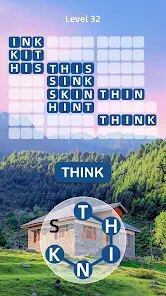
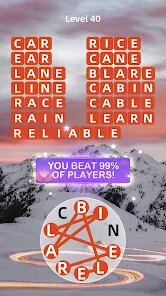
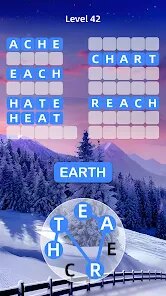
editor reviews
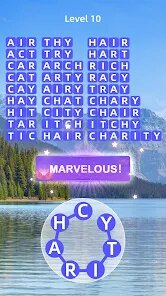
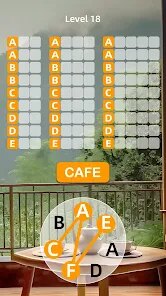
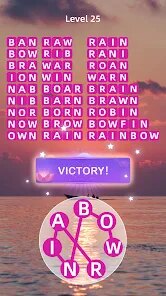
So you're looking for a chill word game to kill some time on your Android or iPhone, huh? Let me tell you about Zen Word® - Relax Puzzle Game. It's basically a word-finding puzzle where you swipe letters to uncover hidden words, and the whole vibe is super laid-back. First launched on the Google Play Store and the App Store around 2023, it's been quietly building a following. As of now, it's racked up over 10 million installs on Android alone, which is pretty solid for a casual game. It's completely free to download and install, which is a huge plus in my book. Yeah, there are in-app purchases and the occasional ad, but they're not shoved in your face. You can buy coin packs or remove ads for something like $2.99 to $4.99, but honestly? I never spent a dime and had a great time. It's strictly a mobile app — no PC version on Steam or console ports for Xbox or Switch, which makes sense for this kind of pick-up-and-play experience.
Playing Zen Word® is as simple as it gets, and that's exactly why I love it. You're given a grid of tiles with letters, and you just drag your finger across them to form words. The puzzle starts easy with short words, but as you level up, the words get longer and more challenging. The best part? There's no timer, no pressure, no "game over" screen. You can just sit back and swipe at your own pace. My favorite part is the serene soundtrack and the minimalist backgrounds — it really does feel like a meditation session mixed with a brain teaser. It's one of those word games you can jump into for five minutes while waiting for coffee or sink into for an hour on the couch. The app is ad-supported, but the ads are mostly opt-in for hints or extra coins, which I respect a lot. If you're someone who hates aggressive monetization, this is a refreshing change from other free games out there.
Now, let's talk about how this stacks up against similar word games. If you've played Wordscapes or Word Stacks, you'll notice Zen Word® takes a different approach. Wordscapes feels more like a crossword-lite where you fill in blanks, while Word Stacks is about stacking letters and finding words. Zen Word® sits somewhere in between, but with a stronger focus on relaxation. The interface is cleaner, the colors are softer, and the whole experience is designed to be stress-free. Other games like 7 Little Words can be fun but often have cluttered screens or time-based challenges that stress me out. With Zen Word®, I never felt rushed or frustrated. The puzzles are balanced — not too easy, not too hard — and the word sets are varied enough to keep me coming back. If you're looking for a word game on Google Play that doesn't try to nickel-and-dime you or bombard you with ads, this is the one. It's become my go-to for unwinding after a long day, and I'd recommend it to anyone who enjoys brainteasers without the anxiety.
features
- Relaxation First Design 🧘: Unlike many word games like Wordscapes that can feel like a race against the clock, Zen Word® actively removes all time limits and scoring pressure. The game rewards you for taking your time, which makes it perfect for unwinding. It's more of a zen garden for your brain than a typical puzzle app.
- Clean and Minimalist UI ✨: The interface is incredibly simple and clutter-free. No flashy animations or loud colors — just soft pastels and a focus on the letter tiles. This is a big deal for mobile games where screen space is limited, and it makes the game feel premium compared to something like Word Stacks, which can feel visually busy.
- Smart Hint System 💡: The hint feature gives you just a gentle nudge instead of outright solving the puzzle. You can reveal a letter's position or highlight a word, but it's not overbearing. It avoids the frustration of being stuck while still letting you feel accomplished when you find the word yourself — something other games often get wrong.
pros
- No Timers or Pressure ⏱️: This is the biggest selling point for me. Games like 7 Little Words or traditional crosswords often have timers or scoring systems that make you feel rushed. Zen Word® lets you play completely at your own pace, so you can enjoy a cup of coffee and just swipe away without stress. It's truly a "relax puzzle game" as the title says.
- Offline Play Availability 📵: You can download and install this app and play without an internet connection. That's rare for free games these days, especially word games that often require online access for ads or leaderboards. Whether I'm on a plane or in a subway tunnel, the game just works — no loading screens, no waiting.
- Generous Free Progression 🆓: You don't need to spend a single cent to enjoy all the levels. In-app purchases are purely optional — mostly for cosmetics or to skip ads. Compare this to Wordscapes, which nudges you toward buying hint packs, and Zen Word® feels much more generous and player-friendly.
cons
- Limited Word Variety Early On 🔄: The first few dozen levels feel a bit repetitive, with the same basic words appearing frequently. While it gets better later, I found myself bored initially compared to Word Stacks, which throws in more varied themes from the start. It takes a bit of patience to unlock the deeper levels.
- No Social or Competitive Features 🤷: There's no way to connect with friends, compare scores, or play multiplayer. If you enjoy that aspect of Wordscapes (which has teams and weekly challenges), this will feel lonely. It's strictly a solo experience, so those craving competition might want to look elsewhere.
- Ads Can Still Be a Nuisance 📺: While the ads are mostly opt-in, there are occasional forced interstitial ads between levels, especially if you're on a winning streak. It breaks the "zen" mood when a loud ad pops up after a relaxing puzzle. This doesn't happen in premium games like the NYT Crossword app, so it's a clear drawback of the free model.
Articles
![]()
Guide
How to Update Google Play Store on Android 2026
![]()
Guide
How to Download Older Versions of Android Apps
![]()
Guide
How to Download Apps Without Google Play Store
![]()
Guide
What Is an APK File for Android?
If you use an Android phone, you may have seen the term APK while searching for apps or games online. Some websites offer an APK download instead of a Google Play install button. Some users also mention APK files when talking about apps that are not available in their region, older app versions, or Android games downloaded outside the Play Store.
![]()
Guide
How to Install Games from Google Play for Beginners
Installing games on an Android phone is usually simple, but for beginners, the process can still feel confusing at first. You may not know where to search, which button to tap, whether the game is safe, or why Google Play sometimes asks for account settings, storage access, or payment information. If you are using an Android phone for the first time, learning how to install games from Google Play is one of the easiest ways to get started.
![]()
Guide
How Useful Gemini Is for Everyday Questions and Quick Tasks
emini feels different from many AI apps because it is not only trying to be a chatbot. After using it for everyday questions, quick writing, image understanding, and planning, I think its biggest strength is convenience.
![]()
Guide
What to Know Before Downloading APKs
For many Android users, downloading an APK is a common way to install apps and games. Sometimes an app is not available in a certain country.
![]()
Guide
ChatGPT Review: Is It Still the Best AI App in 2026?
![]()
Guide
Seedance 2.0 vs Sora: The Future of AI Video Generation
The AI video race has intensified dramatically over the past two years. Platforms like Sora from OpenAI and Luma Dream Machine pushed the boundaries of text-to-video realism. Yet, despite their impressive outputs, most tools still operate as probabilistic generators—you describe a scene, and the model interprets it. Control remains limited. With the February 2026 release of Seedance 2.0, developed by ByteDance, the paradigm shifted. Internally known as Jimeng 2.0, Seedance does not position itself as just another video model. It positions itself as an AI Director. Rather than guessing what you want, Seedance 2.0 allows you to direct what happens. This distinction defines everything that follows.









Recommended Apps
![]()
My Supermarket Simulator 3D®
Game District LLC3.9

![]()
Fortnite
Epic Games, Inc4![]()
Poppy Playtime Chapter 3
Mob Entertainment4.2![]()
Diamond Painting ASMR Coloring
CrazyLabs LTD4.5![]()
Real Bus Simulator : Bus Games
Solo Studio Inc3.2![]()
Sprunki All Phases Beat Maker
Gotstar Studio0![]()
Looper!
Kwalee (Ltd)4.2![]()
Gugu Gaga Penguin: Mini Games
Kids Games LLC3![]()
KPop Demon Hunter Wallpaper
Highlights Devloper0![]()
Count Masters: Stickman Games
Freeplay Inc4.6![]()
Scary Teacher 3D
Z & K Games4.3![]()
Papa's Wingeria HD
Flipline Studios4.6![]()
Who's Your Daddy?!
Evil Tortilla Games Incorporated2.7![]()
AFK Arena
LilithGames4.6![]()
Hungry Balls
HYPERCELL4.6












































