

Tai Chi Workout at Home

500K+
Installs
Hazard Studio
Developer
-
Health & Fitness
Category
-
Everyone
Content Rating
-
hazardstdio@gmail.com
Developer Email
-
https://hazardfitnessads.web.app/private_policy.html
Privacy Policy
Screenshots
editor reviews
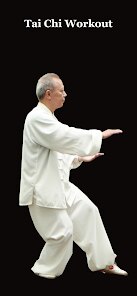
Finding a structured way to practice Tai Chi without leaving the house can be challenging, which is where the Tai Chi Workout at Home app, created by Hazard Studio, comes into play. Available for download on Google Play, this fitness application focuses on bringing the slow, deliberate movements of Tai Chi directly to your mobile device. The app is free to install and use, though like many free applications, it does include occasional advertisements and offers optional in-app purchases for those who want to remove them or access additional content.
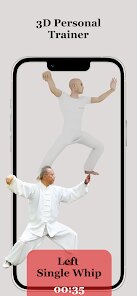
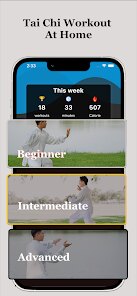
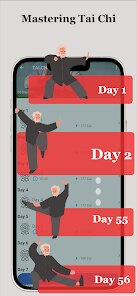
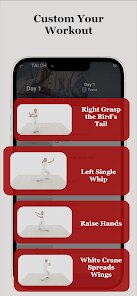
The app presents a series of guided routines that users can follow along with at their own pace. Upon opening it, you are greeted with a clean menu that lists different workout categories, ranging from beginner sessions to more advanced sequences. Each routine is demonstrated through clear video instructions that show the proper form and breathing techniques, making it fairly straightforward to mimic the movements in your own living space. I found that the sessions vary in length, which is helpful when you only have a short break versus a full hour to dedicate to practice.
Compared to other home workout apps that focus on high-intensity interval training or yoga, this one takes a notably calmer and more meditative approach. The emphasis is clearly on fluidity and control rather than speed or sweat, which sets it apart from apps like Seven or Home Workout. While those apps often push for quick results and physical exhaustion, this Tai Chi app feels more like a gentle practice session, which might appeal to users looking for stress relief through movement rather than intense calorie burning.
features
- The video demonstrations are clear and well-paced, which makes it easy to follow along even if you have never tried Tai Chi before. Each movement is broken down step by step, and the instructor's voice is calm without being monotonous.
- One feature I appreciate is the ability to customize session length. You can choose a 10-minute warm-up or a longer 45-minute full routine, which gives flexibility depending on your schedule. In comparison, a similar app called Tai Chi for Beginners does not offer as much time variety.
- The interface is straightforward and not overloaded with flashy graphics or confusing menus. Everything is labeled simply, so you can start a session within seconds of opening the app, which is a nice change from apps that require too much navigation before you actually begin exercising.
pros
- It helps improve balance and flexibility over time, especially if you practice regularly for a few weeks.
- The guided breathing cues are useful for reducing daily stress and encouraging mindfulness during movement.
- Since the workouts require no equipment and minimal space, it is easy to fit a session into a busy day without any setup.
cons
- The free version includes ads that can interrupt the flow of a session, which may be distracting during longer routines.
- Some of the advanced sequences assume a certain level of prior knowledge, so total beginners might feel a bit lost without additional explanations.
- The app occasionally lacks detailed feedback on form, meaning users have to rely solely on watching the video to correct their posture.
Articles
![]()
Guide
How to Update Google Play Store on Android 2026
![]()
Guide
How to Download Older Versions of Android Apps
![]()
Guide
How to Download Apps Without Google Play Store
![]()
Guide
What Is an APK File for Android?
If you use an Android phone, you may have seen the term APK while searching for apps or games online. Some websites offer an APK download instead of a Google Play install button. Some users also mention APK files when talking about apps that are not available in their region, older app versions, or Android games downloaded outside the Play Store.
![]()
Guide
How to Install Games from Google Play for Beginners
Installing games on an Android phone is usually simple, but for beginners, the process can still feel confusing at first. You may not know where to search, which button to tap, whether the game is safe, or why Google Play sometimes asks for account settings, storage access, or payment information. If you are using an Android phone for the first time, learning how to install games from Google Play is one of the easiest ways to get started.
![]()
Guide
How Useful Gemini Is for Everyday Questions and Quick Tasks
emini feels different from many AI apps because it is not only trying to be a chatbot. After using it for everyday questions, quick writing, image understanding, and planning, I think its biggest strength is convenience.
![]()
Guide
What to Know Before Downloading APKs
For many Android users, downloading an APK is a common way to install apps and games. Sometimes an app is not available in a certain country.
![]()
Guide
ChatGPT Review: Is It Still the Best AI App in 2026?
![]()
Guide
Seedance 2.0 vs Sora: The Future of AI Video Generation
The AI video race has intensified dramatically over the past two years. Platforms like Sora from OpenAI and Luma Dream Machine pushed the boundaries of text-to-video realism. Yet, despite their impressive outputs, most tools still operate as probabilistic generators—you describe a scene, and the model interprets it. Control remains limited. With the February 2026 release of Seedance 2.0, developed by ByteDance, the paradigm shifted. Internally known as Jimeng 2.0, Seedance does not position itself as just another video model. It positions itself as an AI Director. Rather than guessing what you want, Seedance 2.0 allows you to direct what happens. This distinction defines everything that follows.









Recommended Apps
![]()
Home Design 3D
Anuman4.2
![]()
Truth or Dare Game - Party App
Chouic4.8
![]()
Photo Collage Maker
Scoompa4.7![]()
Learn to Draw Flower
Creative APPS4.2![]()
FIFA World Cup 2026™
FIFA2.8![]()
Mirror Plus: Mirror with Light
Digitalchemy, LLC4.4![]()
Meitu- Photo Editor & AI Art
Meitu (China) Limited4.5![]()
Perplexity - Ask Anything
PerplexityAI4.7![]()
GhostTube SLS Camera Alternate
GhostTube4![]()
Boom Chip Blast: 2-Player
Black Pyramid 3D Games Studio0![]()
Healthy Benefits+
Solutran, Inc.4.5![]()
Deepcheck AI Search Assistant
rohe.ai4![]()
Idol Prank Video Call & Chat
LightCode Solutions4![]()
Face Shape - Pretty Scale
GlintTec Apps3.9![]()
Plant App - Plant Identifier
ScaleUp4.6












































