

SkinSAFE: Ingredient Scanner

10K+
Installs
SkinSAFE
Developer
-
Health & Fitness
Category
-
Everyone
Content Rating
-
dev@skinsafeproducts.com
Developer Email
-
https://www.skinsafeproducts.com/policies#privacy
Privacy Policy
Screenshots
editor reviews
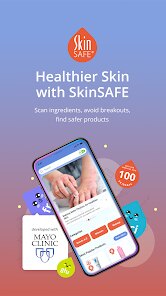
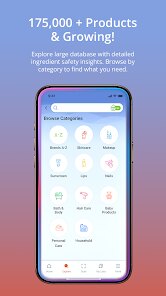
For anyone navigating the world of personal care products with sensitive or reactive skin, SkinSAFE: Ingredient Scanner offers a practical and targeted solution. This app acts as a comprehensive database and scanning tool, allowing you to quickly check the ingredients in cosmetics, skincare, and other personal care items against your own unique sensitivities. Available for download on Google Play, it is free to install and use, though it does include in-app advertisements and offers optional subscription-based premium features that unlock more detailed analysis and broader scanning capabilities.
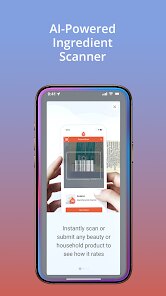
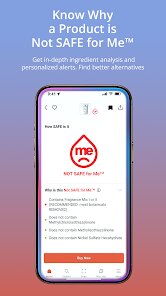
The core functionality revolves around a straightforward scanning process. After download and install, you can either use your camera to scan a product's barcode or manually search for a specific item. The app then presents a clear, color-coded breakdown of each ingredient, flagging potential irritants, allergens, or triggers based on user-defined allergies and internal medical data. In practice, this means pointing your phone at a lotion at a store and receiving near-instant clarity on whether it is likely suitable. I found this speed genuinely helpful, though the manual search can sometimes yield no results for newer or niche products, which is a minor friction point in an otherwise smooth experience.
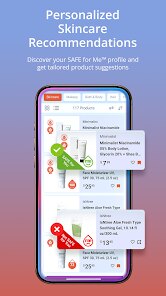
Compared to general ingredient analysis tools like Yuka or Think Dirty, SkinSAFE takes a more medically-grounded and less judgmental approach. While Yuka might assign a single score out of 100 based on a broad assessment of ingredients, SkinSAFE focuses on whether a product is compatible with specific, user-defined allergies. This difference is significant; rather than ranking products by a generic safety metric, it tells you if particular ingredients are present that you have listed. For someone like me with a known sensitivity to fragrances and certain preservatives, this targeted filtering feels far more actionable. It removes the guesswork and the need to constantly interpret a generic score against my own personal skin needs.
features
- The barcode scanner is the standout feature for efficiency. It typically identifies products immediately, pulling up detailed ingredient data within seconds. This is noticeably faster than manually searching, especially when browsing in a physical store. However, the manual search database can be hit or miss, sometimes failing to recognize smaller brands, a limitation also found in similar scanning apps.
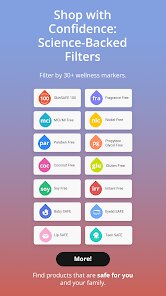
- Another notable aspect is the facial sunscreens and general sun care filter. The app includes a specific setting to check for ingredients that comply with AAD guidelines for sun protection. This is a thoughtful addition that goes beyond simple allergen checking, offering practical, dermatology-aligned advice that I haven't seen as clearly integrated in other apps like the EWG Healthy Living app.
- The user interface is clean but prioritizes function over visual flair. Navigation is logical, and results are presented in a clear, digestible list. While not as sleek as some health apps, the focus on readability and quick comprehension is appreciated. The inclusion of in-app ads can be a slight distraction, but they do not heavily disrupt the core scanning workflow.
pros
- I have noticed a real reduction in random skin reactions since using it; a quick scan before buying new shampoo or lotion helps me avoid ingredients I already know are problematic.
- It is particularly useful when trying a new brand for the first time, providing a safety net and saving me from the hassle of returning a product that stings or irritates.
- Sharing a scan or product rating from the app has made it easier to communicate specific concerns with friends or family, helping them understand my routine without lengthy explanations.
cons
- Some of the more detailed features require the subscription, which feels a bit restrictive after the initial free experience and comparable alternatives offer more for free.
- The camera can occasionally struggle with damaged or unusually shaped barcodes, forcing a manual search that may not always succeed.
- A relatively substantial amount of battery is used during scanning sessions, especially if you are checking multiple products in one trip.
Articles
![]()
Guide
How to Update Google Play Store on Android 2026
![]()
Guide
How to Download Older Versions of Android Apps
![]()
Guide
How to Download Apps Without Google Play Store
![]()
Guide
What Is an APK File for Android?
If you use an Android phone, you may have seen the term APK while searching for apps or games online. Some websites offer an APK download instead of a Google Play install button. Some users also mention APK files when talking about apps that are not available in their region, older app versions, or Android games downloaded outside the Play Store.
![]()
Guide
How to Install Games from Google Play for Beginners
Installing games on an Android phone is usually simple, but for beginners, the process can still feel confusing at first. You may not know where to search, which button to tap, whether the game is safe, or why Google Play sometimes asks for account settings, storage access, or payment information. If you are using an Android phone for the first time, learning how to install games from Google Play is one of the easiest ways to get started.
![]()
Guide
How Useful Gemini Is for Everyday Questions and Quick Tasks
emini feels different from many AI apps because it is not only trying to be a chatbot. After using it for everyday questions, quick writing, image understanding, and planning, I think its biggest strength is convenience.
![]()
Guide
What to Know Before Downloading APKs
For many Android users, downloading an APK is a common way to install apps and games. Sometimes an app is not available in a certain country.
![]()
Guide
ChatGPT Review: Is It Still the Best AI App in 2026?
![]()
Guide
Seedance 2.0 vs Sora: The Future of AI Video Generation
The AI video race has intensified dramatically over the past two years. Platforms like Sora from OpenAI and Luma Dream Machine pushed the boundaries of text-to-video realism. Yet, despite their impressive outputs, most tools still operate as probabilistic generators—you describe a scene, and the model interprets it. Control remains limited. With the February 2026 release of Seedance 2.0, developed by ByteDance, the paradigm shifted. Internally known as Jimeng 2.0, Seedance does not position itself as just another video model. It positions itself as an AI Director. Rather than guessing what you want, Seedance 2.0 allows you to direct what happens. This distinction defines everything that follows.









Recommended Apps
![]()
Home Design 3D
Anuman4.2
![]()
Truth or Dare Game - Party App
Chouic4.8
![]()
Photo Collage Maker
Scoompa4.7![]()
Learn to Draw Flower
Creative APPS4.2![]()
FIFA World Cup 2026™
FIFA2.8![]()
Mirror Plus: Mirror with Light
Digitalchemy, LLC4.4![]()
Meitu- Photo Editor & AI Art
Meitu (China) Limited4.5![]()
Perplexity - Ask Anything
PerplexityAI4.7![]()
GhostTube SLS Camera Alternate
GhostTube4![]()
Boom Chip Blast: 2-Player
Black Pyramid 3D Games Studio0![]()
Healthy Benefits+
Solutran, Inc.4.5![]()
Deepcheck AI Search Assistant
rohe.ai4![]()
Idol Prank Video Call & Chat
LightCode Solutions4![]()
Face Shape - Pretty Scale
GlintTec Apps3.9![]()
Plant App - Plant Identifier
ScaleUp4.6











































