
LINE: Calls & Messages

500,000,000+
Installs
LINE Corporation
Developer
-
Social
Category
-
Rated for 3+
Content Rating
-
line-support@line.me
Developer Email
-
https://terms.line.me/line_rules/
Privacy Policy
Screenshots

editor reviews
LINE started out as a messaging app, but over the years it's turned into this all-in-one platform where you can chat, call, share photos and videos, and even pay for stuff. It's especially huge in places like Japan, Thailand, and Taiwan, where people basically live inside it. You download it from Google Play or the App Store for free, and once you launch it, you're asked to register with a phone number. The first impression is pretty clean and polished, with a bright green and white theme that feels friendly. There's no forced sign-up with email or social media, which I appreciated, and the app has over a billion installs, so you know it's not some obscure tool. There are in-app purchases for stickers and themes, but the core calling and messaging features are completely free. Ads show up in some places, but they're not too annoying.
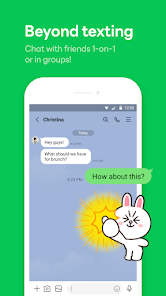
After you sign in, the main screen shows your chat list, and tapping a contact lets you send a message or start a call right away. The interface is straightforward, with a bottom bar for chats, calls, timeline, and settings, so navigating feels natural even if you've never used it. During the onboarding, the app suggests syncing your contacts, which is helpful, and you can also add friends by QR code or ID. Making a voice or video call is just one tap, and the quality has been solid in my experience, even on slower Wi-Fi. One small thing I noticed is that the app can feel a bit cluttered if you join too many group chats or official accounts, but you can mute or hide them easily. A practical tip is to turn on the "Sticker Suggestions" feature in settings, which makes finding the right emoji or sticker much faster during chats.
After using LINE for a while, I found it works best if your social circle already uses it, otherwise you're just talking to yourself. The app really shines with its stickers and themes, which make conversations feel more personal, but that's also where it pushes purchases. Compared to something like WhatsApp, LINE is heavier on entertainment and social features, with a timeline similar to Facebook and even games you can play inside the app. If you live in Asia or have friends there, this app is almost essential, but if you're somewhere like the US, you might find Telegram or Signal more straightforward. I ended up keeping it installed because a few close friends use it daily, but I could see someone uninstalling if they feel overwhelmed by all the extra stuff. It's not a bad app by any means, but it's definitely more than just a messaging tool.
features
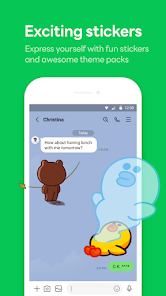
- 💬 LINE's chat system is built around Stickers and Themes, which let you customize conversations way more than WhatsApp can. While WhatsApp keeps things minimal, LINE lets you buy entire sticker packs or apply themes that change the whole look of the app, making chats feel more lively and personal.
- 📅 The Timeline feature acts like a social feed where you can post photos, thoughts, or updates, and friends can comment or like them. This is similar to Facebook's feed but integrated directly into the app, so you don't need to jump between different platforms to stay connected.
- 👤 LINE also offers a "Keep" feature for saving important messages, photos, and notes within the app, which is great for quick access later. Telegram has "Saved Messages" too, but Keep is more organized with folders, making it easier to sort things out without digging through chat history.
pros
- 👍 LINE has a much larger sticker and emoji marketplace compared to WhatsApp or Signal. You can find everything from cute animals to anime characters, which adds a fun layer to daily conversations that other apps just can't match.
- 👍 The official accounts feature is a big plus if you follow brands or celebrities. You can get news, promotions, or updates directly from companies like Starbucks or Disney, something Messenger does too, but LINE keeps it less spammy with better filtering options.
- 👍 Group calls support up to 200 participants, which beats WhatsApp's 32-person limit by a long shot. This makes it a solid choice for large friend groups or small team meetings without needing a separate app like Zoom.
cons
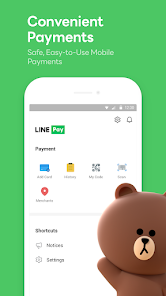
- 👎 The app can feel bloated compared to Signal or Telegram. It comes with a ton of pre-loaded features like games, a payment system, and a built-in browser, which makes it slower and uses more storage space than simpler messaging apps.
- 👎 Privacy is a concern here because LINE stores chat data on servers and has faced security issues in the past. WhatsApp at least offers end-to-end encryption by default, while LINE only does for secret chats, which you have to manually enable each time.
- 👎 The free call quality on LINE isn't as reliable as on WhatsApp or Viber. I've noticed more dropped calls and audio lag, especially when using the app on a weak cellular connection, where WhatsApp generally holds up better.
Articles
![]()
Guide
How to Update Google Play Store on Android 2026
![]()
Guide
How to Download Older Versions of Android Apps
![]()
Guide
How to Download Apps Without Google Play Store
![]()
Guide
What Is an APK File for Android?
If you use an Android phone, you may have seen the term APK while searching for apps or games online. Some websites offer an APK download instead of a Google Play install button. Some users also mention APK files when talking about apps that are not available in their region, older app versions, or Android games downloaded outside the Play Store.
![]()
Guide
How to Install Games from Google Play for Beginners
Installing games on an Android phone is usually simple, but for beginners, the process can still feel confusing at first. You may not know where to search, which button to tap, whether the game is safe, or why Google Play sometimes asks for account settings, storage access, or payment information. If you are using an Android phone for the first time, learning how to install games from Google Play is one of the easiest ways to get started.
![]()
Guide
How Useful Gemini Is for Everyday Questions and Quick Tasks
emini feels different from many AI apps because it is not only trying to be a chatbot. After using it for everyday questions, quick writing, image understanding, and planning, I think its biggest strength is convenience.
![]()
Guide
What to Know Before Downloading APKs
For many Android users, downloading an APK is a common way to install apps and games. Sometimes an app is not available in a certain country.
![]()
Guide
ChatGPT Review: Is It Still the Best AI App in 2026?
![]()
Guide
Seedance 2.0 vs Sora: The Future of AI Video Generation
The AI video race has intensified dramatically over the past two years. Platforms like Sora from OpenAI and Luma Dream Machine pushed the boundaries of text-to-video realism. Yet, despite their impressive outputs, most tools still operate as probabilistic generators—you describe a scene, and the model interprets it. Control remains limited. With the February 2026 release of Seedance 2.0, developed by ByteDance, the paradigm shifted. Internally known as Jimeng 2.0, Seedance does not position itself as just another video model. It positions itself as an AI Director. Rather than guessing what you want, Seedance 2.0 allows you to direct what happens. This distinction defines everything that follows.









Recommended Apps
![]()
Home Design 3D
Anuman4.2
![]()
Truth or Dare Game - Party App
Chouic4.8
![]()
Photo Collage Maker
Scoompa4.7![]()
Learn to Draw Flower
Creative APPS4.2![]()
FIFA World Cup 2026™
FIFA2.8![]()
Mirror Plus: Mirror with Light
Digitalchemy, LLC4.4![]()
Meitu- Photo Editor & AI Art
Meitu (China) Limited4.5![]()
Perplexity - Ask Anything
PerplexityAI4.7![]()
GhostTube SLS Camera Alternate
GhostTube4![]()
Boom Chip Blast: 2-Player
Black Pyramid 3D Games Studio0![]()
Healthy Benefits+
Solutran, Inc.4.5![]()
Deepcheck AI Search Assistant
rohe.ai4![]()
Idol Prank Video Call & Chat
LightCode Solutions4![]()
Face Shape - Pretty Scale
GlintTec Apps3.9![]()
Plant App - Plant Identifier
ScaleUp4.6











































