

Life360: Live Location Sharing

100,000,000+
Installs
Life360
Developer
-
Lifestyle
Category
-
Rated for 3+
Content Rating
-
feedback@life360.com
Developer Email
-
http://www.life360.com/mobile_privacy_policy
Privacy Policy
Screenshots
editor reviews
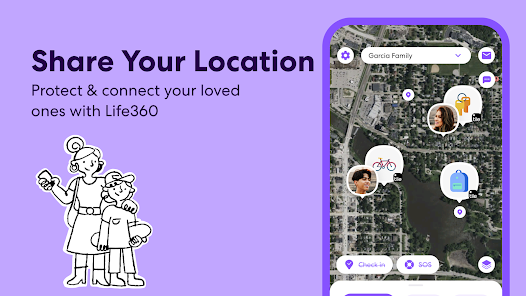
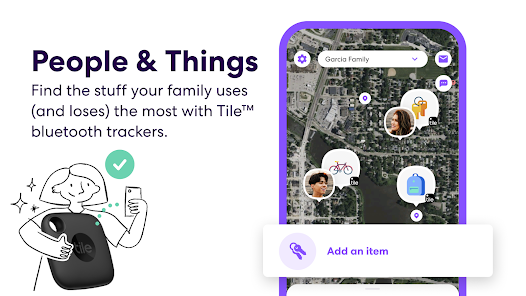
Life360: Live Location Sharing is a family-oriented safety app available for free on Google Play, with a premium subscription tier that removes ads and unlocks extra features. The app has been downloaded over 100 million times, making it one of the more popular location-sharing tools around. Its core function is pretty straightforward: it lets family members see each other's real-time locations on a private map, with the option to set up alerts for arrivals and departures from places like home, school, or work. In-app purchases exist for the subscription plans, but the free version covers basic needs reasonably well.
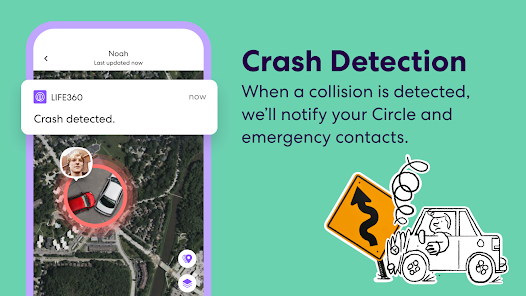
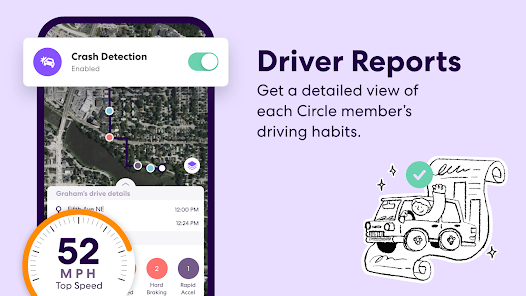
Setting up a Circle—which is what Life360 calls its groups—takes only a few minutes. You send invitations to family members, and once they accept, their location appears on the shared map inside the app. I found the interface clean and intuitive; the map updates quickly, and tapping on a person shows their battery level, driving speed, and even how long they have been at a particular spot. Beyond just tracking, Life360 includes a driving report feature that logs speed and phone usage, which some families might find useful for monitoring new drivers. There is also a built-in chat and a panic alert button that sends your location and an SOS message to the entire Circle.
Compared to other location-sharing apps like Google Maps, Life360 feels more focused on safety and structured notifications rather than casual or occasional use. Google Maps supports location sharing too, but it lacks the Circle-level alerts or detailed driving reports. On the other hand, Glympse is simpler and more temporary, built around sharing location for a specific trip. Life360 sits somewhere in between, offering a persistent connection with fairly granular control. For families who want continuous awareness without constantly texting whereabouts, the app handles that well. However, the subscription push can feel a bit heavy at times.
features
- The Place Alerts feature is one of the more practical tools in the app. I set up notifications for when my son arrives at school and leaves for home, and it works reliably—no false alarms or missed pings. The configuration is simple, just selecting a location from the map and choosing alert triggers. Compared to similar alerts in Google Maps, Life360 gives more flexibility on repeating schedules and multi-location setup.
- Driving reports provide a summary after every trip, including top speed, distance, and phone usage detection. I found this insightful, particularly for keeping tabs on driving habits. The app differentiates between passenger and driver activity fairly accurately. One downside is that the free version only gives limited report history, but the summaries generated are clear and easy to understand.
- The app's battery usage is better than I expected for continuous GPS tracking. I left it running for a full day and noticed about 10 to 12 percent battery drain, which is acceptable for a background service. Some competing apps like Find My drain more noticeably, so Life360 seems optimized well in that regard.
pros
- I get peace of mind knowing the family's locations without needing to message every time someone leaves or arrives somewhere.
- Setting up geofencing for key locations like home and work saves me from manually checking the map throughout the day.
- The driving report helps me stay aware of family members' driving patterns, which is helpful for coaching safer habits.
cons
- The free version shows ads that can be a bit invasive, appearing after checking the map or switching tabs.
- Premium features like detailed location history and unlimited place alerts are locked behind a subscription, which feels limiting for regular users.
- Occasionally the app sends notification reminders when you leave a location, even if you did not set an alert for that place.
Articles
![]()
Guide
How to Update Google Play Store on Android 2026
![]()
Guide
How to Download Older Versions of Android Apps
![]()
Guide
How to Download Apps Without Google Play Store
![]()
Guide
What Is an APK File for Android?
If you use an Android phone, you may have seen the term APK while searching for apps or games online. Some websites offer an APK download instead of a Google Play install button. Some users also mention APK files when talking about apps that are not available in their region, older app versions, or Android games downloaded outside the Play Store.
![]()
Guide
How to Install Games from Google Play for Beginners
Installing games on an Android phone is usually simple, but for beginners, the process can still feel confusing at first. You may not know where to search, which button to tap, whether the game is safe, or why Google Play sometimes asks for account settings, storage access, or payment information. If you are using an Android phone for the first time, learning how to install games from Google Play is one of the easiest ways to get started.
![]()
Guide
How Useful Gemini Is for Everyday Questions and Quick Tasks
emini feels different from many AI apps because it is not only trying to be a chatbot. After using it for everyday questions, quick writing, image understanding, and planning, I think its biggest strength is convenience.
![]()
Guide
What to Know Before Downloading APKs
For many Android users, downloading an APK is a common way to install apps and games. Sometimes an app is not available in a certain country.
![]()
Guide
ChatGPT Review: Is It Still the Best AI App in 2026?
![]()
Guide
Seedance 2.0 vs Sora: The Future of AI Video Generation
The AI video race has intensified dramatically over the past two years. Platforms like Sora from OpenAI and Luma Dream Machine pushed the boundaries of text-to-video realism. Yet, despite their impressive outputs, most tools still operate as probabilistic generators—you describe a scene, and the model interprets it. Control remains limited. With the February 2026 release of Seedance 2.0, developed by ByteDance, the paradigm shifted. Internally known as Jimeng 2.0, Seedance does not position itself as just another video model. It positions itself as an AI Director. Rather than guessing what you want, Seedance 2.0 allows you to direct what happens. This distinction defines everything that follows.









Recommended Apps
![]()
Home Design 3D
Anuman4.2
![]()
Truth or Dare Game - Party App
Chouic4.8
![]()
Photo Collage Maker
Scoompa4.7![]()
Learn to Draw Flower
Creative APPS4.2![]()
FIFA World Cup 2026™
FIFA2.8![]()
Mirror Plus: Mirror with Light
Digitalchemy, LLC4.4![]()
Meitu- Photo Editor & AI Art
Meitu (China) Limited4.5![]()
Perplexity - Ask Anything
PerplexityAI4.7![]()
GhostTube SLS Camera Alternate
GhostTube4![]()
Boom Chip Blast: 2-Player
Black Pyramid 3D Games Studio0![]()
Healthy Benefits+
Solutran, Inc.4.5![]()
Deepcheck AI Search Assistant
rohe.ai4![]()
Idol Prank Video Call & Chat
LightCode Solutions4![]()
Face Shape - Pretty Scale
GlintTec Apps3.9![]()
Plant App - Plant Identifier
ScaleUp4.6











































