
Lyft

50,000,000+
Installs
Lyft, Inc.
Developer
-
Travel & Local
Category
-
Rated for 3+
Content Rating
-
+18558659553
Developer Email
-
https://www.lyft.com/privacy
Privacy Policy
Screenshots
editor reviews
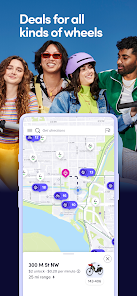
Lyft is a ride-hailing app that connects passengers with nearby drivers for on-demand transportation. It belongs to the mobility-as-a-service category, and people mainly use it to book rides when they don't have a car, don't want to drive, or need an affordable alternative to taxis. A normal user might download the app from the Google Play or App Store because they're traveling, their car is in the shop, or they just don't want to deal with parking. The first impression after launching the app is pretty straightforward: you're greeted with a map showing your current location and a text field to enter your destination. The design feels clean and modern, with a pink and purple color scheme that makes it stand out. It's free to download, but you have to create an account before you can book a ride. In-app purchases and ads aren't really a thing here, though drivers might get promotions for completing trips.
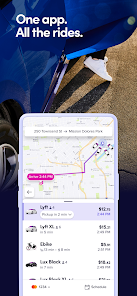
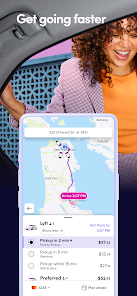
Once you start using Lyft, the experience is mostly smooth. After entering your destination, the app shows you ride options like Standard, XL, and Lux, each with a different price and estimated wait time. You pick one, confirm the pickup point, and the app finds a driver nearby. The onboarding is simple: you get a driver's name, car model, and license plate, plus a live map showing their approach. One small tip is to check the pin on the map before confirming, because the app sometimes guesses your location wrong in dense areas. A common daily use step is rating the ride afterward, which helps the app improve its matching. The interface is uncluttered, though switching between ride types can feel a bit laggy at times. Overall, moving through the app feels intuitive, even for someone who isn't tech-savvy.
After using Lyft for a while, I feel it's a solid choice for anyone who needs a reliable ride occasionally. People living in cities with lots of drivers will probably keep it installed, but if you're in a rural area, you might uninstall it because wait times can be long. What sets Lyft apart from competitors like Uber is its driver tipping policy and community feel, though Uber has more features like Uber Eats and more vehicle options. I personally keep Lyft installed for backup, but I might switch to a local car service in some towns. It's not perfect, but for quick trips in big cities, it does the job well.
features
- 📱 Real-time ride tracking: Lyft lets you follow your driver's arrival in real-time on a live map, which is similar to what you get with Uber. But what stands out is the split-fare feature for sharing costs with friends, which Uber also offers, but Lyft's version feels a bit easier to set up mid-trip.
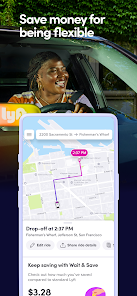
- 💵 Upfront pricing: Before you confirm a ride, you see the exact fare, including any surcharges or discounts. This beats Uber's dynamic pricing model where the cost can change last-minute, though Uber gives more accurate estimates in bad weather.
- 🔋 Scheduled rides: You can book a ride up to 7 days in advance, which is handy for airport trips or early morning meetings. Uber offers this too, but Lyft's scheduling interface is cleaner and less confusing.
- 🎧 In-app music control: Some drivers sync Spotify to let you pick songs during the ride, which is a fun perk Uber doesn't emphasize as much. It's a small touch, but it makes the trip feel more personal.
pros
- 🎨 Clean interface: Lyft's pink and purple design is more visually appealing than Uber's all-black layout. It feels less corporate and more friendly, making the first-time user experience less intimidating.
- 🤝 Driver tipping is built-in: The app prompts you to tip after every ride, and drivers typically get 100% of the tip. This creates a better relationship than Uber, where tipping is optional and less front-and-center.
- 🌱 Community focus: Lyft offers a "Lyft Pink" membership for discounts, but its emphasis on driver earnings and shared rides gives it a more local vibe than Uber's global brand.
cons
- ⏳ Longer wait times: In suburban or rural areas, Lyft often has fewer drivers than Uber, leading to longer pickup times. This can be a dealbreaker if you need a ride quickly.
- 💸 Price spikes during events: Like Uber, Lyft uses surge pricing during concerts or sports games, but it's not always clear when it kicks in. Uber gives more upfront warnings about high-demand periods.
- 📱 App glitches: Occasionally, the map freezes or the payment method doesn't process, which is rarer with Uber's more stable app. It's not frequent, but it's annoying when it happens.
- 🛑 Limited vehicle options: Lyft doesn't have a luxury service as polished as Uber Black, so if you want a high-end car, you might need to switch apps.
Articles
![]()
Guide
How to Update Google Play Store on Android 2026
![]()
Guide
How to Download Older Versions of Android Apps
![]()
Guide
How to Download Apps Without Google Play Store
![]()
Guide
What Is an APK File for Android?
If you use an Android phone, you may have seen the term APK while searching for apps or games online. Some websites offer an APK download instead of a Google Play install button. Some users also mention APK files when talking about apps that are not available in their region, older app versions, or Android games downloaded outside the Play Store.
![]()
Guide
How to Install Games from Google Play for Beginners
Installing games on an Android phone is usually simple, but for beginners, the process can still feel confusing at first. You may not know where to search, which button to tap, whether the game is safe, or why Google Play sometimes asks for account settings, storage access, or payment information. If you are using an Android phone for the first time, learning how to install games from Google Play is one of the easiest ways to get started.
![]()
Guide
How Useful Gemini Is for Everyday Questions and Quick Tasks
emini feels different from many AI apps because it is not only trying to be a chatbot. After using it for everyday questions, quick writing, image understanding, and planning, I think its biggest strength is convenience.
![]()
Guide
What to Know Before Downloading APKs
For many Android users, downloading an APK is a common way to install apps and games. Sometimes an app is not available in a certain country.
![]()
Guide
ChatGPT Review: Is It Still the Best AI App in 2026?
![]()
Guide
Seedance 2.0 vs Sora: The Future of AI Video Generation
The AI video race has intensified dramatically over the past two years. Platforms like Sora from OpenAI and Luma Dream Machine pushed the boundaries of text-to-video realism. Yet, despite their impressive outputs, most tools still operate as probabilistic generators—you describe a scene, and the model interprets it. Control remains limited. With the February 2026 release of Seedance 2.0, developed by ByteDance, the paradigm shifted. Internally known as Jimeng 2.0, Seedance does not position itself as just another video model. It positions itself as an AI Director. Rather than guessing what you want, Seedance 2.0 allows you to direct what happens. This distinction defines everything that follows.









Recommended Apps
![]()
Home Design 3D
Anuman4.2
![]()
Truth or Dare Game - Party App
Chouic4.8
![]()
Photo Collage Maker
Scoompa4.7![]()
Learn to Draw Flower
Creative APPS4.2![]()
FIFA World Cup 2026™
FIFA2.8![]()
Mirror Plus: Mirror with Light
Digitalchemy, LLC4.4![]()
Meitu- Photo Editor & AI Art
Meitu (China) Limited4.5![]()
Perplexity - Ask Anything
PerplexityAI4.7![]()
GhostTube SLS Camera Alternate
GhostTube4![]()
Boom Chip Blast: 2-Player
Black Pyramid 3D Games Studio0![]()
Healthy Benefits+
Solutran, Inc.4.5![]()
Deepcheck AI Search Assistant
rohe.ai4![]()
Idol Prank Video Call & Chat
LightCode Solutions4![]()
Face Shape - Pretty Scale
GlintTec Apps3.9![]()
Plant App - Plant Identifier
ScaleUp4.6












































