

Upside: Gas & Food Cash Back

10M+
Installs
Upside Inc.
Developer
-
Travel & Local
Category
-
Everyone
Content Rating
-
support@upside.com
Developer Email
-
https://www.upside.com/privacy/
Privacy Policy
Screenshots
editor reviews
Getting cash back on everyday purchases sounds appealing, but not all apps deliver on that promise in a straightforward way. Upside, formerly known as GetUpside, is a location-based rewards application available on Google Play that focuses specifically on gasoline and groceries. The app is free to download and install, generating revenue primarily through partnerships with retailers and gas stations rather than through a subscription model. While there are no mandatory subscription fees, users should expect to encounter advertisements for partner locations within the interface, along with occasional promotional offers that encourage repeat usage.
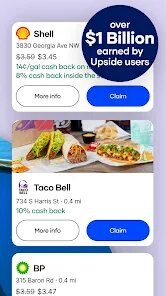
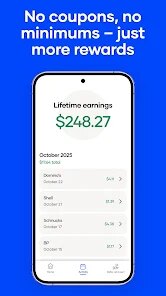
The core functionality centers around location tracking and receipt verification. After installing the app from Google Play, users open it to see nearby participating gas stations and grocery stores, each displaying a specific cash back percentage or fixed amount per gallon or dollar spent. Claiming an offer requires checking in at the location through the app before making a purchase, then photographing the receipt afterward for verification. From my experience, the scanning process usually takes less than twenty-four hours, after which the cash back amount appears in the user's account balance. Accumulated rewards can be withdrawn via PayPal, direct bank transfer, or gift card redemption, though minimum withdrawal thresholds apply depending on the chosen method.
Compared to similar cash back platforms like Ibotta or Fetch Rewards, Upside adopts a narrower focus on fuel and groceries but offers a more immediate and location-driven experience. Ibotta requires users to browse a catalog of specific products and scan barcodes, which works well for planned shopping trips but feels cumbersome for impulsive stops. Fetch Rewards, on the other hand, accepts any receipt but offers smaller, more generalized rewards. Upside strikes a middle ground by linking offers directly to the user's physical location, making it more convenient for spontaneous gasoline purchases but somewhat limiting for broader grocery savings unless the user visits partnered store chains regularly.
features
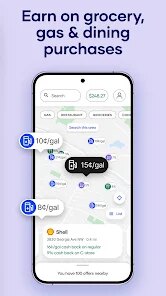
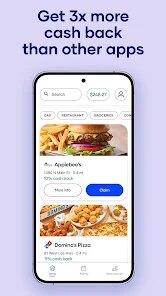
- Location-based offers feel convenient for daily commutes. The map interface automatically highlights nearby stations with active deals, eliminating the need to search manually. During my morning routine, this feature reduces decision time when choosing where to fill up, though the cash back percentages vary widely depending on regional partnerships.
- Receipt verification is generally smooth but not instant. Submitting a receipt typically processes within a few hours, though weekends occasionally cause delays of up to two days. Compared to Fetch Rewards which processes almost immediately, Upside's verification feels slightly slower but remains reliable overall.
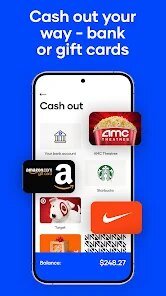
- Reward withdrawal options are decently flexible. Users can choose between PayPal, bank transfers, or gift cards, each with different minimum thresholds. The gift card option starts at five dollars, making it accessible for casual users, while bank transfers require a slightly higher minimum.
- Promotional bonuses for first-time users stand out compared to competitors. New users on Google Play often see boosted cash back rates for their first few claims, which creates a noticeably better initial experience than Ibotta's gradual earning curve.
pros
- Saves money on routine gasoline purchases without requiring complex actions beyond checking in and taking a photo.
- Works alongside existing credit card rewards programs since cash back accumulates separately, effectively stacking savings.
- Encourages exploration of unfamiliar gas stations that may offer competitive prices beyond what users typically consider.
cons
- Partner coverage remains inconsistent across regions; rural areas often have very few participating locations, limiting practical use.
- Occasional receipt rejection occurs due to blurry photos or missing items, requiring resubmission that delays reward crediting.
- Cash back amounts have decreased over time for regular users, as the app shifts promotional attention toward attracting new downloads rather than retaining existing ones.
- The requirement to enable location services drains battery more noticeably than similar apps that only activate during active use.
Articles
![]()
Guide
How to Update Google Play Store on Android 2026
![]()
Guide
How to Download Older Versions of Android Apps
![]()
Guide
How to Download Apps Without Google Play Store
![]()
Guide
What Is an APK File for Android?
If you use an Android phone, you may have seen the term APK while searching for apps or games online. Some websites offer an APK download instead of a Google Play install button. Some users also mention APK files when talking about apps that are not available in their region, older app versions, or Android games downloaded outside the Play Store.
![]()
Guide
How to Install Games from Google Play for Beginners
Installing games on an Android phone is usually simple, but for beginners, the process can still feel confusing at first. You may not know where to search, which button to tap, whether the game is safe, or why Google Play sometimes asks for account settings, storage access, or payment information. If you are using an Android phone for the first time, learning how to install games from Google Play is one of the easiest ways to get started.
![]()
Guide
How Useful Gemini Is for Everyday Questions and Quick Tasks
emini feels different from many AI apps because it is not only trying to be a chatbot. After using it for everyday questions, quick writing, image understanding, and planning, I think its biggest strength is convenience.
![]()
Guide
What to Know Before Downloading APKs
For many Android users, downloading an APK is a common way to install apps and games. Sometimes an app is not available in a certain country.
![]()
Guide
ChatGPT Review: Is It Still the Best AI App in 2026?
![]()
Guide
Seedance 2.0 vs Sora: The Future of AI Video Generation
The AI video race has intensified dramatically over the past two years. Platforms like Sora from OpenAI and Luma Dream Machine pushed the boundaries of text-to-video realism. Yet, despite their impressive outputs, most tools still operate as probabilistic generators—you describe a scene, and the model interprets it. Control remains limited. With the February 2026 release of Seedance 2.0, developed by ByteDance, the paradigm shifted. Internally known as Jimeng 2.0, Seedance does not position itself as just another video model. It positions itself as an AI Director. Rather than guessing what you want, Seedance 2.0 allows you to direct what happens. This distinction defines everything that follows.









Recommended Apps
![]()
Home Design 3D
Anuman4.2
![]()
Truth or Dare Game - Party App
Chouic4.8
![]()
Photo Collage Maker
Scoompa4.7![]()
Learn to Draw Flower
Creative APPS4.2![]()
FIFA World Cup 2026™
FIFA2.8![]()
Mirror Plus: Mirror with Light
Digitalchemy, LLC4.4![]()
Meitu- Photo Editor & AI Art
Meitu (China) Limited4.5![]()
Perplexity - Ask Anything
PerplexityAI4.7![]()
GhostTube SLS Camera Alternate
GhostTube4![]()
Boom Chip Blast: 2-Player
Black Pyramid 3D Games Studio0![]()
Healthy Benefits+
Solutran, Inc.4.5![]()
Deepcheck AI Search Assistant
rohe.ai4![]()
Idol Prank Video Call & Chat
LightCode Solutions4![]()
Face Shape - Pretty Scale
GlintTec Apps3.9![]()
Plant App - Plant Identifier
ScaleUp4.6












































