
Aura Frames

500,000+
Installs
Aura Home, Inc.
Developer
-
Productivity
Category
-
Rated for 3+
Content Rating
-
help@auraframes.com
Developer Email
-
https://auraframes.com/privacy
Privacy Policy
Screenshots

editor reviews
I grabbed Aura Frames after my cousin kept bugging me to finally put up some family photos around the house. It's basically a digital picture frame app, but instead of loading pictures onto a clunky SD card, you just send them straight from your phone. You download it for free from either Google Play or the App Store, and when you first launch it, the app asks you to either create an account or log into an existing frame. There's no forced registration just to browse, but you do have to sign up before you can actually do anything useful. The first impression is clean and minimal — mostly white background, big thumbnails, and a bottom menu that doesn't overwhelm you. It has over half a million installs, and while the app itself is free, the real product here is the physical frame hardware, which isn't cheap.
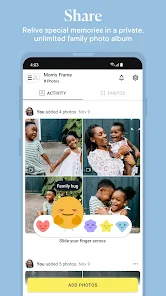
Once you're logged in, the main thing you do is add photos. You can either pick from your camera roll directly or let the app auto-sync from things like Google Photos or Facebook. For everyday use, you just tap the big plus button at the bottom, select a batch of images, and they get sent to whatever Aura frame you own. The interface moves fast, and there's no weird loading lag. I did run into a small annoyance where the app doesn't sort photos by date very well unless you manually adjust them. You can also invite family members to upload their own pictures, which makes it feel less like a one-person project and more like a shared family device. The app nudges you with occasional notifications asking if you “want to send a photo to the frame,” which feels helpful at first but can get a bit repetitive after a week.
After using it for about two months, I think Aura Frames does one thing really well: it removes the friction of displaying photos. You don't need to curate, print, or frame anything — just tap and it shows up. Who's gonna love this? Probably grandparents who miss seeing grandkids often, or anyone who likes having rotating memories without effort. Who might skip it? People who already use Google Nest Hub or Amazon Echo Show as a photo slideshow — those devices do similar stuff for less money. The app itself is well-made and stable, but after the novelty wears off, I found myself sending fewer photos each week. Some might end up uninstalling if they realize it only really shines when you own the Aura hardware. That said, for what it does, it's noticeably smoother than other digital frame apps I've tried, like Nixplay or Skylight.
features
- 🧩 Remote uploading from anywhere — No need to be in the same room as the frame. You can send photos from your phone while you're on vacation or at work, and they appear instantly. Competing apps like Nixplay also offer this, but Aura handles it faster with less delay.
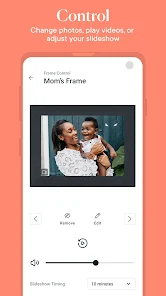
- 🧩 Auto-playback and curated slideshows — The app doesn't just dump your photos in random order. It automatically adjusts brightness and orientation, and it can even detect the best parts of a photo to avoid awkward cropping. Google Photos on a Nest Hub does this too, but Aura feels more polished because it was designed specifically for displaying pictures.
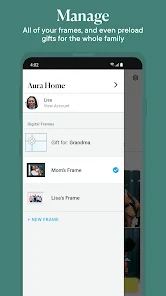
- 🧩 Family sharing without hassle — You can invite multiple people to contribute to the same frame, and everyone gets their own “channel.” If my mom uploads baby photos and I upload travel shots, they don't get mixed up in one messy album. Some apps like Skylight make you manage shared libraries manually, which gets annoying real quick.
pros
- ✅ Super easy setup — You literally plug in the frame and scan a QR code from the app. The whole thing takes under five minutes. Nixplay's setup process is more finicky and requires typing in a long code.
- ✅ High-quality display rendering — The app actually processes your photos to look good on the frame's screen. Skin tones stay natural, and dark photos get lifted slightly so you can see details. Most other frame apps just send the raw file and hope for the best.
- ✅ Responsive customer support inside the app — If your frame disconnects or a photo doesn't appear, you can start a chat directly from the settings menu. I had a minor sync issue once, and they replied within an hour. Nixplay's support often takes a full day.
cons
- ❌ App feels hollow without the physical frame — If you download this app expecting it to turn your phone into a photo display, you'll be disappointed. It's purely a remote control for the hardware. Skylight at least lets you use the app alone to preview slideshows.
- ❌ No built-in photo editing tools — You can't crop, adjust, or filter images directly inside the app. If a photo is poorly lit or rotated weirdly, you have to edit it in your phone's gallery first. Nixplay offers basic editing features within the app itself.
- ❌ Occasional notification spam — The app sends too many “Hey, it's been a while since you sent a photo” reminders. I get that it wants engagement, but after the third time in a week, it starts feeling pushy compared to the less intrusive approach from Google Photos.
Articles
![]()
Guide
How to Update Google Play Store on Android 2026
![]()
Guide
How to Download Older Versions of Android Apps
![]()
Guide
How to Download Apps Without Google Play Store
![]()
Guide
What Is an APK File for Android?
If you use an Android phone, you may have seen the term APK while searching for apps or games online. Some websites offer an APK download instead of a Google Play install button. Some users also mention APK files when talking about apps that are not available in their region, older app versions, or Android games downloaded outside the Play Store.
![]()
Guide
How to Install Games from Google Play for Beginners
Installing games on an Android phone is usually simple, but for beginners, the process can still feel confusing at first. You may not know where to search, which button to tap, whether the game is safe, or why Google Play sometimes asks for account settings, storage access, or payment information. If you are using an Android phone for the first time, learning how to install games from Google Play is one of the easiest ways to get started.
![]()
Guide
How Useful Gemini Is for Everyday Questions and Quick Tasks
emini feels different from many AI apps because it is not only trying to be a chatbot. After using it for everyday questions, quick writing, image understanding, and planning, I think its biggest strength is convenience.
![]()
Guide
What to Know Before Downloading APKs
For many Android users, downloading an APK is a common way to install apps and games. Sometimes an app is not available in a certain country.
![]()
Guide
ChatGPT Review: Is It Still the Best AI App in 2026?
![]()
Guide
Seedance 2.0 vs Sora: The Future of AI Video Generation
The AI video race has intensified dramatically over the past two years. Platforms like Sora from OpenAI and Luma Dream Machine pushed the boundaries of text-to-video realism. Yet, despite their impressive outputs, most tools still operate as probabilistic generators—you describe a scene, and the model interprets it. Control remains limited. With the February 2026 release of Seedance 2.0, developed by ByteDance, the paradigm shifted. Internally known as Jimeng 2.0, Seedance does not position itself as just another video model. It positions itself as an AI Director. Rather than guessing what you want, Seedance 2.0 allows you to direct what happens. This distinction defines everything that follows.









Recommended Apps
![]()
Home Design 3D
Anuman4.2
![]()
Truth or Dare Game - Party App
Chouic4.8
![]()
Photo Collage Maker
Scoompa4.7![]()
Learn to Draw Flower
Creative APPS4.2![]()
FIFA World Cup 2026™
FIFA2.8![]()
Mirror Plus: Mirror with Light
Digitalchemy, LLC4.4![]()
Meitu- Photo Editor & AI Art
Meitu (China) Limited4.5![]()
Perplexity - Ask Anything
PerplexityAI4.7![]()
GhostTube SLS Camera Alternate
GhostTube4![]()
Boom Chip Blast: 2-Player
Black Pyramid 3D Games Studio0![]()
Healthy Benefits+
Solutran, Inc.4.5![]()
Deepcheck AI Search Assistant
rohe.ai4![]()
Idol Prank Video Call & Chat
LightCode Solutions4![]()
Face Shape - Pretty Scale
GlintTec Apps3.9![]()
Plant App - Plant Identifier
ScaleUp4.6












































