

Moises: The Musician's AI App

50M+
Installs
Moises Systems
Developer
-
Entertainment
Category
-
Everyone
Content Rating
-
playstore@moises.ai
Developer Email
-
https://app.moises.ai/privacy
Privacy Policy
Screenshots

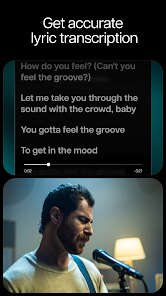
editor reviews
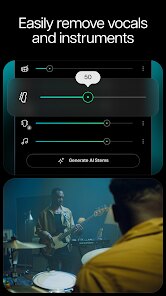
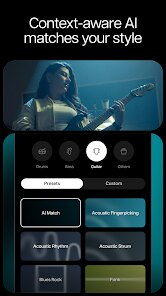
For musicians looking to isolate instruments, adjust tempos, or extract chord progressions from audio files, Moises: The Musician's AI App provides a surprisingly capable toolkit. Available on Google Play, this application uses artificial intelligence to analyze uploaded songs and separate them into individual stems like vocals, drums, bass, and other instruments. The free version offers a reasonable set of basic features, though a subscription unlocks higher audio quality and more extensive processing. Many users download and install the app expecting a novelty tool, only to discover it works well enough for serious practice sessions.
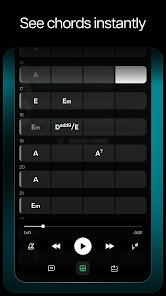
Getting started involves selecting a track from your device or streaming services, after which the AI processes it within a few seconds. Users can then mute specific instrument tracks, change the playback speed without affecting pitch, or apply a metronome. I found the stem separation quite clean for most modern recordings, though older or denser mixes occasionally produced artifacts. The chord detection feature highlights progressions in real-time, which helps when learning songs by ear. The interface keeps things straightforward, with each tool accessible from the main player screen, so switching between functions feels intuitive.
Compared to other stem separation tools like Vocal Remover or LALAL.AI, Moises feels more like a complete practice ecosystem rather than just a one-function utility. While some rivals offer slightly cleaner separation for certain genres, Moises balances strong AI performance with features like tempo adjustment and a built-in recorder for capturing rehearsals. The mobile interface also outshines many desktop alternatives for quick, on-the-go use. Personally, I found the app more comfortable for everyday practice than more complex DAW-based methods, even if professionals might still prefer a full editing suite for critical work.
features
- The AI stem quality performs admirably across pop, rock, and electronic genres but can struggle with acoustic recordings or live tracks. Bass separation tends to be cleaner than vocal extraction, which sometimes retains minor artifacts. Using the premium tier noticeably reduces these imperfections compared to the free tier.
- Chord detection works well for simple progressions but occasionally misidentifies jazzy or extended chords. The feature displays labels in real time as the song plays, which helps when trying to learn a piece quickly. Compared to similar features in apps like Chordify, Moises feels more responsive and accurately follows key changes.
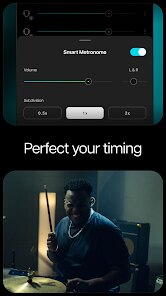
- The smart metronome adapts to tempo changes in a song's timeline, which proved useful for practicing tracks with fluctuating speeds. This differs from standard metronome apps that require manual tapping to find the beat. The visual waveform display also shows where tempo shifts occur.
- Smart tempo adjustment allows slowing a track to 50% speed without chipmunk effects, making difficult passages more manageable. I tested this with a fast metal segment and the result remained usable down to 60% speed before noticing slight wobble.
pros
- Practicing solos becomes easier when isolating guitar or vocal stems, as hearing only the target part helps focus on technique rather than getting lost in the full mix.
- Learning songs by ear improves with chord detection showing likely progressions, reducing time spent hunting for notes on an instrument.
- Jamming with others works better when exporting stems for sharing, allowing band members to rehearse individual parts without the full track.
- Recording covers becomes straightforward when importing a separated track minus the lead instrument, providing a clean backing without needing complex studio setup.
cons
- Free tier limits monthly processing to 5 tracks, which runs out quickly for heavy users who might need a subscription for regular practice.
- Cloud upload required for processing means tracks cannot be processed offline, which can be inconvenient in areas with poor connectivity or during travel.
- Occasional mislabeling of instruments occurs with unconventional arrangements, such as labeling synth pads as vocals or missing percussion in sparse mixes.
- Audio export quality drops noticeably compared to the in-app playback, which defeats the purpose for users wanting to produce polished practice tracks for later use.
Articles
![]()
Guide
How to Update Google Play Store on Android 2026
![]()
Guide
How to Download Older Versions of Android Apps
![]()
Guide
How to Download Apps Without Google Play Store
![]()
Guide
What Is an APK File for Android?
If you use an Android phone, you may have seen the term APK while searching for apps or games online. Some websites offer an APK download instead of a Google Play install button. Some users also mention APK files when talking about apps that are not available in their region, older app versions, or Android games downloaded outside the Play Store.
![]()
Guide
How to Install Games from Google Play for Beginners
Installing games on an Android phone is usually simple, but for beginners, the process can still feel confusing at first. You may not know where to search, which button to tap, whether the game is safe, or why Google Play sometimes asks for account settings, storage access, or payment information. If you are using an Android phone for the first time, learning how to install games from Google Play is one of the easiest ways to get started.
![]()
Guide
How Useful Gemini Is for Everyday Questions and Quick Tasks
emini feels different from many AI apps because it is not only trying to be a chatbot. After using it for everyday questions, quick writing, image understanding, and planning, I think its biggest strength is convenience.
![]()
Guide
What to Know Before Downloading APKs
For many Android users, downloading an APK is a common way to install apps and games. Sometimes an app is not available in a certain country.
![]()
Guide
ChatGPT Review: Is It Still the Best AI App in 2026?
![]()
Guide
Seedance 2.0 vs Sora: The Future of AI Video Generation
The AI video race has intensified dramatically over the past two years. Platforms like Sora from OpenAI and Luma Dream Machine pushed the boundaries of text-to-video realism. Yet, despite their impressive outputs, most tools still operate as probabilistic generators—you describe a scene, and the model interprets it. Control remains limited. With the February 2026 release of Seedance 2.0, developed by ByteDance, the paradigm shifted. Internally known as Jimeng 2.0, Seedance does not position itself as just another video model. It positions itself as an AI Director. Rather than guessing what you want, Seedance 2.0 allows you to direct what happens. This distinction defines everything that follows.









Recommended Apps
![]()
Home Design 3D
Anuman4.2
![]()
Truth or Dare Game - Party App
Chouic4.8
![]()
Photo Collage Maker
Scoompa4.7![]()
Learn to Draw Flower
Creative APPS4.2![]()
FIFA World Cup 2026™
FIFA2.8![]()
Mirror Plus: Mirror with Light
Digitalchemy, LLC4.4![]()
Meitu- Photo Editor & AI Art
Meitu (China) Limited4.5![]()
Perplexity - Ask Anything
PerplexityAI4.7![]()
GhostTube SLS Camera Alternate
GhostTube4![]()
Boom Chip Blast: 2-Player
Black Pyramid 3D Games Studio0![]()
Healthy Benefits+
Solutran, Inc.4.5![]()
Deepcheck AI Search Assistant
rohe.ai4![]()
Idol Prank Video Call & Chat
LightCode Solutions4![]()
Face Shape - Pretty Scale
GlintTec Apps3.9![]()
Plant App - Plant Identifier
ScaleUp4.6












































