

Booking.com: Hotels and more

500M+
Installs
Booking.com Hotels & Vacation Rentals
Developer
-
Travel & Local
Category
-
Rated for 3+
Content Rating
-
customer.service@booking.com
Developer Email
-
http://www.booking.com/content/privacy.html
Privacy Policy
Screenshots


editor reviews
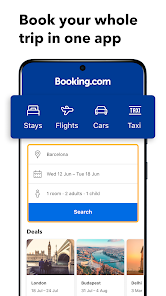
I first grabbed Booking.com because I was planning a last-minute trip and needed a place to stay that wasn't going to totally drain my wallet. It's basically a one-stop shop for hotels, vacation rentals, and even flight and car rental bookings. Downloading it from the Google Play Store was straightforward, and it's a free app to install, though you obviously pay for the actual reservations. The first thing I noticed after opening it was the sheer amount of listings and filters — it felt a bit overwhelming at first, like walking into a massive warehouse. You have to enter your destination and dates right away, so it's very transactional from the get-go, and there isn't much of a welcome tour to ease you in.
Once I got past the initial shock, the actual experience was pretty solid. You start by typing where you want to go, pick your dates, and then you're hit with a page full of options. The interface is clean, but the real trick is using the filter button to narrow things down by price, rating, or distance from the city center. I spent most of my time scrolling through photos and reading recent guest reviews, which are clearly labeled by date. The booking process itself was smooth — it only took a couple of taps to reserve a room, and the confirmation popped up instantly. One small thing that threw me off was how the app sometimes changes the price when you switch from one property to another, so you have to double-check the final total before you commit.
After using it for a few weeks to plan a short getaway, I think it's a solid tool if you're the type who likes comparing dozens of options before making a call. The variety is honestly its biggest draw — you can find anything from a cheap hostel to a five-star resort. That said, it's not for everyone. If you just want a quick, no-fuss booking, kayak or Hotels.com might feel less cluttered because they don't throw as many filters at you. I kept Booking.com installed mainly because it has that "Genius" loyalty program that sometimes gives you a small discount or free breakfast after a few stays. But honestly, if you don't travel often, it might just take up space on your phone.
features
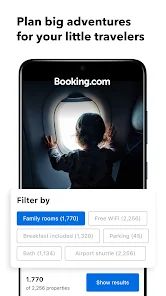
- 🔍 Search and Filter Power: The app is a beast when it comes to narrowing down choices. You can filter by price range, star rating, property type, even specific amenities like free Wi-Fi or a pool. Compared to Airbnb, which is a bit more vague with its search, Booking.com lets you really drill down to exactly what you need.
- 🏨 Instant Booking and Confirmation: Once you pick a place, the booking is almost always instant, and you get a clear confirmation with all the details. This feels way more reliable than Hotels.com, where some listings still make you wait for the property to confirm your reservation, which can be nerve-wracking.
- 📋 Real Guest Reviews: The reviews are front and center, and you can sort them by date or by language. They also show a helpful summary of what guests liked and disliked most. This beats Kayak's review system, where the scores feel more generic and less tied to specific opinions.
pros
- 🏡 Massive Selection of Options: Booking.com covers everything from big hotel chains to cute vacation rentals. This beats Airbnb because you can search across both types of stays in one go, without needing two separate apps. It's super convenient for a trip where you might want a hotel for a night and then a cabin.
- 💰 Price Transparency: The app usually shows the total price including taxes and fees upfront, which is a huge relief. Hotels.com is often guilty of hiding those extra charges until you're about to pay, so Booking.com feels more honest from the start.
- 📱 User-Friendly Interface: The app is well-organized, with a clear layout that makes it easy to swipe through photos and read details. Expedia can feel a bit crowded with too many buttons and ads, but Booking.com keeps the focus on the listings themselves.
cons
- 🔄 Inconsistent Pricing as You Browse: A big frustration is that when you look at one property and then go back to the list, the prices sometimes change without any clear reason. This is something Hotels.com does better — their prices tend to stay stable during a session.
- 📧 Too Many Email Notifications: After booking one room, the app will spam you with emails about other deals and suggestions. It's too pushy compared to Airbnb, which only sends you updates about your actual trip. I had to turn off notifications right away.
- 🗺️ Map View Can Be Clunky: The integrated map feature sometimes lags or doesn't load properly, especially when you have many listings. Kayak's map is smoother and more responsive, making it easier to see where everything is located.
- 🕒 Slow Customer Support: When I had a minor issue with a cancellation, getting help through the in-app chat took ages. Expedia's customer service is much faster, with a 24/7 hotline that actually gets you a real person quickly.
Articles
![]()
Guide
How to Update Google Play Store on Android 2026
![]()
Guide
How to Download Older Versions of Android Apps
![]()
Guide
How to Download Apps Without Google Play Store
![]()
Guide
What Is an APK File for Android?
If you use an Android phone, you may have seen the term APK while searching for apps or games online. Some websites offer an APK download instead of a Google Play install button. Some users also mention APK files when talking about apps that are not available in their region, older app versions, or Android games downloaded outside the Play Store.
![]()
Guide
How to Install Games from Google Play for Beginners
Installing games on an Android phone is usually simple, but for beginners, the process can still feel confusing at first. You may not know where to search, which button to tap, whether the game is safe, or why Google Play sometimes asks for account settings, storage access, or payment information. If you are using an Android phone for the first time, learning how to install games from Google Play is one of the easiest ways to get started.
![]()
Guide
How Useful Gemini Is for Everyday Questions and Quick Tasks
emini feels different from many AI apps because it is not only trying to be a chatbot. After using it for everyday questions, quick writing, image understanding, and planning, I think its biggest strength is convenience.
![]()
Guide
What to Know Before Downloading APKs
For many Android users, downloading an APK is a common way to install apps and games. Sometimes an app is not available in a certain country.
![]()
Guide
ChatGPT Review: Is It Still the Best AI App in 2026?
![]()
Guide
Seedance 2.0 vs Sora: The Future of AI Video Generation
The AI video race has intensified dramatically over the past two years. Platforms like Sora from OpenAI and Luma Dream Machine pushed the boundaries of text-to-video realism. Yet, despite their impressive outputs, most tools still operate as probabilistic generators—you describe a scene, and the model interprets it. Control remains limited. With the February 2026 release of Seedance 2.0, developed by ByteDance, the paradigm shifted. Internally known as Jimeng 2.0, Seedance does not position itself as just another video model. It positions itself as an AI Director. Rather than guessing what you want, Seedance 2.0 allows you to direct what happens. This distinction defines everything that follows.









Recommended Apps
![]()
Home Design 3D
Anuman4.2
![]()
Truth or Dare Game - Party App
Chouic4.8
![]()
Photo Collage Maker
Scoompa4.7![]()
Learn to Draw Flower
Creative APPS4.2![]()
FIFA World Cup 2026™
FIFA2.8![]()
Mirror Plus: Mirror with Light
Digitalchemy, LLC4.4![]()
Meitu- Photo Editor & AI Art
Meitu (China) Limited4.5![]()
Perplexity - Ask Anything
PerplexityAI4.7![]()
GhostTube SLS Camera Alternate
GhostTube4![]()
Boom Chip Blast: 2-Player
Black Pyramid 3D Games Studio0![]()
Healthy Benefits+
Solutran, Inc.4.5![]()
Deepcheck AI Search Assistant
rohe.ai4![]()
Idol Prank Video Call & Chat
LightCode Solutions4![]()
Face Shape - Pretty Scale
GlintTec Apps3.9![]()
Plant App - Plant Identifier
ScaleUp4.6











































