

Emoji Home: Make Messages Fun

5M+
Installs
Emoji Home
Developer
-
Productivity
Category
-
Rated for 12+
Content Rating
-
emojihomeapp@gmail.com
Developer Email
-
https://myhomeapps.com/legal/privacy.html
Privacy Policy
Screenshots


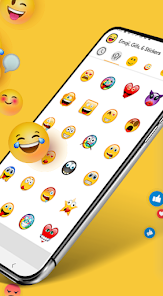
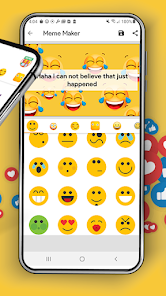
editor reviews
Emoji Home is a keyboard app you grab from the Play Store to stick fun emojis, stickers, and GIFs into your texts. It's made by Emoji Home and works as a direct install from Google Play, completely free with no forced login, though there are optional in-app purchases to unlock extra sticker packs and you'll spot some banner ads now and then. I downloaded it because my default keyboard's emoji selection felt boring and limited, and I wanted something with more personality for chatting with friends. The first impression after tapping it open was a colorful, cartoonish interface that feels a bit overwhelming at first, but it quickly shows your most used emojis upfront, which is a nice touch.
Once you start typing, the hands-on experience is pretty straightforward. The app integrates as a separate keyboard, so you have to switch to it in your system settings, which took me a minute to figure out. After that, you're greeted with a clean row of emoji categories at the bottom, and tapping any category expands a grid of options. The main workflow is tapping an emoji to copy it, then pasting into your chat app, but there's also a direct send button that works with some messaging apps. I found the sticker search feature handy when I was looking for a specific reaction, though the load times for sticker packs can be a bit sluggish. One small tip is to turn off sound effects in the settings, because the default click noises get annoying fast.
After using Emoji Home for a while, I think it's great for people who love spicing up their messages with visuals and don't mind an extra keyboard switch. It's different from Gboard or SwiftKey because it focuses purely on emojis and stickers rather than predictive text or swipe typing, which makes it feel more like a toy than a tool. Someone who just wants basic emojis might not need it, but if you're into custom sticker packs and want variety beyond the standard set, it's worth a try. I kept it installed because it's fun for casual chats, but I could see uninstalling it if the ads get too intrusive or if I find a similar app with faster performance.
features
- 😊 Emoji Home's standout feature is its massive library of animated stickers and custom emoji packs that you can browse by mood or event. Compared to Gboard, which offers standard emojis and some stickers, Emoji Home gives you way more variety, especially for holidays and memes. The animated effects make conversations feel livelier, though it does require a bit of patience to load all the packs.
- 😊 The copy-and-paste workflow is simple and universal, working with any app you use for messaging. Unlike SwiftKey's built-in sticker system that sometimes feels clunky, Emoji Home lets you copy an emoji quickly and paste it right into WhatsApp, Telegram, or even Twitter. It's not as smooth as an in-app keyboard, but it gets the job done across different platforms without compatibility issues.
- 😊 The search bar for stickers is a huge time-saver when you need a specific reaction fast. For example, typing "happy birthday" instantly shows related stickers, which is more efficient than scrolling through categories like you'd do on Facebook Messenger's sticker store. It's not perfect since the search sometimes misses niche terms, but it's better than nothing.
pros
- 🌟 Emoji Home is totally free to download and use, unlike many sticker apps that lock premium packs behind a paywall. You can access a decent collection without spending a dime, which is a big plus compared to something like Bitmoji, where you feel pressured to buy extra outfits or accessories.
- 🌟 The app updates regularly with new emoji packs based on current trends or seasons. I noticed new Halloween and Christmas packs arriving without me having to manually update, whereas apps like Textra or Kika Keyboard often have stale libraries that don't refresh as often.
- 🌟 The interface is colorful and beginner-friendly, with big icons and clear labels for each category. Compared to the cluttered design of some third-party keyboards, Emoji Home makes it easy even for non-techy users to find what they need without getting lost in menus.
cons
- ⚠️ The ads are a major downside; they pop up as full-screen banners when you switch packs or browse categories, which can interrupt your flow. Gboard doesn't have ads at all, and even SwiftKey only shows minimal ones in the free version, so this feels intrusive.
- ⚠️ You have to manually switch to the Emoji Home keyboard from your default one, and it doesn't always integrate smoothly with all apps. For example, copying an emoji in Snapchat sometimes takes two tries, whereas Bitmoji works directly within Snapchat without extra steps.
- ⚠️ The load times for sticker packs can be slow, especially if your internet connection isn't strong. I've waited several seconds for a pack to load, which defeats the purpose of a quick reaction, and this lag isn't an issue with stock keyboard emojis that load instantly.
- ⚠️ Some premium sticker packs are quite pricey for what they offer, costing a few dollars each for essentially animated images. Compared to Telegram's free and vast sticker store, Emoji Home's paid packs feel overpriced, and you might question if they're worth the money.
Articles
![]()
Guide
How to Update Google Play Store on Android 2026
![]()
Guide
How to Download Older Versions of Android Apps
![]()
Guide
How to Download Apps Without Google Play Store
![]()
Guide
What Is an APK File for Android?
If you use an Android phone, you may have seen the term APK while searching for apps or games online. Some websites offer an APK download instead of a Google Play install button. Some users also mention APK files when talking about apps that are not available in their region, older app versions, or Android games downloaded outside the Play Store.
![]()
Guide
How to Install Games from Google Play for Beginners
Installing games on an Android phone is usually simple, but for beginners, the process can still feel confusing at first. You may not know where to search, which button to tap, whether the game is safe, or why Google Play sometimes asks for account settings, storage access, or payment information. If you are using an Android phone for the first time, learning how to install games from Google Play is one of the easiest ways to get started.
![]()
Guide
How Useful Gemini Is for Everyday Questions and Quick Tasks
emini feels different from many AI apps because it is not only trying to be a chatbot. After using it for everyday questions, quick writing, image understanding, and planning, I think its biggest strength is convenience.
![]()
Guide
What to Know Before Downloading APKs
For many Android users, downloading an APK is a common way to install apps and games. Sometimes an app is not available in a certain country.
![]()
Guide
ChatGPT Review: Is It Still the Best AI App in 2026?
![]()
Guide
Seedance 2.0 vs Sora: The Future of AI Video Generation
The AI video race has intensified dramatically over the past two years. Platforms like Sora from OpenAI and Luma Dream Machine pushed the boundaries of text-to-video realism. Yet, despite their impressive outputs, most tools still operate as probabilistic generators—you describe a scene, and the model interprets it. Control remains limited. With the February 2026 release of Seedance 2.0, developed by ByteDance, the paradigm shifted. Internally known as Jimeng 2.0, Seedance does not position itself as just another video model. It positions itself as an AI Director. Rather than guessing what you want, Seedance 2.0 allows you to direct what happens. This distinction defines everything that follows.









Recommended Apps
![]()
Home Design 3D
Anuman4.2
![]()
Truth or Dare Game - Party App
Chouic4.8
![]()
Photo Collage Maker
Scoompa4.7![]()
Learn to Draw Flower
Creative APPS4.2![]()
FIFA World Cup 2026™
FIFA2.8![]()
Mirror Plus: Mirror with Light
Digitalchemy, LLC4.4![]()
Meitu- Photo Editor & AI Art
Meitu (China) Limited4.5![]()
Perplexity - Ask Anything
PerplexityAI4.7![]()
GhostTube SLS Camera Alternate
GhostTube4![]()
Boom Chip Blast: 2-Player
Black Pyramid 3D Games Studio0![]()
Healthy Benefits+
Solutran, Inc.4.5![]()
Deepcheck AI Search Assistant
rohe.ai4![]()
Idol Prank Video Call & Chat
LightCode Solutions4![]()
Face Shape - Pretty Scale
GlintTec Apps3.9![]()
Plant App - Plant Identifier
ScaleUp4.6











































