

Photoshop Express Photo Editor

100M+
Installs
Adobe
Developer
-
Video Players & Editors
Category
-
Rated for 3+
Content Rating
-
PSX-Feedback-Android@adobe.com
Developer Email
-
http://www.adobe.com/privacy/policy.html
Privacy Policy
Screenshots

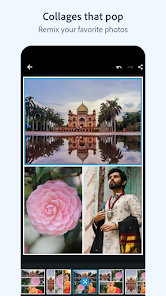
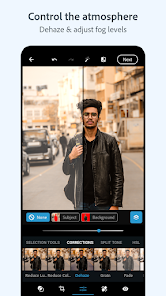
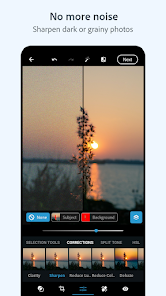
editor reviews
Photoshop Express Photo Editor is Adobe's streamlined mobile photo editing app, designed for quick fixes and creative touches on the go. Unlike its desktop big brother, this app focuses on essential adjustments rather than full-blown graphic design. A lot of people download it from Google Play or the App Store because they want reliable color correction, cropping, and effects without opening a laptop. The first impression after launching it is honestly a bit busy — you get a camera icon, a collage tool, and a big "Edit" button staring at you, which can feel overwhelming if you just wanted to brighten a selfie. It's free to install, and while there are in-app purchases for premium features like noise reduction and heal tools, the basic editing suite doesn't require a cent. I noticed the app has over 100 million installs on Android alone, so clearly, Adobe's reputation pulls people in.
Once you actually start using it, the flow is more straightforward than the initial screen suggests. You tap "Edit," pick a photo from your gallery, and you're greeted with a toolbar at the bottom: Crop, Adjust, Looks, and Details. The Adjust tab is where I spent most of my time — sliders for exposure, contrast, and saturation are responsive and smooth, unlike some clunkier free editors. The "Auto Fix" button is a lifesaver when you're in a hurry, though it sometimes oversaturates greens. The onboarding doesn't explain much, so I had to figure out that tapping the checkmark commits your changes rather than saving the file. A neat practical tip: you can long-press the image at any point to see the "before" version, which makes it easy to compare your tweaks. The interface occasionally lags when applying high-res filters, which was frustrating during a quick edit session before dinner.
After using it for a few weeks, I think Photoshop Express is best for casual photographers who want Adobe-grade results without the subscription commitment of Lightroom. It's not great for people who need layer-based editing or masking — that kind of depth is missing here. Compared to something like Snapseed, which feels more intuitive and simpler, Photoshop Express wins in the filter variety department but loses in sheer workflow speed. The uncrop and perspective correction tools are surprisingly good for a free app, and that's what kept me from uninstalling it after a month. But the persistent ads for Adobe's other products do get annoying, especially when you're just trying to export a picture. I could see someone sticking with it if they already use Adobe's ecosystem, but for a one-off edit, it's easier to grab something less demanding.
features
- ✏️ Adobe Photoshop Express offers a solid set of editing tools like crop, rotate, straighten, and flip, but its standout is the "Heal" tool that removes blemishes or objects — something Snapseed's "Healing" does well too, but Adobe's version feels more precise. The "Auto Fix" button instantly adjusts lighting and color, which is great for beginners, while Lightroom mobile has a similar feature but requires more manual tweaking. Honestly, the "Looks" filters are where it shines — you get over 30 professional presets, and they apply faster than similar ones in VSCO, which sometimes takes a second to render. The raw file support is another plus, letting you edit DNG images directly, though it's not as robust as Lightroom's raw editor. Overall, the outstanding feature has to be the "Defog" tool — it clears up hazy skies in travel photos better than any other mobile editor I've tried.
pros
- 👍 One big strength is that it's completely free to start — no subscription is required for basic edits, which isn't the case with Lightroom mobile, where many features are locked behind a paywall. The integration with Adobe Creative Cloud is also handy; you can start editing on your phone and finish in Photoshop on a computer, something Snapseed can't offer at all. The interface is surprisingly stable across different screen sizes, unlike some editors that get clunky on tablets. I also appreciate that it saves multiple undo steps, so you can backtrack without losing your work — a feature that's missing in simpler apps like Pixlr.
cons
- 👎 A notable weakness is the heavy reliance on in-app purchases — features like noise reduction and selective adjustments cost extra, which feels greedy compared to Snapseed, which offers those for free. The app also pushes Adobe subscriptions aggressively, with pop-up ads for Lightroom and Photoshop after almost every export. Another downside is the lack of layers or masks, which limits creative control; even the free app PicsArt gives you layer support. Lastly, the app can drain battery quickly during extended editing sessions, especially on older phones, while competitors like PhotoDirector are more power-efficient.
Articles
![]()
Guide
How to Update Google Play Store on Android 2026
![]()
Guide
How to Download Older Versions of Android Apps
![]()
Guide
How to Download Apps Without Google Play Store
![]()
Guide
What Is an APK File for Android?
If you use an Android phone, you may have seen the term APK while searching for apps or games online. Some websites offer an APK download instead of a Google Play install button. Some users also mention APK files when talking about apps that are not available in their region, older app versions, or Android games downloaded outside the Play Store.
![]()
Guide
How to Install Games from Google Play for Beginners
Installing games on an Android phone is usually simple, but for beginners, the process can still feel confusing at first. You may not know where to search, which button to tap, whether the game is safe, or why Google Play sometimes asks for account settings, storage access, or payment information. If you are using an Android phone for the first time, learning how to install games from Google Play is one of the easiest ways to get started.
![]()
Guide
How Useful Gemini Is for Everyday Questions and Quick Tasks
emini feels different from many AI apps because it is not only trying to be a chatbot. After using it for everyday questions, quick writing, image understanding, and planning, I think its biggest strength is convenience.
![]()
Guide
What to Know Before Downloading APKs
For many Android users, downloading an APK is a common way to install apps and games. Sometimes an app is not available in a certain country.
![]()
Guide
ChatGPT Review: Is It Still the Best AI App in 2026?
![]()
Guide
Seedance 2.0 vs Sora: The Future of AI Video Generation
The AI video race has intensified dramatically over the past two years. Platforms like Sora from OpenAI and Luma Dream Machine pushed the boundaries of text-to-video realism. Yet, despite their impressive outputs, most tools still operate as probabilistic generators—you describe a scene, and the model interprets it. Control remains limited. With the February 2026 release of Seedance 2.0, developed by ByteDance, the paradigm shifted. Internally known as Jimeng 2.0, Seedance does not position itself as just another video model. It positions itself as an AI Director. Rather than guessing what you want, Seedance 2.0 allows you to direct what happens. This distinction defines everything that follows.









Recommended Apps
![]()
Home Design 3D
Anuman4.2
![]()
Truth or Dare Game - Party App
Chouic4.8
![]()
Photo Collage Maker
Scoompa4.7![]()
Learn to Draw Flower
Creative APPS4.2![]()
FIFA World Cup 2026™
FIFA2.8![]()
Mirror Plus: Mirror with Light
Digitalchemy, LLC4.4![]()
Meitu- Photo Editor & AI Art
Meitu (China) Limited4.5![]()
Perplexity - Ask Anything
PerplexityAI4.7![]()
GhostTube SLS Camera Alternate
GhostTube4![]()
Boom Chip Blast: 2-Player
Black Pyramid 3D Games Studio0![]()
Healthy Benefits+
Solutran, Inc.4.5![]()
Deepcheck AI Search Assistant
rohe.ai4![]()
Idol Prank Video Call & Chat
LightCode Solutions4![]()
Face Shape - Pretty Scale
GlintTec Apps3.9![]()
Plant App - Plant Identifier
ScaleUp4.6











































