
Prisma Art Effect Photo Editor

50M+
Installs
Prisma Labs, Inc.
Developer
-
Video Players & Editors
Category
-
Rated for 3+
Content Rating
-
contact@prisma-ai.com
Developer Email
-
http://prisma-ai.com/privacy.html
Privacy Policy
Screenshots
editor reviews
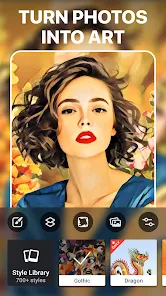
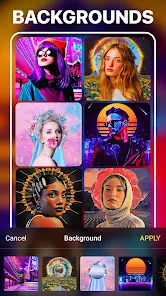
Prisma is a photo editing app that uses AI to transform your regular photos into artwork that looks like it was painted by famous artists or filtered through cool, abstract styles. It's the kind of app you grab when you want to turn a simple selfie or a landscape shot into something that looks like a Van Gogh or a Picasso piece. I downloaded it from the Google Play store after seeing a friend's Instagram post that had that signature dreamy, oil-painting look. The install size was pretty small, and it's free to download, though I noticed a few in-app purchase prompts almost right away. My first impression after launching it was a clean, minimal interface with a big “Get Started” button. No annoying sign-up wall, which I really appreciated. The app did ask for camera and gallery permissions, which felt standard, but there was a subtle nudge to try the premium version for better resolution exports.
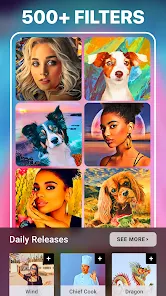
Once I started using it, the experience was pretty straightforward. You pick a photo from your gallery or snap a new one, and then you scroll through a grid of art styles. There are hundreds of filters here, from “Mosaic” to “Comic” to “Sketch,” and each one processes the image in a few seconds. The processing time was surprisingly fast on my phone, maybe three to five seconds per style. I liked that you can adjust the intensity of the filter after it applies, which is a neat touch because some styles can be overwhelming. The interface is swipe-based, so you just scroll up and down to preview styles, and tap to apply. One small tip I found useful was to use photos with clear subjects and high contrast, because the AI works best when it can distinguish between foreground and background. I did hit a couple of confusing moments, though. For instance, the app sometimes freezes when you try to compare the original with the edited version in split-screen mode, and I had to force close and restart. But overall, the flow felt natural for a casual user who just wants a quick artistic edit.
After using Prisma for a few weeks, I think it's a solid tool for anyone who likes to post creative photos on social media or just experiment with art. It's not something I'd use for serious photo editing like adjusting exposure or removing blemishes, because it's all about style transfer. If you want detailed retouching, apps like Adobe Lightroom or Snapseed are much better. But for that unique artistic look, Prisma stands out because it's dedicated to just that one thing, whereas other apps do art filters as an afterthought. I can see someone keeping it installed if they regularly share art-inspired posts, but I can also see someone uninstalling it if they only used it once or twice. The premium upsells can get a bit annoying, especially since the free version limits export resolution to 960 px wide. Still, for a free app, it's worth trying, especially if you're into that painterly vibe.
features
- 🎨 AI Style Transfer: The core feature is the AI-driven filter that mimics styles from artists like Picasso, Monet, or pop art. Unlike apps like PicsArt or Canva that offer simple overlays, Prisma actually analyzes your image and redraws it with brush strokes or abstract textures. I was blown away by how a tree photo turned into a watercolor painting with visible edge blending. The app lets you adjust the filter intensity, so you can dial it back if it looks too artificial.
- 🎨 Hundreds of Filters: There are over 300 filters categorized by mood, from “Dreams” to “Gothic” to “Cocoon.” Each one is unique, not just a color tweak. For example, the “Mosaic” filter breaks the image into stained glass pieces, while “Tokyo” adds neon glows. Compared to the 20 or so art filters in Instagram, this feels like a full art studio.
- 🎨 Real-Time Preview: You can see a low-res preview of the filter before applying it. This saves time because you don't have to wait for each full render. Other apps like FaceApp make you apply first and then undo if you hate it, so this is a nice touch. The preview loads in under a second, and it's accurate enough to decide if the style fits your photo.
pros
- 🌟 High-Quality Output: The results look genuinely artistic, not like a cheap Photoshop action. I've tested similar apps like DeepArt and Artisto, but Prisma's output has better edge detection and fewer artifacts. Even at 960 px in the free version, the detail is sharp enough for Instagram.
- 🌟 Fast Processing: Most styles process in 2-5 seconds thanks to GPU acceleration. In comparison, DeepArt can take 30 seconds to a minute per photo. This makes Prisma much more usable for batch editing.
- 🌟 No Watermark: Unlike many free photo apps that slap a logo on your image, Prisma lets you export without a watermark in the free version. That's huge, because who wants to promote an app for free? PicsArt used to do this, but now they watermark unless you pay.
cons
- ⚠️ Limited Free Resolution: The free version exports at 960 px wide, which is fine for social media but terrible for printing. Apps like Snapseed or Lightroom Mobile export at full resolution for free. If you want 4K exports, you have to pay for Prisma Premium, which feels like a cash grab.
- ⚠️ Occasional Freezes: I've experienced crashes when using the split-screen comparison feature. It's not a dealbreaker, but it's annoying when you've already selected a style. This is rare in competing apps like Afterlight or VSCO.
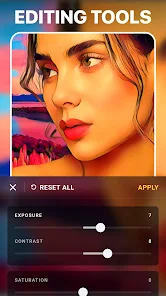
- ⚠️ No Basic Editing Tools: There's no way to adjust brightness, contrast, or crop within Prisma. You have to use another app first, which adds extra steps. Apps like PicsArt combine both editing and effects, so Prisma feels incomplete if you need just a simple crop or tune-up.
Articles
![]()
Guide
How to Update Google Play Store on Android 2026
![]()
Guide
How to Download Older Versions of Android Apps
![]()
Guide
How to Download Apps Without Google Play Store
![]()
Guide
What Is an APK File for Android?
If you use an Android phone, you may have seen the term APK while searching for apps or games online. Some websites offer an APK download instead of a Google Play install button. Some users also mention APK files when talking about apps that are not available in their region, older app versions, or Android games downloaded outside the Play Store.
![]()
Guide
How to Install Games from Google Play for Beginners
Installing games on an Android phone is usually simple, but for beginners, the process can still feel confusing at first. You may not know where to search, which button to tap, whether the game is safe, or why Google Play sometimes asks for account settings, storage access, or payment information. If you are using an Android phone for the first time, learning how to install games from Google Play is one of the easiest ways to get started.
![]()
Guide
How Useful Gemini Is for Everyday Questions and Quick Tasks
emini feels different from many AI apps because it is not only trying to be a chatbot. After using it for everyday questions, quick writing, image understanding, and planning, I think its biggest strength is convenience.
![]()
Guide
What to Know Before Downloading APKs
For many Android users, downloading an APK is a common way to install apps and games. Sometimes an app is not available in a certain country.
![]()
Guide
ChatGPT Review: Is It Still the Best AI App in 2026?
![]()
Guide
Seedance 2.0 vs Sora: The Future of AI Video Generation
The AI video race has intensified dramatically over the past two years. Platforms like Sora from OpenAI and Luma Dream Machine pushed the boundaries of text-to-video realism. Yet, despite their impressive outputs, most tools still operate as probabilistic generators—you describe a scene, and the model interprets it. Control remains limited. With the February 2026 release of Seedance 2.0, developed by ByteDance, the paradigm shifted. Internally known as Jimeng 2.0, Seedance does not position itself as just another video model. It positions itself as an AI Director. Rather than guessing what you want, Seedance 2.0 allows you to direct what happens. This distinction defines everything that follows.









Recommended Apps
![]()
Home Design 3D
Anuman4.2
![]()
Truth or Dare Game - Party App
Chouic4.8
![]()
Photo Collage Maker
Scoompa4.7![]()
Learn to Draw Flower
Creative APPS4.2![]()
FIFA World Cup 2026™
FIFA2.8![]()
Mirror Plus: Mirror with Light
Digitalchemy, LLC4.4![]()
Meitu- Photo Editor & AI Art
Meitu (China) Limited4.5![]()
Perplexity - Ask Anything
PerplexityAI4.7![]()
GhostTube SLS Camera Alternate
GhostTube4![]()
Boom Chip Blast: 2-Player
Black Pyramid 3D Games Studio0![]()
Healthy Benefits+
Solutran, Inc.4.5![]()
Deepcheck AI Search Assistant
rohe.ai4![]()
Idol Prank Video Call & Chat
LightCode Solutions4![]()
Face Shape - Pretty Scale
GlintTec Apps3.9![]()
Plant App - Plant Identifier
ScaleUp4.6












































