
Pic Stitch: Collage Maker

5M+
Installs
Maple Media
Developer
-
Video Players & Editors
Category
-
Rated for 12+
Content Rating
-
contact@maplemedia.io
Developer Email
-
https://maplemedia.io/privacy/
Privacy Policy
Screenshots

editor reviews
Pic Stitch is a collage maker app from Maple Media, sitting in the photo and video utility category on both Google Play and the App Store. People mainly use it to combine multiple photos into a single grid layout, add borders, adjust backgrounds, and sometimes apply basic filters before sharing on social media. For a normal user, the reason to download this comes down to convenience: instead of manually arranging pictures in some other editing tool, they want a quick way to throw a bunch of vacation shots or event photos together. Opening it for the first time gives a pretty straightforward impression, with a clean interface that doesn't overwhelm you with too many options right away. The install count seems healthy based on general download volumes, though exact numbers aren't stated publicly, and it's free to download. There's no forced registration when you launch the app, which is nice, but there are in-app purchases for unlocking extra layout packs and removing ads, meaning you'll see some banner ads unless you pay up.
Once you start using Pic Stitch, the hands-on experience is fairly smooth. The onboarding is minimal, basically just showing the main screen where you pick photos from your gallery or take new ones. After selecting your images, you choose a layout from a decent library of grids, ranging from simple two-photo splits to more complex five or six photo arrangements. The interface lets you pinch and zoom to reposition each photo within its frame, and you can tweak the border width and color pretty easily. A common usage step is adjusting the aspect ratio before saving, as the default sometimes crops oddly if you aren't careful. One confusing moment I ran into was figuring out how to change the background behind transparent areas in certain layouts the button for that is labeled something like "background" but tucked away in a submenu. A practical tip is to use the "fill" option to automatically zoom images to fit their frames, saving manual adjustment time. The overall flow feels decently responsive, though on older phones there can be a slight lag when applying filters.
After using Pic Stitch for a while, my personal take is that it serves its purpose well for casual users who just need quick collages without advanced editing. People who regularly share Instagram stories or Facebook albums would probably enjoy having this around, as it gets the job done fast. On the other hand, someone who wants deeper retouching or artistic blending effects would be better off with something like Adobe Photoshop Express or even Canva, since Pic Stitch is pretty limited beyond the grid layouts. What sets it apart from a similar app like Layout from Instagram is that Pic Stitch actually offers more layout variety and adjustable borders, plus it doesn't force you to post directly to one platform. However, the ad placement can be annoying during saving, and the in-app purchase model feels a bit pushy when you realize free layouts are limited. I could see why someone would keep it installed for those quick party photo compilations, but eventually uninstall it if they find a more feature-rich free alternative.
features
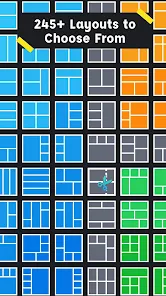
- 🎨 Layout Variety: Pic Stitch offers over 300 layout templates, which is way more than what you get in the basic Layout from Instagram app. You can mix different grid styles, including asymmetrical frames and custom aspect ratios, giving you more creative control for different social media formats.
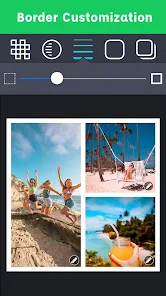
- 🖼️ Customizable Borders & Backgrounds: Unlike some collage tools that lock you into fixed white borders, this app lets you adjust border thickness, color, and pattern. You can also swap in photo backgrounds or solid colors behind the gaps, making the final image look less generic.
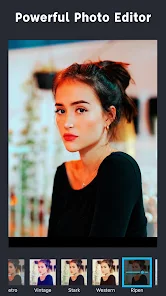
- ✂️ Photo Editing Basics: Each individual photo gets its own editing layer inside the collage, including filters, brightness, contrast, and saturation sliders. That means you don't have to jump between two separate apps to polish the images before stitching them together.
- 🔗 Direct Social Sharing: The app integrates with Instagram, Facebook, Twitter, and messaging platforms directly from the save screen. It's a small convenience, but it saves an extra step compared to apps that only save to your camera roll.
pros
- 👍 More Free Layouts Than Layout: Pic Stitch provides a much larger selection of grid options without requiring payment upfront. Layout from Instagram gives you maybe a dozen basic choices, while Pic Stitch has dozens available for free.
- 👍 Border Customization Over Canva: While Canva is great for design, its collage borders are pretty limited. Pic Stitch lets you independently control border thickness and color per layout, which is handy for matching brand colors or avoiding the plain white frame look.
- 👍 No Account Required: You don't need to sign up or log in to use the core features. That's a clear win over apps like PicsArt, which nags you to register before saving high-resolution output.
cons
- 👎 Ads Are Invasive: The free version shows banner ads at the bottom and occasional full-screen ads after saving. Layout from Instagram has zero ads, which makes Pic Stitch feel clunkier for daily use.
- 👎 Limited Advanced Editing: You won't find layers, masks, or text overlay tools here. Canva or Pixlr let you add stickers, text, and overlays alongside collage making, which Pic Stitch simply doesn't offer.
- 👎 Grid Resizing Is Clunky: When you try to manually resize individual cells by dragging dividers, it's not always smooth, sometimes snapping to preset ratios instead of freeform. This can be frustrating compared to the flexibility of PicsArt's collage mode.
- 👎 Export Quality Feels Compressed: Even at the highest resolution setting, exported images sometimes look slightly softer than the originals. For print-quality collages, this is a dealbreaker versus using Adobe Photoshop Express.
Articles
![]()
Guide
How to Update Google Play Store on Android 2026
![]()
Guide
How to Download Older Versions of Android Apps
![]()
Guide
How to Download Apps Without Google Play Store
![]()
Guide
What Is an APK File for Android?
If you use an Android phone, you may have seen the term APK while searching for apps or games online. Some websites offer an APK download instead of a Google Play install button. Some users also mention APK files when talking about apps that are not available in their region, older app versions, or Android games downloaded outside the Play Store.
![]()
Guide
How to Install Games from Google Play for Beginners
Installing games on an Android phone is usually simple, but for beginners, the process can still feel confusing at first. You may not know where to search, which button to tap, whether the game is safe, or why Google Play sometimes asks for account settings, storage access, or payment information. If you are using an Android phone for the first time, learning how to install games from Google Play is one of the easiest ways to get started.
![]()
Guide
How Useful Gemini Is for Everyday Questions and Quick Tasks
emini feels different from many AI apps because it is not only trying to be a chatbot. After using it for everyday questions, quick writing, image understanding, and planning, I think its biggest strength is convenience.
![]()
Guide
What to Know Before Downloading APKs
For many Android users, downloading an APK is a common way to install apps and games. Sometimes an app is not available in a certain country.
![]()
Guide
ChatGPT Review: Is It Still the Best AI App in 2026?
![]()
Guide
Seedance 2.0 vs Sora: The Future of AI Video Generation
The AI video race has intensified dramatically over the past two years. Platforms like Sora from OpenAI and Luma Dream Machine pushed the boundaries of text-to-video realism. Yet, despite their impressive outputs, most tools still operate as probabilistic generators—you describe a scene, and the model interprets it. Control remains limited. With the February 2026 release of Seedance 2.0, developed by ByteDance, the paradigm shifted. Internally known as Jimeng 2.0, Seedance does not position itself as just another video model. It positions itself as an AI Director. Rather than guessing what you want, Seedance 2.0 allows you to direct what happens. This distinction defines everything that follows.









Recommended Apps
![]()
Home Design 3D
Anuman4.2
![]()
Truth or Dare Game - Party App
Chouic4.8
![]()
Photo Collage Maker
Scoompa4.7![]()
Learn to Draw Flower
Creative APPS4.2![]()
FIFA World Cup 2026™
FIFA2.8![]()
Mirror Plus: Mirror with Light
Digitalchemy, LLC4.4![]()
Meitu- Photo Editor & AI Art
Meitu (China) Limited4.5![]()
Perplexity - Ask Anything
PerplexityAI4.7![]()
GhostTube SLS Camera Alternate
GhostTube4![]()
Boom Chip Blast: 2-Player
Black Pyramid 3D Games Studio0![]()
Healthy Benefits+
Solutran, Inc.4.5![]()
Deepcheck AI Search Assistant
rohe.ai4![]()
Idol Prank Video Call & Chat
LightCode Solutions4![]()
Face Shape - Pretty Scale
GlintTec Apps3.9![]()
Plant App - Plant Identifier
ScaleUp4.6











































