
AI Mirror: AI Art Photo Editor

5M+
Installs
POLYVERSE INC.
Developer
-
Generative AI
Category
-
Rated for 18+
Content Rating
-
aimirror-support@polyversestudio.com
Developer Email
-
https://aimirror.fun/policy
Privacy Policy
Screenshots


editor reviews
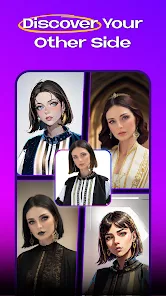
AI Mirror is a photo editing app from POLYVERSE INC., tucked away in the Google Play and App Store. Think of it as a Swiss Army knife for your pictures, but one that relies on artificial intelligence. You download it to do things like generate artwork from a selfie, swap your face into a meme, or give an old photo a fresh, painterly look. The first time you launch it, it feels a bit like walking into a candy store – there are so many tools and filters packed into the home screen that your eyes can dart around for a second. It's free to install, with in-app purchases for the more advanced stuff, and you don't really need to register to start poking around, which is a nice touch for someone who just wants to test the waters before diving in.
Once you're inside, the real experience kicks in. The onboarding is pretty light, maybe a quick permission pop-up for your camera roll, and then you're on your own. You generally start by picking a photo from your library or snapping one on the spot. From there, it's a choose-your-own-adventure. Tap 'AI Art', wait a few seconds, and watch as your casual Friday selfie gets morphed into a watercolor. The 'Face Swap' tool is surprisingly straightforward; you just mark two faces and let it do the heavy lifting. The interface can feel a bit cluttered at first, with buttons stacked in a way that makes you tap the wrong thing once or twice. But after that first stumble, you get a feel for the flow – pick a photo, choose a style, hit generate, and then either save it or share it. A small practical tip: the 'Enhance' feature works wonders on blurry screenshots, but it eats up a bit more time than a simple crop.
After using AI Mirror for a while, it leaves you in a bit of a mixed spot. Who will love it? Casual users who want a quick, fun filter without wrestling with complex layers. People who like to make silly memes of their friends or try on different artistic styles without learning Photoshop. Who might skip it? Anyone looking for serious, granular control over lighting and color curves – that's not this app. Its main trick is the sheer number of AI styles, from cartoon to oil painting, which sets it apart from simpler tools like FaceApp or YouCam Perfect. You might keep it installed for a few weeks, jumping on when you see a new trend, but you could also uninstall it if the novelty wears off and you realize you're only using one or two features regularly. It's good for a laugh, but not a lifeline.
features
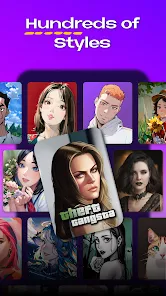
- 🎨 AI Mirror shines with its breadth of art styles. Snap a portrait and pick from dozens of templates to turn it into anime, a sketch, or a pop-art piece. In contrast, something like PicsArt leans more on manual layering and pre-made stickers, not this one-tap transformation.
- 🤖 The face swap tool feels surprisingly smooth for a free app. It handles different angles and lighting okay, which is a step up from older swap tools that would leave a ghostly outline behind. It's fast enough that you can run a few swaps in a minute.
- ⚡ The 'Batch Edit' option is a hidden gem. If you have a bunch of vacation photos that all need the same filter, you can select them all at once. Competing apps often force you to edit each image one by one, so this saves real time when you're organizing a collection.
- 🖼️ AI Mirror's 'Restoration' tool is decent for giving old, pixelated family photos a second life. It's not as heavy-duty as something like Remini, but it does the job without pushing a premium subscription to just see the preview.
pros
- 👍 The sheer variety of filters and styles is a major strength. You get hundreds of one-tap looks, whereas YouCam Perfect often limits its premium-looking styles behind a paywall.
- 👍 Processing speed is decent. Most transformations pop out in 5-10 seconds, which is quicker than using a web-based tool like Canva for the same effect.
- 👍 The user interface, while crowded, has a logical flow once you learn it. It's less confusing than Facetune's nested menus for similar AI effects.
cons
- 👎 The app feels a bit bloated with features you might never touch. There are body reshaping tools and background blurs packed in, but they feel half-baked compared to the focus on art filters, making the app lag at times.
- 👎 Too many ads. Free usage comes with frequent full-screen pop-ups, which interrupts the flow. PicsArt gives you a bit more breathing room with less intrusive ads during basic edits.
- 👎 The 'Face Swap' doesn't always get the skin tone right across different faces, leaving a noticeable color mismatch. YouCam Perfect has a more refined color match for that specific tool.
- 👎 Some of the best filters, like the 3D cartoon effect, require a subscription or credits to even preview. Remini gives you a full preview before hitting the paywall, which feels more fair.
Articles
![]()
Guide
How to Update Google Play Store on Android 2026
![]()
Guide
How to Download Older Versions of Android Apps
![]()
Guide
How to Download Apps Without Google Play Store
![]()
Guide
What Is an APK File for Android?
If you use an Android phone, you may have seen the term APK while searching for apps or games online. Some websites offer an APK download instead of a Google Play install button. Some users also mention APK files when talking about apps that are not available in their region, older app versions, or Android games downloaded outside the Play Store.
![]()
Guide
How to Install Games from Google Play for Beginners
Installing games on an Android phone is usually simple, but for beginners, the process can still feel confusing at first. You may not know where to search, which button to tap, whether the game is safe, or why Google Play sometimes asks for account settings, storage access, or payment information. If you are using an Android phone for the first time, learning how to install games from Google Play is one of the easiest ways to get started.
![]()
Guide
How Useful Gemini Is for Everyday Questions and Quick Tasks
emini feels different from many AI apps because it is not only trying to be a chatbot. After using it for everyday questions, quick writing, image understanding, and planning, I think its biggest strength is convenience.
![]()
Guide
What to Know Before Downloading APKs
For many Android users, downloading an APK is a common way to install apps and games. Sometimes an app is not available in a certain country.
![]()
Guide
ChatGPT Review: Is It Still the Best AI App in 2026?
![]()
Guide
Seedance 2.0 vs Sora: The Future of AI Video Generation
The AI video race has intensified dramatically over the past two years. Platforms like Sora from OpenAI and Luma Dream Machine pushed the boundaries of text-to-video realism. Yet, despite their impressive outputs, most tools still operate as probabilistic generators—you describe a scene, and the model interprets it. Control remains limited. With the February 2026 release of Seedance 2.0, developed by ByteDance, the paradigm shifted. Internally known as Jimeng 2.0, Seedance does not position itself as just another video model. It positions itself as an AI Director. Rather than guessing what you want, Seedance 2.0 allows you to direct what happens. This distinction defines everything that follows.









Recommended Apps
![]()
Home Design 3D
Anuman4.2
![]()
Truth or Dare Game - Party App
Chouic4.8
![]()
Photo Collage Maker
Scoompa4.7![]()
Learn to Draw Flower
Creative APPS4.2![]()
FIFA World Cup 2026™
FIFA2.8![]()
Mirror Plus: Mirror with Light
Digitalchemy, LLC4.4![]()
Meitu- Photo Editor & AI Art
Meitu (China) Limited4.5![]()
Perplexity - Ask Anything
PerplexityAI4.7![]()
GhostTube SLS Camera Alternate
GhostTube4![]()
Boom Chip Blast: 2-Player
Black Pyramid 3D Games Studio0![]()
Healthy Benefits+
Solutran, Inc.4.5![]()
Deepcheck AI Search Assistant
rohe.ai4![]()
Idol Prank Video Call & Chat
LightCode Solutions4![]()
Face Shape - Pretty Scale
GlintTec Apps3.9![]()
Plant App - Plant Identifier
ScaleUp4.6












































