
Voice Changer - Voice Effects

10M+
Installs
Dairy App & Notes & Audio Editor & Voice Recorder
Developer
-
Video Players & Editors
Category
-
Rated for 3+
Content Rating
-
betterapp88@gmail.com
Developer Email
-
https://www.betterapptech.com/about-us/privacy-policy/
Privacy Policy
Screenshots

editor reviews
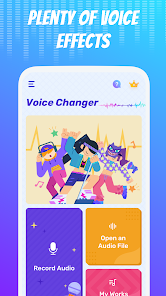
Voice Changer - Voice Effects is a fun, lightweight audio tool that lets you record your voice and apply different sound filters to it. It's one of those apps you download on a whim, maybe before a prank call or to spice up a voice message for friends. On the Google Play Store, it's been downloaded over 10 million times, which is pretty impressive for a niche utility. It's free to install, though you'll get pop-up ads now and then. When you first launch it, the design feels a bit cluttered—lots of buttons and banner ads competing for attention. You don't need to register or sign up, which is a relief. The app immediately asks for microphone permission, and then you're staring at a big red record button with a list of effects below it. Honestly, it's not the prettiest interface out there, but it's fairly straightforward.
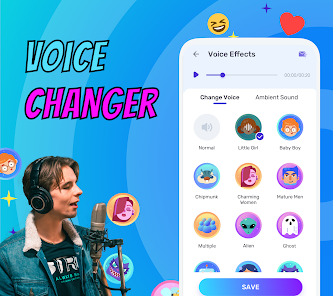
Once you start using it, the experience is a mixed bag. You press record, say something, stop, and then pick an effect from a fairly long list. There are about twenty options, including chipmunk, robot, alien, echo, and even a “female” or “male” pitch shift. The effects apply instantly, and you can preview them before saving. A lot of them sound decent—robotic and helium are my go-to. But the processing takes a second or two, and sometimes the app freezes for a moment. You can trim the start and end of your recording, though it's a bit fiddly. Saving is simple: it goes to a local library where you can play, rename, or share it. There's no built-in way to layer effects on top of each other, which would've been nice. The ads pop up after every save and occasionally interrupt playback, which gets old fast. If you want to remove them, there's a small one-time purchase, but it's not pushed hard.
After using it for a while, I can see why people keep it around. It's great for quick laughs—sending a weird voice note to a group chat or making a funny ringtone. But it's not something you'd rely on for serious voice work. Compared to more polished apps like Voice Changer Plus, this one feels rougher around the edges. The ads are annoying, and the effect quality isn't as smooth. On the other hand, it's completely free to start, while similar apps often lock decent effects behind a paywall. If you need a quick, no-commitment way to mess with your voice, this works. But if you want something more professional or ad-free, you'll likely uninstall it after a few days.
features
- 🎤 Big variety of effects – The app comes with over 20 different voice filters, from simple pitch shifts like helium and deep to more creative ones like alien, zombie, or echo chamber. Most competing apps in this niche offer maybe half that number without a premium upgrade. You don't have to pay a cent to try any of them, which lets you experiment freely. The fact that each effect actually sounds distinct also helps, while some cheaper apps just apply generic distortion that all sounds the same.
- 🎤 Instant preview and simple saving – Once you record a short clip, you can tap any effect and preview it immediately without processing or rendering. This is a huge time saver compared to apps like Voice Changer Plus, which often apply effects and make you wait for a preview export. You can save, share, or rename the final file directly from the preview screen, making the workflow smooth for quick tasks like sending a fun message on WhatsApp.
- 🎤 No account or registration – You are free to use every core feature without creating an account, signing in, or linking social media. Many similar tools, like Clownfish Voice Changer for mobile, force you to log in before unlocking even basic effects. This app respects casual usage, which feels refreshing.
pros
- 😊 A massive range of free effects – Unlike Voice Changer X, which puts around half its effects behind a subscription, this app gives you all the main filters for free with just occasional banner ads. That alone is a strong reason to keep it over alternatives.
- 😊 No learning curve – The design is basic but functional. You hit record, choose an effect, and you're done. Other apps sometimes bury controls under confusing menus, but this one keeps everything visible from the main screen.
- 😊 Fair ad frequency – Yes, there are ads, but they appear after saving rather than during playback or recording, which is less intrusive than tools like Fun Voice Changer, which interrupt mid-use.
cons
- 😞 Processing lag and occasional freezing – The app often stutters for a couple of seconds after applying an effect, especially on slower phones. Voice Changer Plus handles real-time preview much more smoothly without that pause.
- 😞 Cluttered, dated interface – The layout looks a bit old, with small buttons and mismatched text sizes. Competing apps like Voicemod have a much cleaner, modern look that makes navigation feel easier.
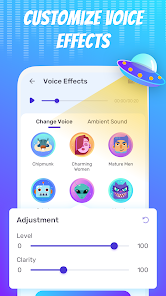
- 😞 No effect layering or customization – You cannot combine effects or adjust parameters like pitch depth or reverb strength. More advanced tools let you tweak each filter, which limits creative use here.
- 😞 Can't use in real time with other apps – This app requires recording first, then applying. There is no mode to change your voice live during a call or streaming, an area where apps like Clownfish excel.
Articles
![]()
Guide
How to Update Google Play Store on Android 2026
![]()
Guide
How to Download Older Versions of Android Apps
![]()
Guide
How to Download Apps Without Google Play Store
![]()
Guide
What Is an APK File for Android?
If you use an Android phone, you may have seen the term APK while searching for apps or games online. Some websites offer an APK download instead of a Google Play install button. Some users also mention APK files when talking about apps that are not available in their region, older app versions, or Android games downloaded outside the Play Store.
![]()
Guide
How to Install Games from Google Play for Beginners
Installing games on an Android phone is usually simple, but for beginners, the process can still feel confusing at first. You may not know where to search, which button to tap, whether the game is safe, or why Google Play sometimes asks for account settings, storage access, or payment information. If you are using an Android phone for the first time, learning how to install games from Google Play is one of the easiest ways to get started.
![]()
Guide
How Useful Gemini Is for Everyday Questions and Quick Tasks
emini feels different from many AI apps because it is not only trying to be a chatbot. After using it for everyday questions, quick writing, image understanding, and planning, I think its biggest strength is convenience.
![]()
Guide
What to Know Before Downloading APKs
For many Android users, downloading an APK is a common way to install apps and games. Sometimes an app is not available in a certain country.
![]()
Guide
ChatGPT Review: Is It Still the Best AI App in 2026?
![]()
Guide
Seedance 2.0 vs Sora: The Future of AI Video Generation
The AI video race has intensified dramatically over the past two years. Platforms like Sora from OpenAI and Luma Dream Machine pushed the boundaries of text-to-video realism. Yet, despite their impressive outputs, most tools still operate as probabilistic generators—you describe a scene, and the model interprets it. Control remains limited. With the February 2026 release of Seedance 2.0, developed by ByteDance, the paradigm shifted. Internally known as Jimeng 2.0, Seedance does not position itself as just another video model. It positions itself as an AI Director. Rather than guessing what you want, Seedance 2.0 allows you to direct what happens. This distinction defines everything that follows.









Recommended Apps
![]()
Home Design 3D
Anuman4.2
![]()
Truth or Dare Game - Party App
Chouic4.8
![]()
Photo Collage Maker
Scoompa4.7![]()
Learn to Draw Flower
Creative APPS4.2![]()
FIFA World Cup 2026™
FIFA2.8![]()
Mirror Plus: Mirror with Light
Digitalchemy, LLC4.4![]()
Meitu- Photo Editor & AI Art
Meitu (China) Limited4.5![]()
Perplexity - Ask Anything
PerplexityAI4.7![]()
GhostTube SLS Camera Alternate
GhostTube4![]()
Boom Chip Blast: 2-Player
Black Pyramid 3D Games Studio0![]()
Healthy Benefits+
Solutran, Inc.4.5![]()
Deepcheck AI Search Assistant
rohe.ai4![]()
Idol Prank Video Call & Chat
LightCode Solutions4![]()
Face Shape - Pretty Scale
GlintTec Apps3.9![]()
Plant App - Plant Identifier
ScaleUp4.6












































