
Pococha - Chat, Live streaming

5M+
Installs
DeNA Co., Ltd.
Developer
-
Entertainment
Category
-
Rated for 12+
Content Rating
-
support@pococha.com
Developer Email
-
https://www.pococha.com/privacy-policies
Privacy Policy
Screenshots
editor reviews
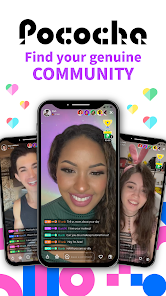
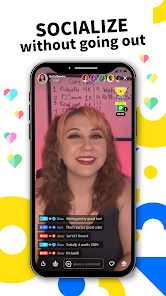
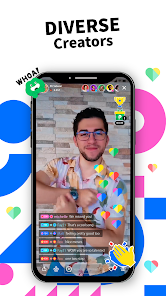
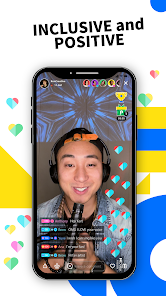
Pococha is a live streaming app from DeNA that focuses on real-time interaction between streamers and viewers. You can find it on Google Play and the App Store. After downloading and installing it, the first thing you notice is how polished the interface feels. It's not cluttered like some other streaming apps. The app is free to download, but you'll need to register, usually through your phone number or social media. There are in-app purchases for virtual gifts and coins. Ads pop up now and then, but they're not too intrusive. For a casual user, the main draw is how easy it is to jump into a live broadcast and say something. The streamers tend to respond quickly, which makes the experience feel more personal.
When you actually start using Pococha, the home screen shows a feed of live streams sorted by popularity or topic. Tapping one opens the stream immediately, with the chat box at the bottom. The onboarding is straightforward—no long tutorials, just a few tips about gifting and following. During daily use, you might scroll through streams, drop a comment, and send a small gift. The sound and video quality are solid on a decent connection. One thing that stands out is the “live” vs. “replay” toggle. If you miss a stream, you can watch it later, which is a nice touch. Navigation is smooth except when the chat gets fast during busy streams. A practical tip: if you want to get noticed, timing your comments when the streamer is reading chat helps.
After using Pococha for a while, I can see why people stick with it. The community vibes are strong, and some streamers build real loyalty with their audience. If you enjoy interactive entertainment and don't mind occasional prompts to buy coins, you'll likely keep it installed. On the flip side, if you prefer passive viewing like on Twitch or YouTube Live, the constant call-to-action for gifts might feel pushy. Compared to apps like Bigo Live or LiveMe, Pococha feels more intimate and less frantic. The streamers here seem less focused on numbers and more on conversation. I'd uninstall it if I ran out of storage, but otherwise, it's worth a spot on my phone for when I want to chat with someone live.
features
- 🌟 Real-time two-way interaction: Unlike Instagram Live where comments often get buried, Pococha lets viewers and streamers talk like they're in the same room. The streamer sees your message instantly and can reply right away.
- 🌟 Replay feature: If you miss a live session, you can watch it again later. Bigo Live doesn't offer this easily—you're stuck hoping someone clipped it.
- 🌟 Clean interface: The UI is minimal compared to YouNow or TikTok Live. No flashing banners or too many buttons. It just focuses on the stream and chat.
pros
- 👍 Faster response from streamers: Because the community is smaller, streamers actually read and reply. On LiveMe, it's easy to get ignored if you're not a big gifter.
- 👍 Lower pressure to spend: You can enjoy the streams without feeling forced to buy coins. Twitch often shoves subscription banners in your face.
- 👍 Smooth video playback: Even on slower Wi-Fi, the streams buffer less than on Periscope. The compression is well-done.
cons
- 👎 Gift culture can get annoying: Streamers often pause to thank gifters, which breaks the flow. On Twitch, this happens less often because chat is more separate.
- 👎 Limited discoverability: It's hard to find new streamers outside the top feed. In Bigo Live, you have more categories to explore.
- 👎 No night mode: The white theme strains your eyes late at night. Unlike YouTube Live, there's no dark theme option yet.
- 👎 Smaller global audience: If you're into niche topics, you might not find many streams. On YouNow, there's more variety in language and content.
Articles
![]()
Guide
How to Update Google Play Store on Android 2026
![]()
Guide
How to Download Older Versions of Android Apps
![]()
Guide
How to Download Apps Without Google Play Store
![]()
Guide
What Is an APK File for Android?
If you use an Android phone, you may have seen the term APK while searching for apps or games online. Some websites offer an APK download instead of a Google Play install button. Some users also mention APK files when talking about apps that are not available in their region, older app versions, or Android games downloaded outside the Play Store.
![]()
Guide
How to Install Games from Google Play for Beginners
Installing games on an Android phone is usually simple, but for beginners, the process can still feel confusing at first. You may not know where to search, which button to tap, whether the game is safe, or why Google Play sometimes asks for account settings, storage access, or payment information. If you are using an Android phone for the first time, learning how to install games from Google Play is one of the easiest ways to get started.
![]()
Guide
How Useful Gemini Is for Everyday Questions and Quick Tasks
emini feels different from many AI apps because it is not only trying to be a chatbot. After using it for everyday questions, quick writing, image understanding, and planning, I think its biggest strength is convenience.
![]()
Guide
What to Know Before Downloading APKs
For many Android users, downloading an APK is a common way to install apps and games. Sometimes an app is not available in a certain country.
![]()
Guide
ChatGPT Review: Is It Still the Best AI App in 2026?
![]()
Guide
Seedance 2.0 vs Sora: The Future of AI Video Generation
The AI video race has intensified dramatically over the past two years. Platforms like Sora from OpenAI and Luma Dream Machine pushed the boundaries of text-to-video realism. Yet, despite their impressive outputs, most tools still operate as probabilistic generators—you describe a scene, and the model interprets it. Control remains limited. With the February 2026 release of Seedance 2.0, developed by ByteDance, the paradigm shifted. Internally known as Jimeng 2.0, Seedance does not position itself as just another video model. It positions itself as an AI Director. Rather than guessing what you want, Seedance 2.0 allows you to direct what happens. This distinction defines everything that follows.









Recommended Apps
![]()
Home Design 3D
Anuman4.2
![]()
Truth or Dare Game - Party App
Chouic4.8
![]()
Photo Collage Maker
Scoompa4.7![]()
Learn to Draw Flower
Creative APPS4.2![]()
FIFA World Cup 2026™
FIFA2.8![]()
Mirror Plus: Mirror with Light
Digitalchemy, LLC4.4![]()
Meitu- Photo Editor & AI Art
Meitu (China) Limited4.5![]()
Perplexity - Ask Anything
PerplexityAI4.7![]()
GhostTube SLS Camera Alternate
GhostTube4![]()
Boom Chip Blast: 2-Player
Black Pyramid 3D Games Studio0![]()
Healthy Benefits+
Solutran, Inc.4.5![]()
Deepcheck AI Search Assistant
rohe.ai4![]()
Idol Prank Video Call & Chat
LightCode Solutions4![]()
Face Shape - Pretty Scale
GlintTec Apps3.9![]()
Plant App - Plant Identifier
ScaleUp4.6












































