
Air Horn Prank (Loud Joke)

5M+
Installs
RRM Jokes, Pranks and fun apps
Developer
-
Entertainment
Category
-
Rated for 3+
Content Rating
-
rodrigorm1091@gmail.com
Developer Email
-
https://rodrigorm1091.wixsite.com/rrmapps/privacy-policy
Privacy Policy
Screenshots
editor reviews
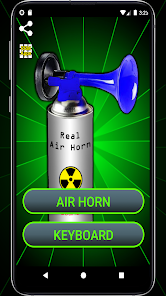
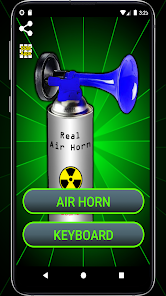
Air Horn Prank (Loud Joke) is exactly what it sounds like: a no-frills soundboard app that turns your phone into an air horn. It falls under the prank and joke app category, which has been popular on both Google Play and the App Store for years. People mainly use it to scare friends, interrupt quiet moments, or add a ridiculous sound effect to everyday situations. You might download and install it because you saw a TikTok video where someone got a jump scare from an air horn, or maybe you just want to annoy your roommate. The app name, developer name, and genre are all clear from the start. When you first launch it, the screen shows a big button that says something along the lines of "HONK" or "AIR HORN," and that's basically it. There is no registration, no login, and the install count seems healthy for a joke app. It is free to download, though there are in-app purchases to unlock extra sounds and a small banner ad at the bottom. The first impression is simple and goofy, like a toy you pick up at a dollar store.
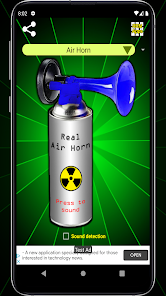
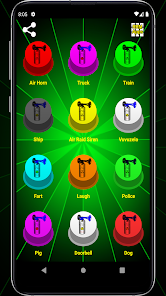
Once you actually use it, the experience is straightforward. You tap the big button, and a loud, realistic air horn sound blasts out of your phone's speaker. The interface is clean but not fancy: a plain background, the horn button, and a small menu icon in the corner. The onboarding is basically nonexistent, you just open the app and start honking. Common usage steps are as simple as opening the app, tapping the button, and watching people jump. One small practical tip: if you have an Android phone, the sound can actually be quite startling because the app uses the full volume output regardless of your media volume setting, so be careful in libraries or quiet cafes. On iPhone, it seems to respect the ringer volume more, which is a bit less intense. The app also includes a few other silly sounds like a fart, a scream, and a baby laugh, which you can unlock by watching a short ad. Navigating between sounds is done through a simple swipe or tap menu, and there is no lag or crashing. The whole thing feels snappy and direct, like a prank app should.
After using Air Horn Prank for a while, my personal judgment is that it is a one-trick pony, but that trick works. People who enjoy harmless pranks, kids, or anyone who likes to get a quick laugh out of a sudden loud noise will probably keep it installed for a few weeks. It is not for people who need a sophisticated soundboard or something with multiple layers of functionality. Compared to similar apps like "Soundboard Studio" or "Funny Prank Sounds," this one stands out because of its simplicity and the sheer realism of the air horn sound. The other apps often try to cram too many sounds or effects, making them cluttered. However, the downside is that after ten or twenty uses, the novelty wears off fast. You might uninstall it after you have pranked all your friends once or twice. The in-app purchases feel a bit greedy for such a simple app, but you can still get plenty of laughs from the free version. Overall, it is a silly, fun, disposable app that does exactly what it promises without overcomplicating things.
features
- 🎯 Core Functionality: The main feature is the air horn button itself. Unlike "Ultimate Soundboard" which has dozens of categories and requires scrolling through lists, this app gets straight to the point. You open it, tap the big button, and get a loud, crisp air horn sound that feels genuine. The outstanding feature is the sound quality; it uses high-bitrate audio that makes the horn sound like a real stadium horn, not a cheap digital beep. Also, the app includes a "long press" mode that lets you hold the button for a sustained blast, which is great for maximum surprise effect.
- 📱 Simplicity of Use: The app's interface is about as minimal as it gets. Other apps like "Prank Call" have complicated menus, social sharing buttons, and settings. Here, you literally have one main screen with one main action. The outstanding feature is the "Shake to Honk" option, which lets you trigger the sound by shaking your phone. This is a clever touch because it feels more natural in a prank scenario, like you are reacting to something and your phone accidentally goes off.
- 🔊 Sound Variety with Ads: Instead of paying upfront, you unlock extra sounds like a train horn, a police siren, and a donkey bray by watching a short ad. This is better than "Joke Soundboard" which locks everything behind a $3 paywall. The outstanding feature is the "Random Prank" button, which plays a random sound from your unlocked collection, so you never know what is coming. It keeps the experience fresh if you are using it repeatedly in a group setting.
pros
- 👍 Realistic Audio Quality: The sound files are high quality and loud. In comparison, "Sound Effects Maker" has lower quality audio that sounds muffled on phone speakers. This app's air horn sounds like it could actually come from a real truck, which makes the prank much more effective.
- 👍 Zero Learning Curve: You do not need a tutorial or any setup time. "Prank Sounds Studio" requires you to assign sounds to buttons and configure profiles. Here, you just open and honk. It is perfect for quick, spontaneous pranks.
- 👍 Free Core Experience: You can use the main air horn sound as much as you want without paying. Many competitors like "Soundboard FX" limit free uses or require a subscription for the good sounds. This app's free tier is generous.
cons
- 👎 Limited Long-Term Value: After you have used the sound a few times, the app becomes boring. Other apps like "Funny Sounds Supreme" have hundreds of sounds and regular updates, so you keep coming back. This one gets old fast.
- 👎 Intrusive Banner Ads: The bottom banner ad is persistent, even when you are trying to prank someone. In "Prank Calls Unlimited," ads only pop up between actions, not during the main screen. Here, it is always present and sometimes blocks the sound selection menu.
- 👎 No Volume Control: The air horn plays at maximum volume, which can be a problem. "Soundboard Master" lets you adjust the volume per sound. This app has no such option, so if you are in a classroom or a meeting, there is no way to tone it down without muting your phone entirely.
- 👎 Unreliable Shake Feature: The "Shake to Honk" function is too sensitive. I found my phone going off in my pocket while walking. Other apps with shake features, like "Prank Sound Effects," allow you to adjust the sensitivity. This one does not, leading to accidental triggers.
Articles
![]()
Guide
How to Update Google Play Store on Android 2026
![]()
Guide
How to Download Older Versions of Android Apps
![]()
Guide
How to Download Apps Without Google Play Store
![]()
Guide
What Is an APK File for Android?
If you use an Android phone, you may have seen the term APK while searching for apps or games online. Some websites offer an APK download instead of a Google Play install button. Some users also mention APK files when talking about apps that are not available in their region, older app versions, or Android games downloaded outside the Play Store.
![]()
Guide
How to Install Games from Google Play for Beginners
Installing games on an Android phone is usually simple, but for beginners, the process can still feel confusing at first. You may not know where to search, which button to tap, whether the game is safe, or why Google Play sometimes asks for account settings, storage access, or payment information. If you are using an Android phone for the first time, learning how to install games from Google Play is one of the easiest ways to get started.
![]()
Guide
How Useful Gemini Is for Everyday Questions and Quick Tasks
emini feels different from many AI apps because it is not only trying to be a chatbot. After using it for everyday questions, quick writing, image understanding, and planning, I think its biggest strength is convenience.
![]()
Guide
What to Know Before Downloading APKs
For many Android users, downloading an APK is a common way to install apps and games. Sometimes an app is not available in a certain country.
![]()
Guide
ChatGPT Review: Is It Still the Best AI App in 2026?
![]()
Guide
Seedance 2.0 vs Sora: The Future of AI Video Generation
The AI video race has intensified dramatically over the past two years. Platforms like Sora from OpenAI and Luma Dream Machine pushed the boundaries of text-to-video realism. Yet, despite their impressive outputs, most tools still operate as probabilistic generators—you describe a scene, and the model interprets it. Control remains limited. With the February 2026 release of Seedance 2.0, developed by ByteDance, the paradigm shifted. Internally known as Jimeng 2.0, Seedance does not position itself as just another video model. It positions itself as an AI Director. Rather than guessing what you want, Seedance 2.0 allows you to direct what happens. This distinction defines everything that follows.









Recommended Apps
![]()
Home Design 3D
Anuman4.2
![]()
Truth or Dare Game - Party App
Chouic4.8
![]()
Photo Collage Maker
Scoompa4.7![]()
Learn to Draw Flower
Creative APPS4.2![]()
FIFA World Cup 2026™
FIFA2.8![]()
Mirror Plus: Mirror with Light
Digitalchemy, LLC4.4![]()
Meitu- Photo Editor & AI Art
Meitu (China) Limited4.5![]()
Perplexity - Ask Anything
PerplexityAI4.7![]()
GhostTube SLS Camera Alternate
GhostTube4![]()
Boom Chip Blast: 2-Player
Black Pyramid 3D Games Studio0![]()
Healthy Benefits+
Solutran, Inc.4.5![]()
Deepcheck AI Search Assistant
rohe.ai4![]()
Idol Prank Video Call & Chat
LightCode Solutions4![]()
Face Shape - Pretty Scale
GlintTec Apps3.9![]()
Plant App - Plant Identifier
ScaleUp4.6












































