
Air Horn - Siren Sounds Prank

5M+
Installs
BN Infotech
Developer
-
Entertainment
Category
-
Rated for 16+
Content Rating
-
apps@bansalindia.in
Developer Email
-
http://bansalindia.in/privacypolicy.htm
Privacy Policy
Screenshots
editor reviews
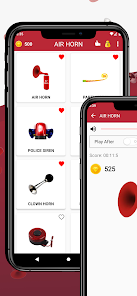
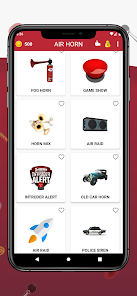
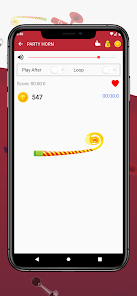
Air Horn - Siren Sounds Prank is exactly what it sounds like — a utility app designed to turn your phone into a portable noise maker. It falls under the prank or entertainment category on app stores, and honestly, it's about as straightforward as it gets. You download it if you want to startle a friend at a party, fake a police siren in a funny video, or just annoy your roommate. After installing it from Google Play (where it sits at a few million downloads, last I checked), the first thing you notice is how no-frills the whole thing feels. It's free to download, with a few banner ads at the bottom, and there's no forced registration or sign-up. The icon itself is a bit cartoonish, but once you tap it open, you're greeted with a colorful menu of buttons labeled with things like “Air Horn,” “Police Siren,” “Fire Truck,” and “Fart Noise.” It's not trying to be elegant — it's just there to make loud sounds fast.
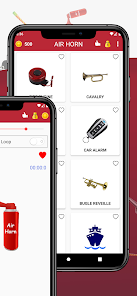
Using the app is basically one tap away from chaos. After launching, you see a grid of buttons, each one tied to a specific sound. I poked the air horn button first, and it blasted out a crisp, genuinely loud horn sound that startled even me — surprising for a free app. The siren sounds cycle through different patterns, and there's a small settings menu where you can adjust volume or set a timer for auto-play. One thing I found neat was the continuous loop option: you can let a siren run in the background while you record a video, which makes for some hilarious prank content. The interface is not the smoothest — sometimes the buttons respond a bit slowly if you tap them too fast — but for a quick laugh, it works fine. No onboarding tutorial, no complicated menus; you just pick a sound and press play.
After using it for a few days, I'd say this app is perfect for one specific crowd: people who want to pull quick pranks or create funny social media clips without any setup. It's not something you'll keep on your home screen for daily use, because once the novelty wears off, the sounds get repetitive. Compared to other prank apps like “iFunny” or “Prank Calls,” this one wins on simplicity — it doesn't try to be a full entertainment suite. But it loses points on polish: the ads can be annoying, and some sound effects sound lower quality than you'd hear on prank apps with paid content. If you love startling friends at cookouts or making fake emergency sounds for laughs, this is a fun little tool. But if you want something more polished or ad-free, you might look elsewhere. I uninstalled it after a week because the charm faded, but I'd reinstall it for a party.
features
- 🔊 Sound Variety – Air Horn - Siren Sounds Prank offers over 30 different sound effects, including classic air horns, multiple siren patterns (police, ambulance, fire truck), and even goofy novelty noises like fart sounds. That's a much bigger selection than something like “Air Horn Free,” which gives you maybe five sounds before asking you to pay. You get more bang for your buck here without spending a dime.
- ⏱️ Auto-Play Timer – One standout feature is the built-in timer that lets you schedule a sound to play after a set delay. This is great for hidden-prank setups — set a police siren to go off in 10 seconds, hide the phone under a couch cushion, and watch your friend jump. Most prank apps lack this timing control, which makes this one more strategic.
- 🎛️ Continuous Loop Mode – You can put any sound on a loop so it plays endlessly until you stop it. This is perfect for background noise in prank videos or for creating a fake emergency atmosphere at a party. Competing apps like “Siren Alarm” often only play a sound once and then stop, so this adds extra replay value.
pros
- ✅ Free and No Login Required – Unlike many entertainment apps that force you to create an account or subscribe, Air Horn - Siren Sounds Prank stays fully usable right after download. No email, no password, no nonsense. Compare that to “Prank Calls Pro,” which locks half its content behind a paywall, and this app feels refreshingly open.
- ✅ Simple One-Tap Use – The interface is so barebones that anyone can use it immediately — even kids or grandparents. There are no confusing menus or multistep processes. Apps like “Soundboard Studio” have so many sliders and options that they're overwhelming for a quick prank. This one keeps it simple.
- ✅ Works Offline – All sounds are stored locally, so you don't need Wi-Fi or mobile data to blast a siren in the middle of nowhere. That's a huge plus compared to streaming-based apps like “iFunny,” which require a connection just to play a fart noise.
cons
- ❌ Annoying Banner Ads – The bottom-of-screen ads are persistent and occasionally intrusive, sometimes covering parts of the button grid on smaller screens. While free apps need revenue, competitors like “Air Horn Lite” place ads only between sound plays, not during use, making the experience less interrupted.
- ❌ Sound Quality Inconsistency – Some effects, especially the novelty sounds, sound compressed or tinny compared to the main air horn and siren options. If you're used to high-quality audio from apps like “Prank Sounds HD,” the lower bitrate on a few sounds here stands out.
- ❌ Limited Customization – You cannot adjust pitch, speed, or volume per sound individually — there's only a master volume slider. Apps like “Soundboard Pro” let you tweak every effect, which is missed if you want to fine-tune a prank for maximum comedy.
- ❌ Outdated Visual Design – The interface looks like it hasn't been updated since 2015, with clunky button art and a dated font. For a younger audience used to polished apps like “Zedge,” the appearance can feel a bit cheap and off-putting at first glance.
Articles
![]()
Guide
How to Update Google Play Store on Android 2026
![]()
Guide
How to Download Older Versions of Android Apps
![]()
Guide
How to Download Apps Without Google Play Store
![]()
Guide
What Is an APK File for Android?
If you use an Android phone, you may have seen the term APK while searching for apps or games online. Some websites offer an APK download instead of a Google Play install button. Some users also mention APK files when talking about apps that are not available in their region, older app versions, or Android games downloaded outside the Play Store.
![]()
Guide
How to Install Games from Google Play for Beginners
Installing games on an Android phone is usually simple, but for beginners, the process can still feel confusing at first. You may not know where to search, which button to tap, whether the game is safe, or why Google Play sometimes asks for account settings, storage access, or payment information. If you are using an Android phone for the first time, learning how to install games from Google Play is one of the easiest ways to get started.
![]()
Guide
How Useful Gemini Is for Everyday Questions and Quick Tasks
emini feels different from many AI apps because it is not only trying to be a chatbot. After using it for everyday questions, quick writing, image understanding, and planning, I think its biggest strength is convenience.
![]()
Guide
What to Know Before Downloading APKs
For many Android users, downloading an APK is a common way to install apps and games. Sometimes an app is not available in a certain country.
![]()
Guide
ChatGPT Review: Is It Still the Best AI App in 2026?
![]()
Guide
Seedance 2.0 vs Sora: The Future of AI Video Generation
The AI video race has intensified dramatically over the past two years. Platforms like Sora from OpenAI and Luma Dream Machine pushed the boundaries of text-to-video realism. Yet, despite their impressive outputs, most tools still operate as probabilistic generators—you describe a scene, and the model interprets it. Control remains limited. With the February 2026 release of Seedance 2.0, developed by ByteDance, the paradigm shifted. Internally known as Jimeng 2.0, Seedance does not position itself as just another video model. It positions itself as an AI Director. Rather than guessing what you want, Seedance 2.0 allows you to direct what happens. This distinction defines everything that follows.









Recommended Apps
![]()
Home Design 3D
Anuman4.2
![]()
Truth or Dare Game - Party App
Chouic4.8
![]()
Photo Collage Maker
Scoompa4.7![]()
Learn to Draw Flower
Creative APPS4.2![]()
FIFA World Cup 2026™
FIFA2.8![]()
Mirror Plus: Mirror with Light
Digitalchemy, LLC4.4![]()
Meitu- Photo Editor & AI Art
Meitu (China) Limited4.5![]()
Perplexity - Ask Anything
PerplexityAI4.7![]()
GhostTube SLS Camera Alternate
GhostTube4![]()
Boom Chip Blast: 2-Player
Black Pyramid 3D Games Studio0![]()
Healthy Benefits+
Solutran, Inc.4.5![]()
Deepcheck AI Search Assistant
rohe.ai4![]()
Idol Prank Video Call & Chat
LightCode Solutions4![]()
Face Shape - Pretty Scale
GlintTec Apps3.9![]()
Plant App - Plant Identifier
ScaleUp4.6











































