
Anime Art - AI Art Generator

1M+
Installs
DREAMPLAY
Developer
-
Generative AI
Category
-
Rated for 12+
Content Rating
-
dreamplaylimited@gmail.com
Developer Email
-
https://sites.google.com/view/fantasy-privacy-and
Privacy Policy
Screenshots
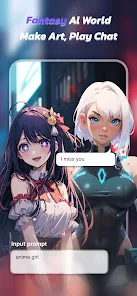
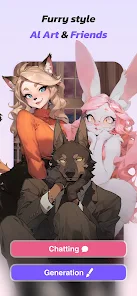
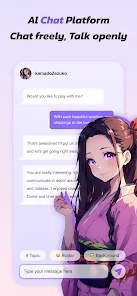
editor reviews
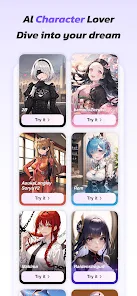
So, Anime Art - AI Art Generator is exactly what it sounds like. It's a mobile app on both Google Play and the App Store, built for people who want to turn any old photo or text idea into anime-style artwork. You can basically feed it a portrait or type out something like “cyberpunk cat girl in the rain,” and it spits out a stylized anime version. I downloaded it mostly out of curiosity, since I have zero drawing skills but love how anime characters look. First impression after launching the app? A bit of a mixed bag. The interface is clean and colorful, definitely anime-themed, but there's a lot of stuff thrown at you right away. Ads pop up almost immediately, and the free version feels a little grindy.
Once I got past the initial shock of all the prompts and buttons, the actual usage wasn't too terrible. You pick either “text to anime” or “image to anime,” then you either upload a photo or type your prompt. The AI processes it in a few seconds, which honestly surprised me. The loading screen has some pretty cool animated art, so at least you're not just staring at a blank spinner. The first few generations were decent but not mind-blowing. You can pick different art styles like “vibrant” or “fantasy,” and the results vary quite a bit. I found that the app works best when you give it a very specific prompt and avoid vague words. It also lets you adjust some sliders for creativity and detail, which is nice for fine-tuning. A smooth moment was when I uploaded a blurry selfie and it turned me into a character that actually looked like me but way cooler. A confusing moment was trying to find the “remove watermark” option in the settings, which is hidden behind a paywall.
After using it for a few days, I'd say this app is great for absolute beginners who just want a quick anime avatar or a fun profile picture. It's not for serious digital artists who want full control over every detail. Compared to something like Midjourney or Stable Diffusion, this is way simpler but also way more limited. You're stuck with anime styles and the free tier gives you maybe 5–10 generations before you hit a hard cap. I could see someone keeping it installed if they love making random anime versions of their friends, but if you want consistent quality or a specific style, you might get frustrated. The ads are really the main reason I could see myself deleting it after a week.
features
- 🎨 Style Variety – The app has over a dozen preset anime styles, from retro 90s to modern high-def fantasy. Most AI tools like Midjourney require you to manually tweak prompts to get a similar effect. Here, you just tap a button and the style shifts completely. It's a big time-saver if you want to quickly explore different looks for the same subject.
- ✨ One-Tap Clean Up – There's a built-in feature that fixes messy generations. If the AI gives you weird fingers or a warped face, you can hit the clean up button and it refines the image. Stable Diffusion doesn't have anything this simple out of the box. It's not perfect but it saves a lot of manual editing.
- 📱 Mobile First Design – Unlike web-only tools like Leonardo AI, this app runs entirely on your phone. You can take a photo, turn it into anime, and share it to social media in under three minutes. The interface is touch-friendly and none of the buttons are hidden too deep, once you figure out the layout.
- 🌀 Batch Mode – You can generate multiple versions of the same prompt at once. This is great for finding the best look without waiting one by one. Most free mobile apps force you to regenerate individually, but this one gives you four at a time in the free tier.
pros
- ⚡ Speed – This app generates images faster than most web-based tools like Midjourney. From prompt to final image is usually under five seconds on a modern phone. No waiting around for a server queue.
- 🎯 Beginner Friendly – There's almost zero learning curve. You don't need to know negative prompts or advanced parameters like you would with Stable Diffusion. Type something, tap generate, done.
- 🖼 Integrated Gallery – The app has a gallery folder that automatically saves your favorite generations. It's easier to revisit older work compared to Flux AI where images just sit in a chat log.
- 🔒 Privacy Focus – No account required for basic use. You don't have to sign up with email or Google to start generating. Most competitors like DreamStudio force registration immediately.
cons
- 🚫 Aggressive Watermarking – Every free generation has a huge watermark in the middle. Competing free apps like AnimeArt.ai put smaller watermarks in the corner, so this feels more restrictive.
- 📉 Inconsistent Quality – Some prompts come out great, others look like a mess. Midjourney V6 is way more reliable for consistent high-quality outputs across different styles.
- 📦 Limited Free Generations – After about 10 free uses, you have to watch ads or wait a timer. Cute Art Generator gives more free credits per day without forcing video ads.
- 🔍 No Layer Editing – You can't edit parts of the image after generation. Other tools like Clipdrop let you erase objects or change backgrounds easily. Here, you just regenerate from scratch.
Articles
![]()
Guide
How to Update Google Play Store on Android 2026
![]()
Guide
How to Download Older Versions of Android Apps
![]()
Guide
How to Download Apps Without Google Play Store
![]()
Guide
What Is an APK File for Android?
If you use an Android phone, you may have seen the term APK while searching for apps or games online. Some websites offer an APK download instead of a Google Play install button. Some users also mention APK files when talking about apps that are not available in their region, older app versions, or Android games downloaded outside the Play Store.
![]()
Guide
How to Install Games from Google Play for Beginners
Installing games on an Android phone is usually simple, but for beginners, the process can still feel confusing at first. You may not know where to search, which button to tap, whether the game is safe, or why Google Play sometimes asks for account settings, storage access, or payment information. If you are using an Android phone for the first time, learning how to install games from Google Play is one of the easiest ways to get started.
![]()
Guide
How Useful Gemini Is for Everyday Questions and Quick Tasks
emini feels different from many AI apps because it is not only trying to be a chatbot. After using it for everyday questions, quick writing, image understanding, and planning, I think its biggest strength is convenience.
![]()
Guide
What to Know Before Downloading APKs
For many Android users, downloading an APK is a common way to install apps and games. Sometimes an app is not available in a certain country.
![]()
Guide
ChatGPT Review: Is It Still the Best AI App in 2026?
![]()
Guide
Seedance 2.0 vs Sora: The Future of AI Video Generation
The AI video race has intensified dramatically over the past two years. Platforms like Sora from OpenAI and Luma Dream Machine pushed the boundaries of text-to-video realism. Yet, despite their impressive outputs, most tools still operate as probabilistic generators—you describe a scene, and the model interprets it. Control remains limited. With the February 2026 release of Seedance 2.0, developed by ByteDance, the paradigm shifted. Internally known as Jimeng 2.0, Seedance does not position itself as just another video model. It positions itself as an AI Director. Rather than guessing what you want, Seedance 2.0 allows you to direct what happens. This distinction defines everything that follows.









Recommended Apps
![]()
Home Design 3D
Anuman4.2
![]()
Truth or Dare Game - Party App
Chouic4.8
![]()
Photo Collage Maker
Scoompa4.7![]()
Learn to Draw Flower
Creative APPS4.2![]()
FIFA World Cup 2026™
FIFA2.8![]()
Mirror Plus: Mirror with Light
Digitalchemy, LLC4.4![]()
Meitu- Photo Editor & AI Art
Meitu (China) Limited4.5![]()
Perplexity - Ask Anything
PerplexityAI4.7![]()
GhostTube SLS Camera Alternate
GhostTube4![]()
Boom Chip Blast: 2-Player
Black Pyramid 3D Games Studio0![]()
Healthy Benefits+
Solutran, Inc.4.5![]()
Deepcheck AI Search Assistant
rohe.ai4![]()
Idol Prank Video Call & Chat
LightCode Solutions4![]()
Face Shape - Pretty Scale
GlintTec Apps3.9![]()
Plant App - Plant Identifier
ScaleUp4.6











































