

Pixelup - AI Photo Enhancer

5M+
Installs
Codeway Dijital
Developer
-
Video Players & Editors
Category
-
Rated for 3+
Content Rating
-
pixelup@codeway.co
Developer Email
-
https://storage.googleapis.com/codeway.co/pixelup.co/privacy.html
Privacy Policy
Screenshots
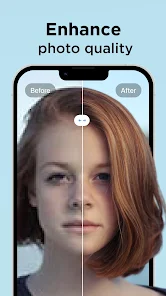

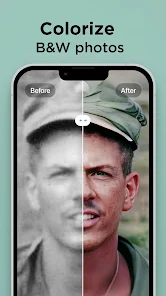
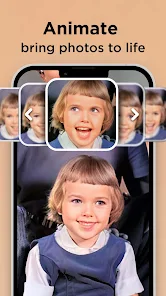
editor reviews
Pixelup is an AI-powered photo enhancer from Codeway Dijital, sitting squarely in the utility and photography category. You can use it to sharpen blurry faces, upscale old or low-resolution images, and restore damaged photos. I downloaded it from Google Play expecting a simple fix for some grainy vacation shots, and the first impression was pretty good. The install count is solid, and the app is free to download, though you quickly realize the heavy lifting requires credits. After a clean launch, you're greeted with a minimalist interface that feels modern and approachable, which made me want to test it right away.
Hands-on, the workflow is straightforward but has a few quirks. You tap the big plus button to import a photo from your gallery, and the app immediately processes it with default AI enhancement, which is fast and impressive for faces. The core action is hitting the "Enhance" button, then waiting a few seconds for a side-by-side preview. I found the slider comparing before and after genuinely satisfying, especially for an old group photo where faces were unrecognizable. The onboarding is quick, but I stumbled when I tried to save the full-resolution version without credits, hitting a paywall prompt. A practical tip: use the free credits on your most important images first, and avoid the automatic batch enhancement unless you're ready to spend. For daily use, it's smooth until you need more credits, which can feel a bit jarring.
After a couple of weeks, I think Pixelup is great for casual users with a few precious old photos or selfies they want to fix. It's different from apps like Remini because the interface is cleaner and less cluttered, but it's also more aggressive with its credit system. Someone who needs frequent enhancements might keep it installed for the face-specific AI, which genuinely recovers detail better than some rivals. However, anyone on a tight budget or who just needs a one-time fix might uninstall after using the free credits. It's fair for what it does, but the monetization can feel like you're always being nudged to pay.
features
- 🤖 Pixelup's standout feature is its dedicated face recovery AI, which consistently outperforms generic enhancers like Remini when dealing with heavily pixelated or blurry faces from old photos. It doesn't just sharpen; it reconstructs facial features convincingly, making it ideal for restoring family memories.
- ⚙️ The side-by-side and slider comparison views are more intuitive than similar apps like Adobe Photoshop Express, letting you see real-time improvements without toggling between screens. This makes deciding whether the enhancement works much easier during editing.
- 🚀 Speed is a hidden strength. Pixelup processes standard images noticeably faster than Topaz Photo AI on mobile, often delivering results in under five seconds, which keeps the workflow seamless for batch tweaks.
- 🎯 The auto-enhance mode for faces is smarter than rivals like FaceApp, because it adjusts lighting and contrast specifically for portraits without over-smoothing skin, preserving natural textures better.
pros
- 👍 Pixelup's face restoration is exceptionally accurate for grainy or damaged portraits, giving better detail than Remini or Lightroom's AI. It recovers eye contours and skin tones without that plastic look.
- 👍 The user interface is cleaner and less overwhelming than Snapseed, which makes it easier for beginners to jump in without a learning curve. No cluttered menus or confusing layers here.
- 👍 Free credits offer a genuine taste of the premium features, unlike some apps like Picsart that lock everything behind a paywall immediately. You can test a few photos before deciding.
cons
- 👎 The aggressive credit system drains quickly, even for simple enhancements. Compare this to Remini, which offers more free daily uses, making Pixelup feel stingier for occasional users.
- 👎 Export quality is capped unless you pay. Saved images often have a slight watercolor artifact on non-face details, which is less noticeable in similar apps like Adobe Enhance.
- 👎 No manual adjustment sliders for brightness or saturation in the enhancement mode. This forces you to rely on its AI alone, whereas Snapseed gives you full control over the final look.
- 👎 The app pushes in-app purchases too frequently after the first few free credits, interrupting the workflow more than rivals like FaceFixer, which keeps prompts minimal.
Articles
![]()
Guide
How to Update Google Play Store on Android 2026
![]()
Guide
How to Download Older Versions of Android Apps
![]()
Guide
How to Download Apps Without Google Play Store
![]()
Guide
What Is an APK File for Android?
If you use an Android phone, you may have seen the term APK while searching for apps or games online. Some websites offer an APK download instead of a Google Play install button. Some users also mention APK files when talking about apps that are not available in their region, older app versions, or Android games downloaded outside the Play Store.
![]()
Guide
How to Install Games from Google Play for Beginners
Installing games on an Android phone is usually simple, but for beginners, the process can still feel confusing at first. You may not know where to search, which button to tap, whether the game is safe, or why Google Play sometimes asks for account settings, storage access, or payment information. If you are using an Android phone for the first time, learning how to install games from Google Play is one of the easiest ways to get started.
![]()
Guide
How Useful Gemini Is for Everyday Questions and Quick Tasks
emini feels different from many AI apps because it is not only trying to be a chatbot. After using it for everyday questions, quick writing, image understanding, and planning, I think its biggest strength is convenience.
![]()
Guide
What to Know Before Downloading APKs
For many Android users, downloading an APK is a common way to install apps and games. Sometimes an app is not available in a certain country.
![]()
Guide
ChatGPT Review: Is It Still the Best AI App in 2026?
![]()
Guide
Seedance 2.0 vs Sora: The Future of AI Video Generation
The AI video race has intensified dramatically over the past two years. Platforms like Sora from OpenAI and Luma Dream Machine pushed the boundaries of text-to-video realism. Yet, despite their impressive outputs, most tools still operate as probabilistic generators—you describe a scene, and the model interprets it. Control remains limited. With the February 2026 release of Seedance 2.0, developed by ByteDance, the paradigm shifted. Internally known as Jimeng 2.0, Seedance does not position itself as just another video model. It positions itself as an AI Director. Rather than guessing what you want, Seedance 2.0 allows you to direct what happens. This distinction defines everything that follows.









Recommended Apps
![]()
Home Design 3D
Anuman4.2
![]()
Truth or Dare Game - Party App
Chouic4.8
![]()
Photo Collage Maker
Scoompa4.7![]()
Learn to Draw Flower
Creative APPS4.2![]()
FIFA World Cup 2026™
FIFA2.8![]()
Mirror Plus: Mirror with Light
Digitalchemy, LLC4.4![]()
Meitu- Photo Editor & AI Art
Meitu (China) Limited4.5![]()
Perplexity - Ask Anything
PerplexityAI4.7![]()
GhostTube SLS Camera Alternate
GhostTube4![]()
Boom Chip Blast: 2-Player
Black Pyramid 3D Games Studio0![]()
Healthy Benefits+
Solutran, Inc.4.5![]()
Deepcheck AI Search Assistant
rohe.ai4![]()
Idol Prank Video Call & Chat
LightCode Solutions4![]()
Face Shape - Pretty Scale
GlintTec Apps3.9![]()
Plant App - Plant Identifier
ScaleUp4.6












































